
Net2 on a PC-based system
A Net2 plus is a single-door access control unit with 2 reader ports and on-board TCP/IP. Net2 Lite software is free of charge, and Paxton lists Net2 at up to 1,000 doors and 50,000 users.
Platform focus
Elwin Security installs, configures, repairs, and supports Paxton access control for commercial and multifamily properties in Santa Clara and the San Francisco Bay Area. The scope covers Net2 plus and Paxton10 single-door controllers, Paxton readers, Entry video door panels, door and gate release hardware, power, network, and software setup and handoff.
Use case
A Paxton scope depends on whether the property runs Net2 or Paxton10, where each controller can mount, and what the existing hardware, power, and network allow.
A Net2 plus is a single-door access control unit with 2 reader ports and on-board TCP/IP. Net2 Lite software is free of charge, and Paxton lists Net2 at up to 1,000 doors and 50,000 users.
A Paxton10 single-door controller connects over IP to a Paxton10 server that hosts the web user interface. Paxton says the software is free of charge with zero license fees and scales to 100 sites, 1,000 doors, 1,000 cameras, and 50,000 users on one system.
Properties already on Paxton that need a door added, a reader replaced, a controller swapped, or release hardware repaired. A Net2 plus continues to permit or deny access if communications fail. A Paxton10 controller's locally stored programming keeps the system working if the connection to the server is lost.
Service focus
The practical questions are the controller, the door hardware behind each reader, the power and network at the controller location, and who manages the software afterward.
The Net2 plus relay is rated 24 V DC and 4 A maximum, and its dry contacts can switch an independent lock power supply. The Paxton10 single-door controller has a 12 V DC, 1 A powered lock output and 2 relays rated 30 V DC, 2 A. Elwin checks the strike or maglock, the request-to-exit device, and the door contact before a controller is mounted.
A Net2 plus runs on 12 V DC or 24 V DC, each ±20%, draws 200 mA at 12 V DC, and connects by Ethernet or RS485. Paxton's PoE+ cabinet supply for Net2 plus delivers 1.5 A at 12 V DC (20.4 W) from a PoE+ 802.3at Type 2 port and 0.8 A (10.36 W) from an 802.3af port. The Paxton10 PoE+ controller includes a built-in PoE+ splitter so both the controller and the door lock are powered via PoE+.
Paxton's Net2 compatibility page lists Windows 11 22H2, 23H2, and 24H2, and Windows Server 2019, 2022, and 2025, and says requirements are determined by a dedicated Windows installation for Net2. Paxton10 is administered in a web browser served from the Paxton10 server, with no software install required. Elwin configures doors, users, permissions, and schedules, then walks the property team through them.
Site walk
The site walk turns Paxton's published requirements into a door-by-door plan for this property.
Each opening's lock type, frame condition, closer, door contact, and exit device. Fire-rated and egress doors are flagged for fire marshal or AHJ review before any hardware is specified.
Paxton's US instructions say the Net2 plus shall be installed within the protected premises, because power and lock wiring are present at the board. The same instructions say it is for indoor use only, and its datasheet rates it 32°F to 131°F.
Net2 reader cable runs up to 82 feet on Belden 9538 or 5506FE and 328 feet on Belden 9540 or 5306FE; the Paxton10 Slimline reader extends up to 100 m from the controller. The PoE supply for Net2 plus plugs into the existing LAN with a standard RJ45 plug when powered by a PoE switch or a PoE injector.
A LAN drop or PoE+ port, a fixed IP address from IT, and whether the property will run Net2 on a dedicated Windows machine or Paxton10 from its server. Paxton does not support or permit the Net2 database on a separate SQL server.
Scope details
Paxton's datasheets and instructions list specifications for the controllers, readers, power supplies, and network connections.
Net2 plus lists UL 294 and FCC Part 15 on its datasheet. Paxton10 single-door controller: one door per unit, up to 2 readers or keypads, 2 relays, and 12 to 24 V DC input. Its datasheet lists UL 294 and FCC Part 15 certifications.
The Paxton10 Slimline reader reads Paxton, MIFARE, HID Prox, and EM tokens and has built-in Bluetooth Low Energy for the Paxton Key app. It is IP67 rated, ships with a 5 m (16 ft) encapsulated cable, and can be extended up to 100 m between controller and reader. Net2 P38, P50, and P75 proximity readers read Paxton and EM tokens, and HID Prox with activation, and their 5 m (16 ft) cable extends to 100 m (328 ft) on Belden 9540 or Belden 5306FE.
Paxton's US instructions for Net2 plus say the use of a fail closed (secure) configuration shall be determined by the local building codes and the local AHJ. They also say a fire alarm system must be used to release all fire doors, and the Paxton10 controller's 12 V lock output can control a door, barrier, or gate. Your fire marshal or AHJ determines compliance.
A Net2 plus supports DHCP with a fixed IP recommended, and Paxton lists Category 5e cabling as the minimum performance category recommended; an RS485 data line has a 1000 yds maximum. The Paxton10 server has a 10/100/1000 network connection, a 19 V, 65 W power supply, and a 2-year warranty, and supports up to 50,000 users, 1,000 controllers, and 1,000 cameras. Paxton Entry Touch panels are powered by PoE (IEEE 802.3af class 0) and can be administered from Net2 or Paxton10.
Process
The process keeps the controller choice tied to the openings, wiring, and people who will run the system.
Walk each opening, record the lock, contact, and exit device, and decide which doors go on Net2 plus units or Paxton10 single-door controllers.
Result: A door-by-door scope with controller and reader counts before anything is ordered.
Mount the controller inside the protected premises and land the reader, lock, contact, and exit button wiring. Connect the PoE+ or 12/24 V supply and any backup battery, then bring the controller onto the network.
Result: Each door is tested at the controller. Paxton's own test is to press the exit button and confirm the lock relay LED comes on and the lock releases.
Install Net2 on the dedicated PC or browse to the Paxton10 server, then build doors, users, permissions, and schedules, and issue tokens or Paxton Key smart credentials.
Result: The property team is walked through adding a user and issuing a credential.
Field proof
The manufacturer's instructions, datasheets, and warranty page are specific about power, distance, code deference, and installation quality, and the site walk is where those limits meet the building.
Paxton's US instructions for Net2 plus say the use of a fail closed (secure) configuration shall be determined by the local building codes and the local AHJ. They also say a fire alarm system must be used to release all fire doors.
Paxton's warranty page says all current product lines made by Paxton Access benefit from a warranty against electronic failure for 5 years from the date the product is manufactured, subject to the equipment being installed in accordance with the instructions and used appropriately in suitable conditions. Paxton10 servers carry a 2-year warranty.
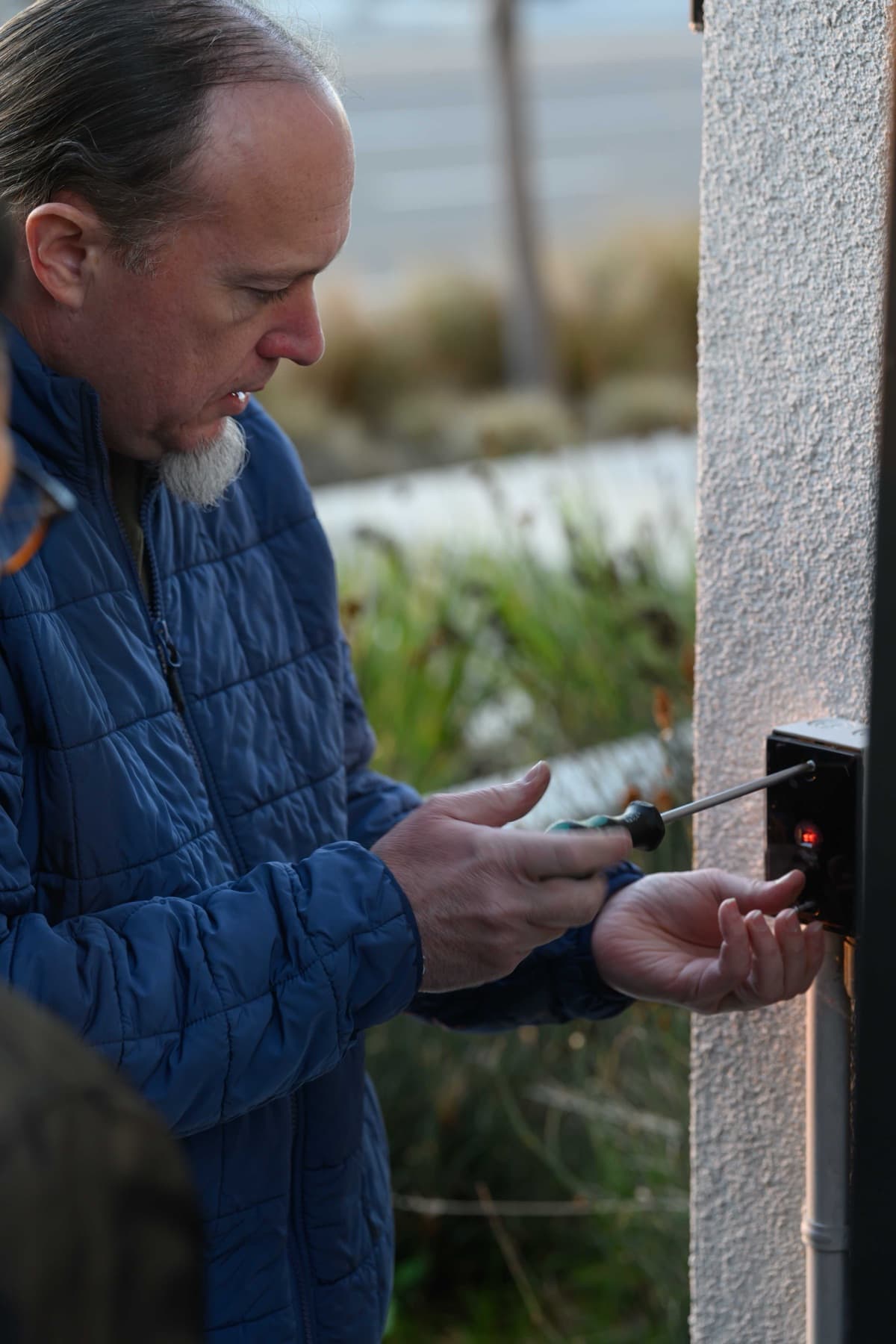
An exterior reader housing being fastened to stucco. The mounting surface and cable entry are checked before the cover goes on.
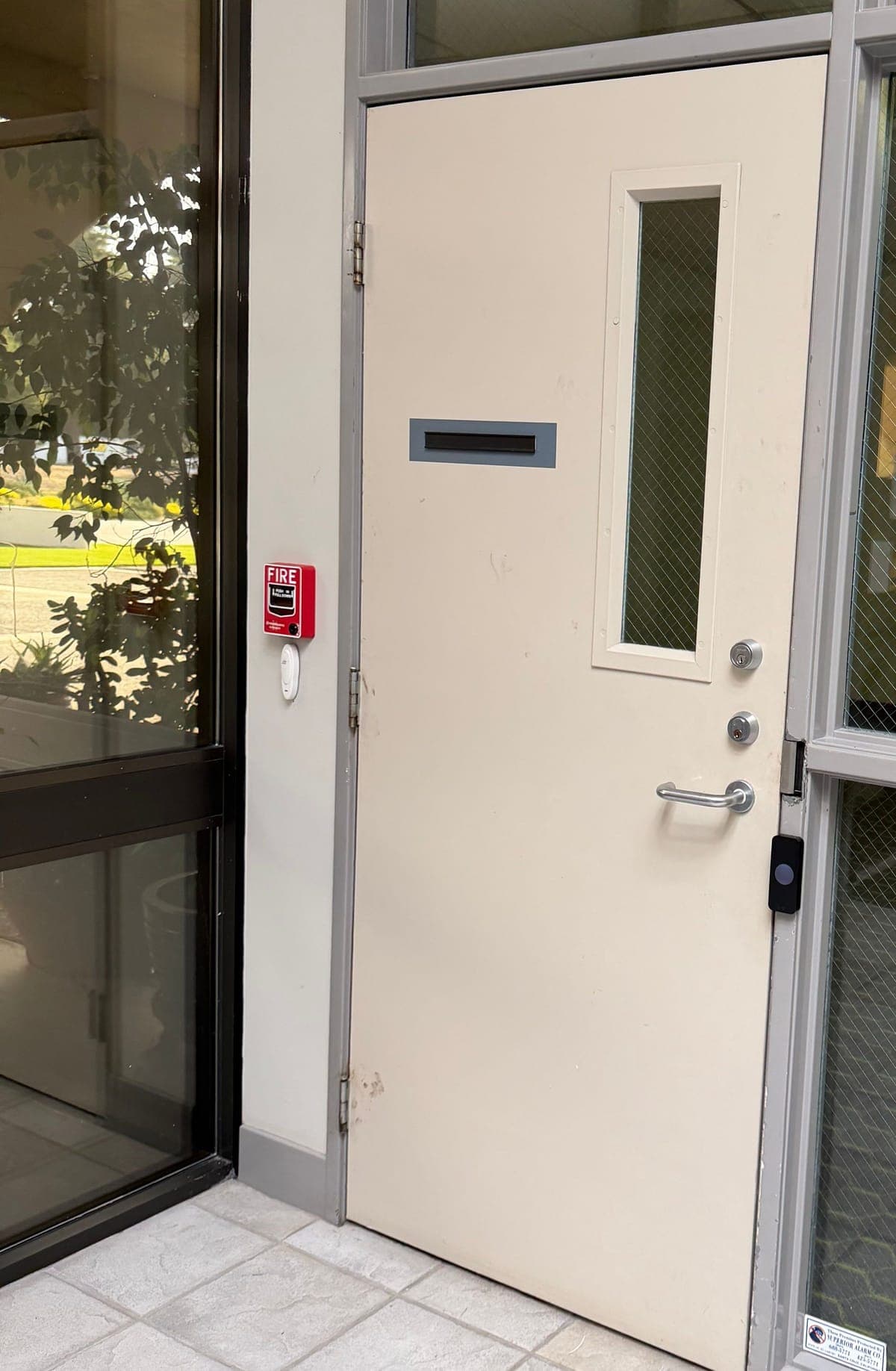
A reader on the frame of a steel staff door, with a fire alarm pull station on the wall beside it. The lock, cylinders, and lever on a door like this are recorded before a controller is specified.
Yes. Elwin Security installs, configures, repairs, and supports Paxton Net2 and Paxton10 access control, Paxton readers, and Entry video door panels for commercial and multifamily properties in Santa Clara and the Bay Area. Elwin also works with existing Net2 and Paxton10 systems that need doors added or hardware replaced.
Site walk
Tell Elwin what is not working, what systems are already on site, and which access points matter most. The next step is a scope grounded in the building, not a generic product list.