Nimbio installation and service for Bay Area gates and doors.
Elwin Security installs, configures, repairs and supports Nimbio cellular access controllers for multifamily and commercial properties in the San Francisco Bay Area. The scope covers the controller, its wiring to the existing gate operator, call box, electric strike, or maglock, operator power, cellular signal, and the activation handoff with Nimbio.
For properties that have chosen Nimbio and need it wired to real gates and doors.
A Nimbio scope turns on what each opening already has. That means a gate operator with a dry-contact relay input at 6.5V to 24V, plus cellular signal where the controller mounts.
01
Gated communities and apartment gates
Nimbio's controller wires in parallel to the existing gate operator's dry-contact input, so clickers, keypads, and fobs keep working. The cited Nimbio pricing page lists a flat rate per home for residential communities.
02
Commercial gates and doors
Nimbio's specification sheet lists gate operators, commercial doors, garage doors, maglocks, and electric strikes as retrofit targets. Each Nimbio controller handles one gate or door relay, and the cited pricing page lists commercial pricing based on the number of active users.
03
Existing Nimbio sites
Properties already on Nimbio that need a controller moved, a second access point added, an external antenna fitted for weak signal, or a relay wire traced. Elwin works with the existing Nimbio account and Nimbio's activation process.
Service focus
Nimbio installation questions start after the platform is chosen.
The practical questions are the operator's input and power, where the controller mounts, how strong the LTE signal is inside the cabinet, and who activates service.
01
Operator input and power
Nimbio's specification sheet calls for any operator with a dry-contact relay input at 6.5 to 24 V. Nimbio's cut sheet lists LiftMaster, Linear, Ghost Controls, Viking, Eagle, DoorKing (DKS), Mighty Mule and others as compatible operators. Nimbio's installer reference says some operators cannot reliably power the controller straight off the board, so those installs use an external power supply.
02
Signal and enclosure
The controller runs on cellular LTE only, with a pre-installed multi-carrier SIM that connects to the strongest of AT&T, Verizon, or T-Mobile. Nimbio's cut sheet lists the controller as cellular-only, with zero Wi-Fi required. Nimbio says to mount it inside the gate operator housing with the antennas pointing straight up, and it supports external antennas for low-signal locations such as metal walls.
03
Activation and handoff
The controller is provisioned over Bluetooth in about 60 seconds through the Nimbio Installer App. A Nimbio support team member then calls to test the gate before the panel is closed. Elwin runs that sequence on site and walks the property team through digital keys and access logs.
Site walk
What Elwin checks before a Nimbio scope is finalized.
The site walk turns Nimbio's published requirements into an opening-by-opening plan for this property.
01
Operators, call boxes, and locks
The make and model of each gate operator, telephone entry call box, electric strike, or maglock. Whether each one has a dry-contact input and a 6.5V to 24V supply.
02
Cabinet space and signal
Room inside the operator cabinet for the controller with both antennas pointing straight up, or a place for an external NEMA enclosure on legacy Linear and Ghost Controls operators. Cellular signal is checked at the cabinet, since Nimbio supports external antennas where metal walls or heavy interference weaken it.
03
Doors with strikes or maglocks
Fire-rated and egress doors are flagged for fire marshal or AHJ review before any hardware is specified. Your fire marshal or AHJ determines compliance.
04
Access rules and gate regulations
Who gets digital keys, which keys expire on a schedule, and whether GuestView will handle visitors. Nimbio's installer reference says HOA, multifamily, and commercial installs should confirm compliance with local regulations governing gate access before installation; the local AHJ decides what applies to this gate.
Scope details
The install scope is the controller, the operator or lock, power, signal, and the account.
Nimbio's cut sheet lists compatible gate operators as any operator with a dry-contact relay input at 6.5V to 24V. The property decides whether that requirement is easy or hard to meet.
Controller and relay
Nimbio's cut sheet lists one premium Omron mechanical relay output rated for a minimum of 50,000,000 operations. The relay gives a momentary pulse by default, with hold-open supported in constant-energized or repeating-pulse mode. The on time is set in Box Settings to 0.5, 1.0, 2.0, 3.0 (default), 4.0, 6.0, 8.0, or 10 seconds.
One relay per controller
1 A at 125 VAC or 60 VDC
0.5 to 10 s on time
Wiring to the operator or lock
Nimbio's specification sheet describes a 7-wire parallel connection to the operator's existing dry-contact input, with existing clickers, keypads, and fobs left in service. If wire is needed, Nimbio recommends 24 gauge silicone wire.
7-wire parallel connection
Model wiring guides
24 gauge silicone wire
Power and environment
The controller accepts 6.5 to 24 V AC or DC from the operator's existing supply, and Nimbio says solar and battery-backed gates are supported within that range. Nimbio rates it for -40°F to 185°F operation. It fits inside standard gate operator cabinets, with an external NEMA weatherproof enclosure available for legacy or external-mount operators.
6.5 to 24 V AC/DC
40 to 70 mA at 24 VDC
-40°F to 185°F
Cellular, app, and account
The SIM and cellular plan are included, with no separate SIM plan, carrier activation, or data bill, and firmware updates arrive over the air. Nimbio uses Bluetooth only for the initial ~60-second provisioning; all runtime access is over LTE. Access is managed as per-user digital keys with scheduled expiration and instant revocation, with full access logs.
Multi-carrier LTE SIM
OTA firmware
Digital keys and logs
Process
From operator list to an activated Nimbio account.
The process keeps the controller tied to the operator, the wiring, and the people who will manage keys.
01
Confirm the openings and hardware
Walk each gate and door and record the operator or lock model, its supply voltage, and its dry-contact input. Decide which openings get a controller, since each controller handles one gate or door relay, and whether any need an external power supply or a NEMA enclosure.
Result: An opening-by-opening scope with controller count, enclosure needs, and wiring guide references before anything is ordered.
02
Mount, wire, and power
Land the 7-wire parallel connection on the operator's existing dry-contact input and power, leaving the existing clickers and keypads in place. Mount the controller inside the housing with the antennas pointing straight up and confirm it connects to an LTE tower.
Result: Each relay is tested at the gate before Nimbio's test call.
03
Provision, test, and hand off
Provision the controller over Bluetooth in the Nimbio Installer App, enter the community and gate owner details, set the access point location, and program the device. Wait for Nimbio's support test call before closing the panel, then walk the property team through digital keys, expirations, and access logs.
Result: Nimbio's team contacts the gate owner to finalize the account and activate service, and digital keys support instant revocation.
Field proof
Nimbio's own documents set the conditions the install has to meet.
The site walk checks each gate or door against Nimbio's cut sheet and installer field reference.
Nimbio's specification sheet (Rev. 2026-07-26) says the controller is not UL Listed and describes it as a low-voltage Class 2 peripheral acting as a dry-contact trigger. It says the controller does not alter or bypass the operator's own safety mechanisms, such as UL 325 entrapment protection. Your AHJ determines what applies to the gate.
Nimbio's installer field reference says its support team provides live phone assistance and wiring diagrams throughout the installation and does not perform the installation itself.
Nimbio's specification sheet says existing clickers, keypads, and fobs are unaffected during a cellular outage because of the parallel wiring. An optional admin-enabled failsafe holds the gate open until the connection is restored.
Call box terminals
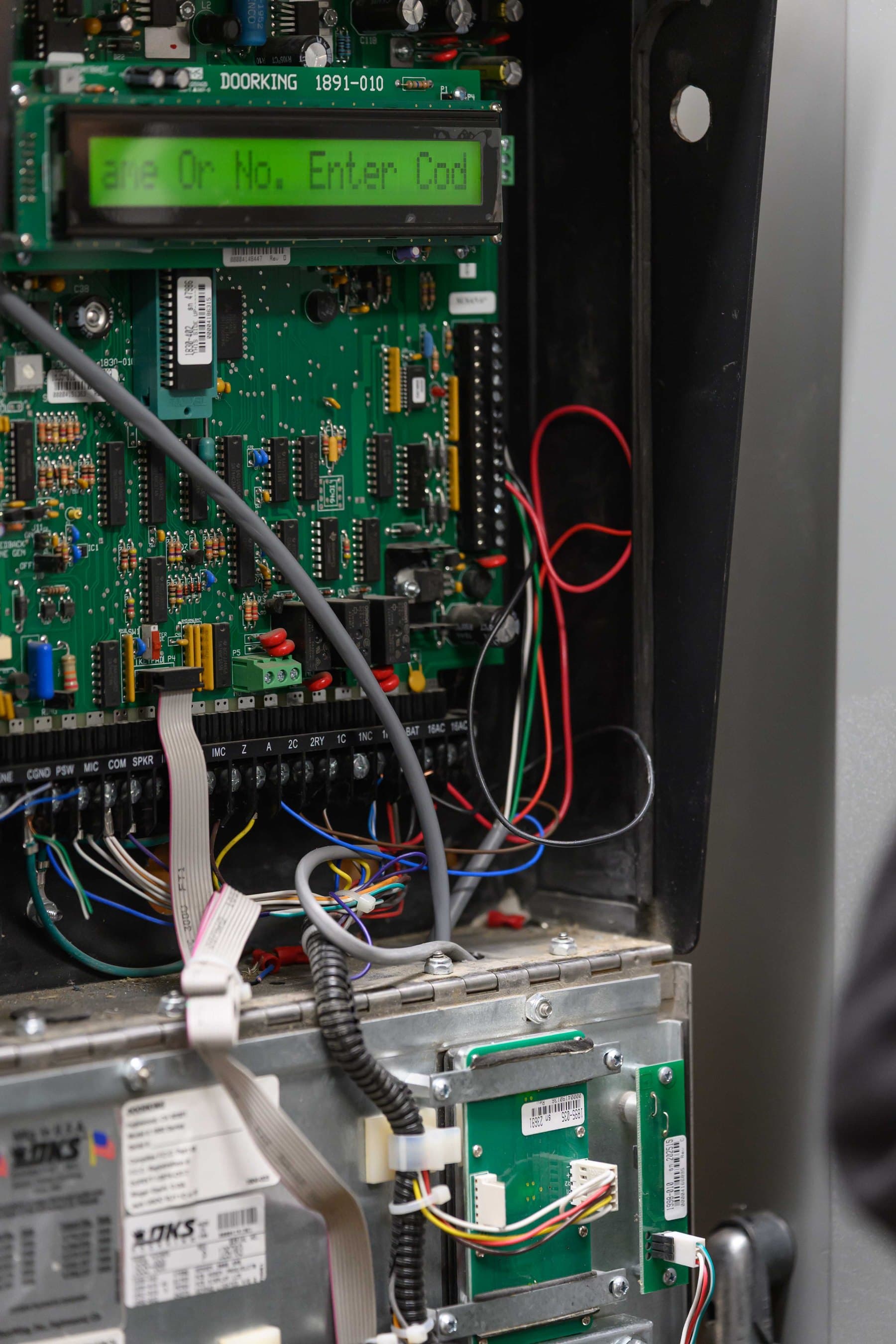
A DoorKing controller with its terminal strip exposed. Nimbio wires in parallel to the gate operator, call box, or lock already on the property, so the existing equipment stays in service.
Gate site walk
A site walk at a slatted metal pedestrian gate. The walk records each opening's operator or lock, its supply voltage, and whether it has the dry-contact input Nimbio's controller needs.
Core service areas for property-first security work.
Elwin serves Bay Area properties from Santa Clara outward, with access control, cameras, intercoms, door hardware, and low-voltage planning tied back to the site conditions in each city.
Yes. Elwin Security installs, configures, repairs and supports Nimbio cellular access controllers on gates and doors for multifamily and commercial properties. Nimbio says it provides wiring diagrams and phone assistance during installation but does not perform the installation itself, so the on-site wiring, power, mounting, and testing are Elwin's work.
An operator with a dry-contact relay input and a 6.5 to 24 V AC or DC supply, per Nimbio's specification sheet. Nimbio's installer reference says some operators cannot reliably power it straight off the board, so those installs use an external power supply.
No, it connects over cellular LTE only, using a pre-installed multi-carrier SIM that connects to the strongest of AT&T, Verizon, or T-Mobile. Nimbio lists the controller as cellular LTE only with zero Wi-Fi required, and Bluetooth only for one-time provisioning. For low-signal locations with metal walls or heavy interference, Nimbio supports external antennas.
Installation labor is a separate line item that Elwin quotes after the site walk.
Nimbio's pricing page says a gate shared by more than one home, such as an HOA, a gated community, or an apartment property, does not count as single-family. Nimbio quotes those rates; Elwin quotes the installation separately.
Nimbio says GuestView, its digital visitor directory, is a standard feature of its installations and needs no physical callbox. A visitor scans a QR code or taps an NFC tag at the entrance, and the resident gets a text with a link. A video call from the visitor's own phone camera (one-way by default, two-way optional) lets the resident confirm who is there and open the gate remotely.
Nimbio's cut sheet lists maglocks and electric strikes among the devices its controller retrofits, with one premium Omron relay output. Fire-rated and egress doors are flagged for fire marshal or AHJ review before any strike or maglock is specified.
Site walk
Start with the property conditions.
Tell Elwin what is not working, what systems are already on site, and which access points matter most. The next step is a scope grounded in the building, not a generic product list.