Visitor management systems installed with the door, the wiring, and the access control behind them.
Elwin Security installs, configures, and supports visitor management systems for Bay Area commercial and multifamily properties. The scope runs from the check-in kiosk and badge printer to the network drop, the power, the reader, the door release, and the access-control integration that let a signed-in visitor through the door. Elwin is Santa Clara-based and serves the San Francisco Bay Area.
For properties where the front desk and the door have to agree.
The kiosk signs the visitor in; the reader and the door release behind it are what let the visitor through. Brivo describes its lobby kiosk as replacing paper sign-in sheets, and Envoy's kiosk is an iPad that must be on Wi-Fi for visitor entries to appear in the visitor log.
01
Multifamily buildings with a front desk
ButterflyMX's Front Desk Station software installs on any internet-connected Windows or Apple computer and unlocks any ButterflyMX-controlled door, gate, or elevator by pressing a single button. ButterflyMX-certified technicians handle the intercom side of that scope.
02
Properties with access control already installed
Envoy's help center documents visitor-credential integrations with Brivo, Kisi, Verkada, and Avigilon Alta. Its Verkada integration requires at least one Access Control Unit (AC12, AD32, AC42, or AC62) and one valid door license, and its Avigilon Alta integration requires a Premium or Enterprise Alta plan.
Service focus
The kiosk, the printer, and the credential each have hardware behind them.
Each platform publishes what its kiosk runs on and what the visitor receives at the door. The site walk is where those requirements meet the counter, the door, and the network.
01
Check-in kiosks
Envoy's kiosk is an iPad running the Envoy Visitors Kiosk app from the App Store, paired with a six-digit code, and on iPadOS 26 the iPad settings must allow full-size apps.
02
Badge printing
Envoy names the Brother QL-820NWB or QL-720NW; Brother lists 802.11 b/g/n, Ethernet, Wi-Fi Direct, and USB 2.0 interfaces for the QL-820NWB. Kisi's Kiosk Pro bundle ships with a label printer, a holder and stand, a PoE to USB-C adapter, and a DK-22205 label roll, and only DK-22205 rolls are supported.
03
Visitor credentials at the door
Verkada Guest grants limited, time-bound visitor access via physical keycards, unlock links, entry codes, or QR codes. Envoy can issue a 4-digit credential for a Brivo keypad, generate temporary permission shares in Kisi, and create temporary Cloud Credentials in Avigilon Alta.
Site walk
What Elwin checks in the lobby before the kiosk is ordered.
The walk records the counter, the door, and the network against the platform's published requirements.
01
Counter and reach
The local AHJ decides how the standards apply to a given lobby.
02
Door and reader
Which door the visitor credential releases, what reads it (a Kisi Kiosk Pro scanning a QR code, a Brivo keypad taking a 4-digit PIN, Verkada access control taking a card or QR code credential), and the strike, maglock, closer, and request-to-exit behavior behind it.
03
Network and power
A Wi-Fi or Ethernet drop, PoE for a Kisi Kiosk Pro, and, for Envoy's Verkada integration, three allowlisted IP addresses and open port 443.
04
Existing access control
Which platform will hold the visitor credential. Envoy's Brivo integration needs Super Admin permissions and an Envoy specific Brivo API key; its Verkada integration needs one valid door license.
Scope details
The scope is the kiosk, the printer, the reader, the release, and the records.
Elwin plans each layer against the platform's published requirement and the opening it has to serve.
Kiosk power and network
Verkada Guest tablets must get an IPv4 address by DHCP, use UDP port 53 for DNS, do not support DNS over HTTPS, and are incompatible with LANs that require proxy servers.
PoE or USB-C power
Wi-Fi or Ethernet drop
DHCP, DNS, allowlists
Badge printer placement
Envoy suggests at least one printer per two iPads; Standard and Premium plans connect one printer per location, and Enterprise connects multiple. The Brother QL-820NWB lists unit dimensions of 5.0 by 9.2 by 5.7 inches and an optional Li-ion battery (PA-BU-001).
Printer on the kiosk network
Counter space
Label stock
Reader and door release
Kisi's Kiosk Pro acts as a reader, opening doors via QR code scan, and Brivo's visitor PIN is used with a Brivo keypad. Elwin installs the electric strike or maglock, the request-to-exit device, and the power supply that the visitor credential releases. Elwin repairs and replaces door hardware; your fire marshal or AHJ determines compliance.
QR or PIN reader
Strike or maglock
Request to exit
Records and retention
Kisi's visitor badges are printed at check-in and include the visitor's name, date, and reason for the visit.
Visitor log
Retention period
Notice at collection
Process
From a paper sign-in sheet to a kiosk that releases the door.
The sequence keeps each platform requirement attached to the counter, the door, and the network from the first walk to the handoff.
01
Walk the lobby and pick the platform
Record the counter, the door the visitor will use, the existing access control, and the network, then match them to the kiosk, printer, and credential type the platform publishes.
Result: A written scope the property can send to its access-control vendor before anything is ordered.
02
Install the counter, the door, and the wiring
Mount the kiosk and printer, run the Ethernet or PoE drop, install or adjust the reader, strike or maglock, and request-to-exit device, and connect the integration between the visitor platform and the access-control system.
Result: A test visitor is signed in, badged, and let through the door before staff are trained.
Field proof
The platforms' own documents set the conditions the install has to meet.
Kiosk power, printer networking, and credential expiry are specified by the platform, and the site walk is where those lines meet the lobby.
Kisi's Kiosk Pro documentation lists an operating temperature of 32°F to 95°F (0°C to 35°C), an IP52 rating, and a body 10.12 inches wide, 6.64 inches high, and 0.27 inches deep.
Envoy's Avigilon Alta integration states: "After the access duration expires automatically in Envoy the Cloud Credential will cease to work," and its Kisi integration states: "After the access duration expires the Kisi permission will be terminated."
Reader at the door
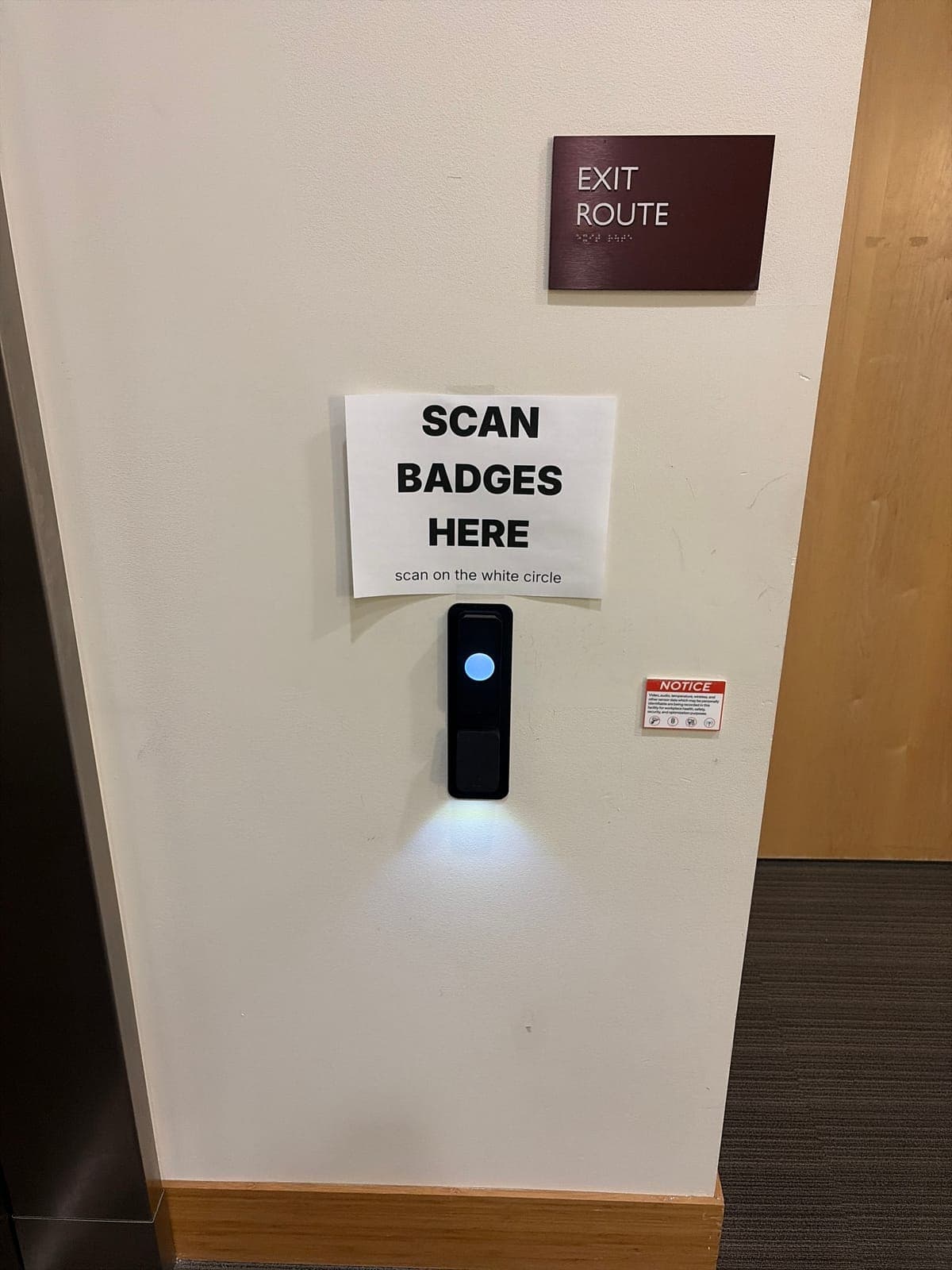
A black reader with a glowing circle on a white wall, a taped paper sign above it reading "SCAN BADGES HERE, scan on the white circle," an EXIT ROUTE sign with braille, and a small red-and-white NOTICE sticker to the right.
Storefront entry
An aluminum-framed glass door with a black reader mounted on the frame beside the pull handle, a NO SOLICITING sign on the glass, and a reception counter with flowers visible inside.
Core service areas for property-first security work.
Elwin serves Bay Area properties from Santa Clara outward, with access control, cameras, intercoms, door hardware, and low-voltage planning tied back to the site conditions in each city.
Brivo states that its visitor management pricing depends on the number of locations, visitor volume, or integration needs. The iPad or kiosk, the printer, the reader, the door hardware, and the wiring are scoped on the site walk.
It can when the platform issues a credential that a reader at the door accepts. Kisi's Kiosk Pro acts as a reader, opening doors via QR code scan, and Envoy can issue a 4-digit PIN for a Brivo keypad. The door also needs an electric strike or maglock, a request-to-exit device, and a power supply, which Elwin installs. Elwin repairs and replaces door hardware; your fire marshal or AHJ determines compliance.
Envoy's kiosk app runs on an iPad, which on iPadOS 26 must allow full size apps; its printers are the Brother QL-820NWB or QL-720NW. Verkada Guest lists an iPad on iOS 14 or higher, a badge printer, and an optional stand, and each Guest tablet managed in Command needs a license. Kisi offers the Kiosk Pro bundle with its own label printer, stand, and PoE adapter, or a registration form pinned as a web app on an iOS or Android tablet you already own, using Safari on iOS or Chrome on Android.
Envoy states the iPad must be connected to Wi-Fi for visitor entries to appear in the visitor log. Kisi's own-tablet option requires a tablet connected to the internet. Elwin plans the Wi-Fi or Ethernet drop at the counter as part of the install so the kiosk is not depending on a guest network.
Verkada Guest can delete visit records automatically after a defined period, and Kisi's registration point can require visitors to accept an agreement during check-in.
Site walk
Start with the property conditions.
Tell Elwin what is not working, what systems are already on site, and which access points matter most. The next step is a scope grounded in the building, not a generic product list.