DoorKing intercom repair and replacement for Bay Area properties.

Elwin Security repairs and replaces DoorKing telephone entry systems at Bay Area multifamily and commercial properties: the 1812 Classic, Plus and Access Plus, and the 1833, 1834, 1835 and 1837. The work covers the circuit board, keypad, display and microphone inside the panel, the relays that release the door or gate, and the phone, cellular or internet connection the panel calls through.

For properties where a DoorKing panel has stopped doing its job.

Each situation below has a different fix, and the model and circuit board decide which one applies.

01

Calls, the display or the release have failed

DoorKing lists replacement parts by model: the 1835-010 circuit board for the 1835-080 and 1835-084, the 1891-010 single-line display for the 1834 and 1835, the 1896-012 eight-line display for the 1837, and a replacement microphone kit and microphone board.
02

The property has outgrown the panel

DoorKing's product reference guide lists 3 phone numbers for the 1812 Classic and 27 for the 1812 Plus and Access Plus. When the directory or the relay count goes past what the installed model supports, Elwin replaces the panel.

Repair, retrofit or replace: the model and board decide.

DoorKing's documents set what each path requires, so the first job is to identify the panel, its circuit board part number and its board revision.

01

Repair with DoorKing replacement parts

DoorKing's product reference guide lists replacement circuit boards and limits each to specific units: 1871-010 for the 1812 Classic, 1971-010 for the 1812 Plus, 1970-010 for the 1802 AP, 1808 AP, 1810 AP, 1812 AP and 1838 AP, 1833-010 for the 1833, 1834-010 for the 1834-080 and 1834-084, 1835-010 for the 1835-080 and 1835-084, and 1837-010 for the 1837. Elwin repairs with the board, keypad, display or microphone part that matches the installed model.

02

Retrofit the connection

The 2334-080 VoIP box provides a voice and data connection for the 1833, 1834, 1835, 1837 and 1838, and DoorKing's product reference guide states that with 1830 Series systems the 1830 circuit board must be Revision Z or higher. DoorKing also notes that some older entry systems may need a circuit board upgrade to be cellular-ready.

03

Replace the system

DoorKing lists the 1812-074 conversion kit, which upgrades older 1812 units to an 1812 Access Plus unit. When the property wants a video intercom instead, Elwin replaces the DoorKing panel and reuses the door or gate release wiring where it tests sound.

What Elwin checks before quoting a DoorKing repair or replacement.

A model number on the faceplate is not enough. The board part number, its revision letter and the connection type decide which DoorKing parts and connection boxes will work.

01

Model and board revision

Faceplate model, circuit board part number (for example 1970-010 or 1835-010), board revision letter, and memory chip. DoorKing's product reference guide states that when used with 1830 Series systems the 1830 circuit board must be Revision Z or higher.

02

Connection type

POTS line, existing cellular control box, or Ethernet.

03

Release path

Which relay drives which door or gate, whether 2358 Tracker expansion boards are in use, and whether a gate operator or elevator control board is connected.

04

Directory and programming

Resident count against the model's capacity, who programs the system today, and whether that happens from a PC, the DoorKing Cloud, or the system keypad.

A DoorKing scope has four parts, and the faceplate is only one of them.

The board, the connection, the relays and the programming are what a repair touches.

Connection path

DoorKing states that neither its cellular nor its VoIP devices can be used for 911 calls.

  • 1800-080 or 1800-081 cellular
  • 2334-080 VoIP
  • Ethernet from the router

Programming and handoff

DoorKing states that the DoorKing Cloud is included with Cellular, VoIP, DoIP and IM Server subscriptions. DoorKing states that its Access Plus programming software is for Access Plus systems with the 1970-010 circuit board only and cannot be used to program 1812 systems with 1871-010 or 1971-010 circuit boards.

  • DKS Cloud
  • Windows Account Manager
  • Access Plus software

From a dead panel to a working entry, with the right DoorKing parts.

Repair decisions follow DoorKing's published parts lists and connection rules.

01

Identify the panel

Record the model, board part number, revision, memory chip, connection type and relay wiring, and test calls, keypad, display and release at the panel.

Result: The quote names the exact DoorKing part or kit, not a generic intercom repair.

02

Choose repair, retrofit or replacement

Match the failure to DoorKing's parts list and connection rules: a replacement board, keypad or display, a cellular or VoIP box with any required board upgrade, a 1812-074 conversion kit, or a new system.

Result: The property knows what the fix costs and what it leaves in place.

03

Install, program and hand off

Install the part or system, register any DoorKing subscription, load the directory, test each relay and call path, and show the property team how programming works.

Result: The entry works and the property can manage its own directory.

Inside a DoorKing telephone entry panel.

The photos show the inside of an open DoorKing telephone entry panel.

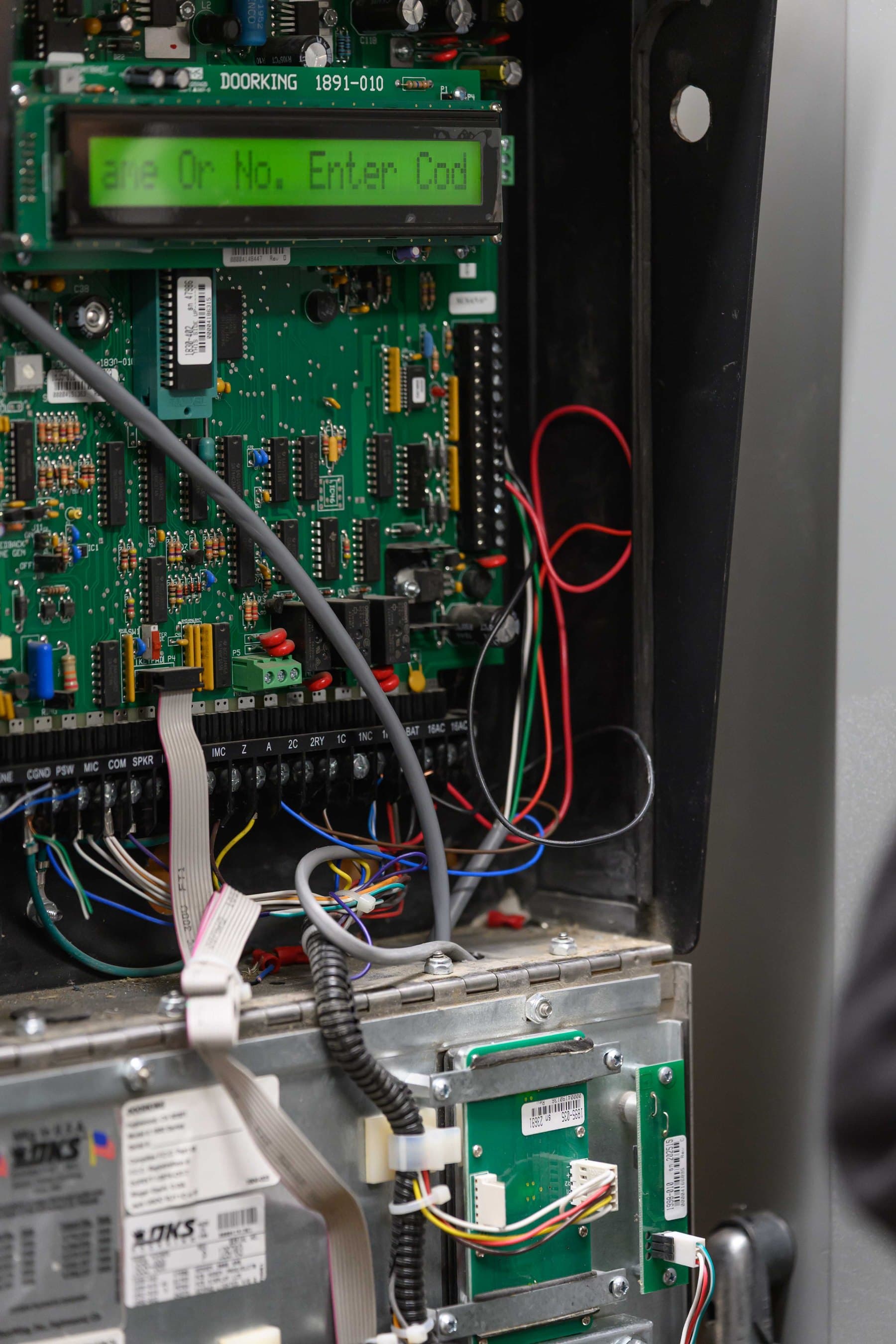
Close-up inside a DoorKing telephone entry panel: a 1891-010 display board with a lit green display above the main circuit board, a socketed chip, and a labeled terminal strip with wiring.
Board detail

The 1891-010 display board sits above the main circuit board. DoorKing lists the 1891-010 as the single-line display for the 1834 and 1835.

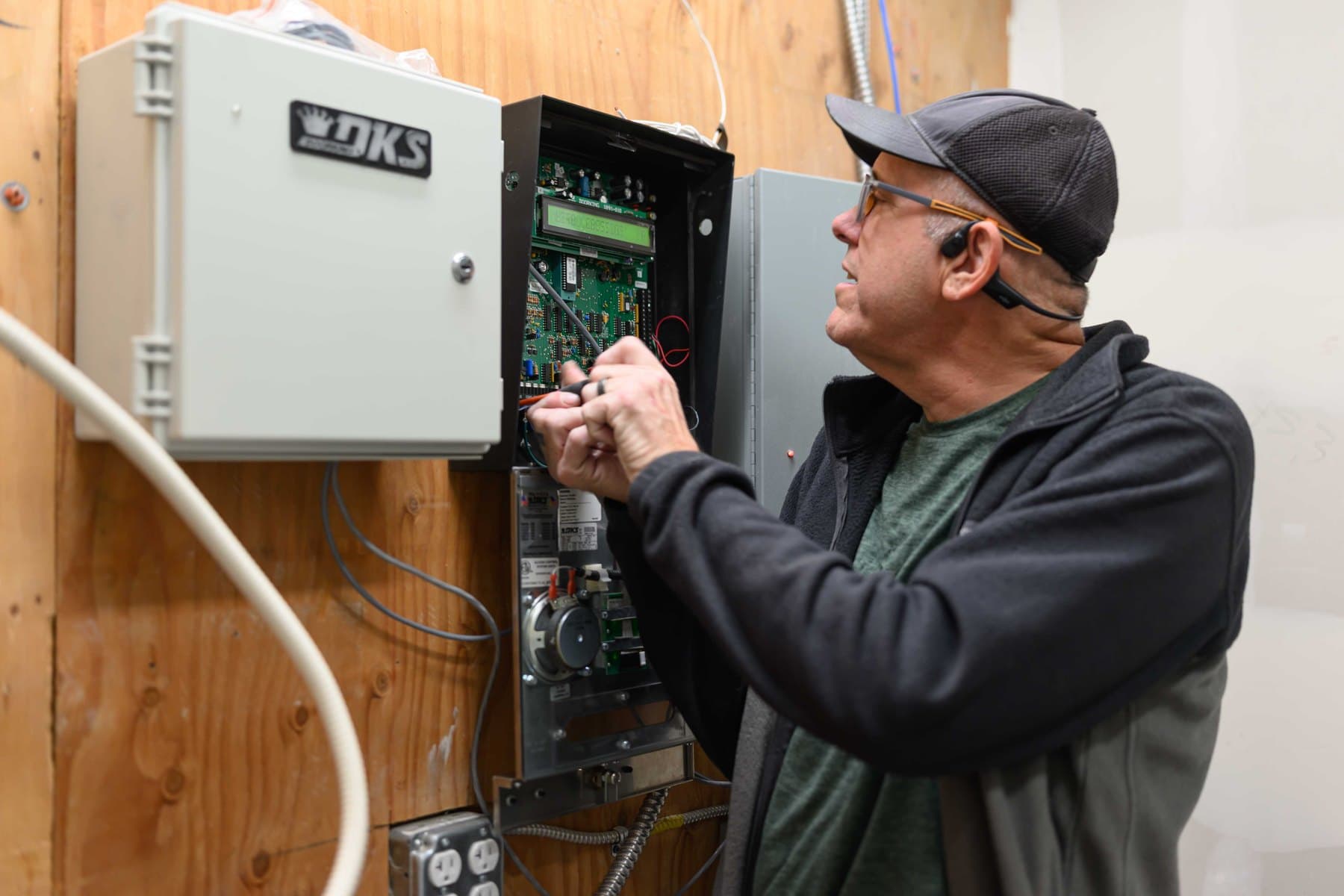
Technician adjusting wiring inside an open DoorKing telephone entry panel, with a grey DKS-badged enclosure mounted to the left.
Panel service

Board, display and connection work happens inside the panel housing, with a DKS enclosure mounted beside it.

See all before and after photos

FAQ

Yes. Each needs a DoorKing subscription, and DoorKing states that its cellular and VoIP devices cannot be used for 911 calls.

Start with the symptom.

Tell Elwin what is not working, what systems are already on site, and which access points matter most. The next step is a scope grounded in the building, not a generic product list.

Request service.

  1. Contact
  2. Problem
  3. Property and send

Who should we contact?

Enter your name and either a phone number or an email address. We save these as you go, so we can follow up even if you don’t finish.