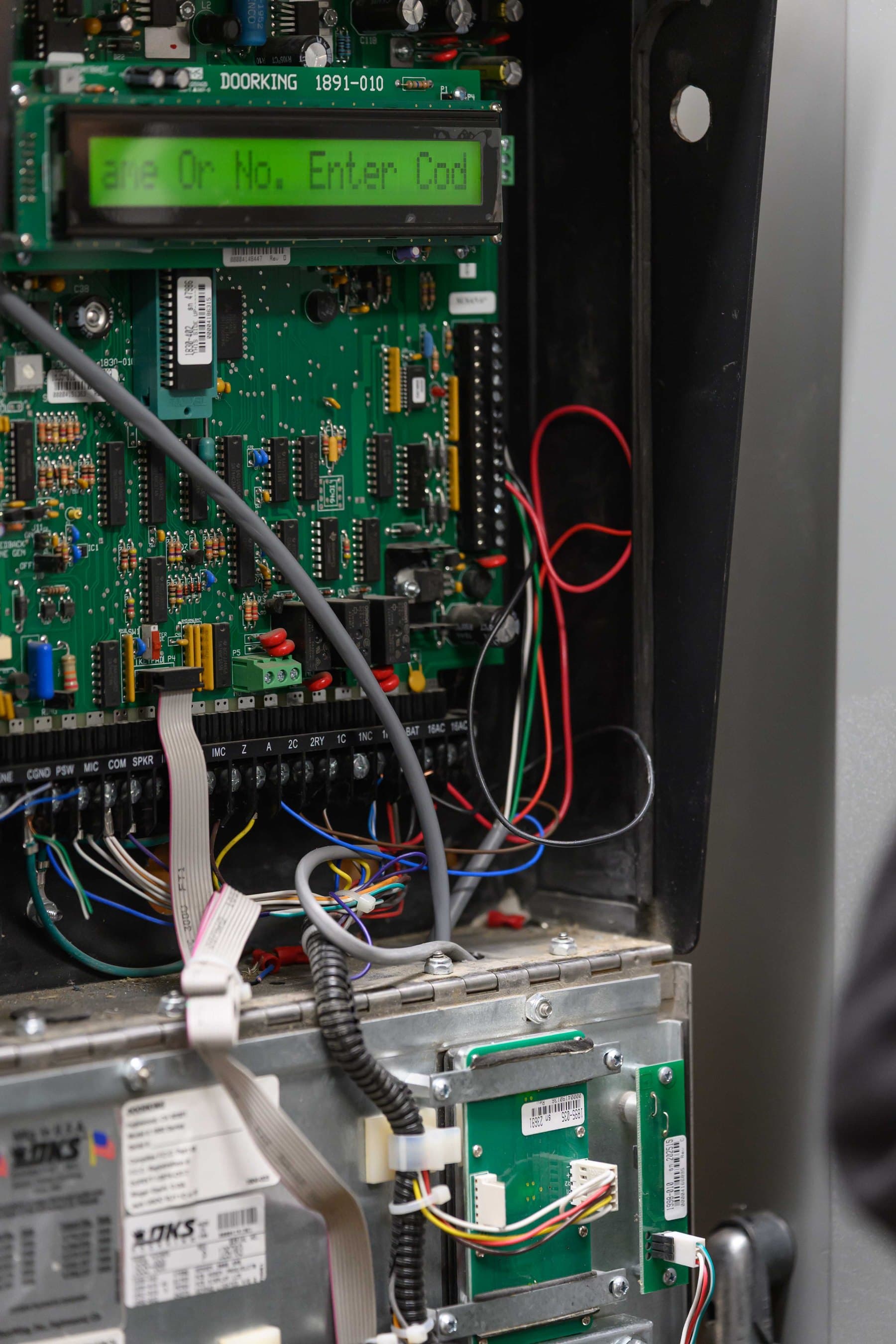
DoorKing 1834, 1835, 1837 and 1838 repair and replacement for Bay Area properties.
Elwin Security repairs and replaces DoorKing 1834, 1835 and 1837 telephone entry panels and the 1838 access controller at Bay Area multifamily and commercial properties. A panel that does not answer when called, a resident's 9 that does not activate the relay, a dead keypad and a strike that locks on each appear in DoorKing's troubleshooting table. The fix depends on which model and circuit board is installed.
For properties where a specific DoorKing panel has a specific fault.
The symptom at the panel points to a short list of causes in DoorKing's troubleshooting guide, and the model decides which parts fit.
01
The panel does not answer, or 9 does not open the door
DoorKing's 80 Series manual lists two causes for 'Entry system will not answer when called': the ring pin is not installed, or a bad phone line or insufficient ring voltage. For 'Touch-tone 9 will not activate relay' it lists four checks. Re-program the tone-open number to 9, press 9 twice if the resident's phone emits a short pulse rather than a long tone, try another phone that is known to work, and lower speaker volume and re-adjust feedback.
02
The keypad, display or audio has failed
The same table pairs a dead keypad with no 16.5 VAC input power or a keypad cable plugged in wrong. It pairs an unreadable LCD with the contrast adjustment, and a ringing or howling speaker with the feedback and volume settings. DoorKing's January 2026 reference guide lists the 1891-010 single-line display for the 1834 and 1835, the 1896-012 eight-line display for the 1837 only, and the 1998-020 replacement microphone kit.
03
The strike or gate misbehaves
For 'Door strike locks on', DoorKing lists excessive voltage drop on the 16 VAC line, a transformer with too low a VA rating, and a relay strike time programmed too long. For a strike or gate operator that holds open, it lists a hold-open command, cleared by calling the system and pressing the tone deactivate number.
Service focus
Repair the board, retrofit the connection, or replace the panel.
DoorKing's manuals name the circuit board part number and revision for the 1834, 1835, 1837 and 1838.
01
Repair with the matching DoorKing part
It lists the 1837-010 for the 1837 only and the 1838-010 for the 1838 only. The 80 Series manual covers the flush and surface 1835-010 and 1837-010 boards at Revision Y or higher and marks the wall-mount 1835-009 and 1837-009 boards discontinued.
02
Retrofit the connection
Its cellular instruction manual says the voice-and-data box must be wired to the entry system's phone line and RS-232 connection. DoorKing's cellular page says some older entry systems may need a circuit board upgrade to be cellular-ready.
03
Replace the panel
DoorKing's reference guide lists the 1834, 1835 and 1837 in 80 Series surface and flush housings and in a larger 90 Series housing with space for a card reader, IP camera and TCP-IP adapter. When a property wants video calls to a phone instead of a voice call box, Elwin replaces the DoorKing panel with a video intercom.
Service check
What Elwin checks at a DoorKing 1834, 1835, 1837 or 1838.
DoorKing's manual says to have a VOM meter handy to check voltages and continuity, and a telephone test set to check the telephone line.
01
Board and revision
Model on the faceplate, and the circuit board part number and revision letter: 1834-010, 1835-010, 1837-010 or 1838-010. The 90 Series manual covers the 1835-009 and 1837-010 boards at Revision Z or higher.
02
Power and ground
The manual's pre-checks: the 16.5 VAC supply, a transformer rated 20 VA for the 1833 and 1835 and 40 VA for the 1837, and 16 or 18 AWG power wire. Then a properly grounded case, and no hum from a phone or power line shorted to ground.
03
Phone line or connection box
A touch-tone, loop-start line checked with a telephone test set, or an 1800-080 cellular box or 2334-080 VoIP box and its DoorKing subscription. DoorKing states that modem communications will not work over cellular or VoIP connections.
04
Relays and programming
Which relay drives which strike or gate operator, strike times, tone-open numbers, and the four-digit master code. DoorKing's manual says there is no way of retrieving the master code after it has been programmed in.
Scope details
What the four models share, and where they differ.
DoorKing's 1834 page says the 1834 80 Series stores up to 3000 phone numbers and can control two (2) entry points.
1834
DoorKing notes that a card reader installed in a 1834 has to be connected to another access controller, and points to the 1835 if a built-in reader is wanted.
1834-080 surface
1834-084 flush
1834-090 90 Series
1835 and 1837
The 1835 has a single-line display and the 1837 an eight-line display.
1835-080, -084, -090
1837-080, -084, -090
2358-010 Tracker boards
1838 access controller
DoorKing's 1838 call stations provide voice communication via telephone and require an active telephone line.
1838-081 surface mount
1838 call stations
2348 elevator boards
Power, ground and line
It calls for a ground wire of at least 12 AWG to a ground point within 10 feet, and twisted phone wiring kept out of conduit shared with 115 V lines. Where a relay releases a maglock or an exit door, the fire marshal or local AHJ decides what egress hardware is acceptable.
16.5 VAC transformers
12 AWG ground
1877-010 and 1878-010 surge suppressors
Process
From the symptom at the panel to a working entry.
The order is to confirm power and line, then test relays and programming.
01
Isolate and test
Disconnect expansion boards, elevator boards, the RS-232 connection, card readers, RF receivers and keypads as the manual directs, then test the call, keypad, display and each relay with a meter and a telephone test set.
Result: The fault is placed at the line, the power, the board or the programming.
02
Choose the fix
Match the fault to DoorKing's parts list: a replacement board, display, keypad or microphone kit, a cellular box, or a new panel.
Result: The quote names the DoorKing part number or the replacement system.
03
Install, program and hand off
Install the part with the panel powered down, since DoorKing warns that installing the memory chip with power on will irrevocably damage it. Then program, test each relay and show the property team the directory.
Result: The entry works and the property keeps control of its own programming.
Field proof
What DoorKing's documents say about repairing these models.
An open DoorKing telephone entry panel.
DoorKing's 2-year limited warranty (Rev 11-23) lists the 1833, 1834, 1835 and 1837 telephone entry systems, the 1838 and 1800 Series cellular devices. It covers bench repairs only and states that DoorKing will not be responsible for onsite service calls or labor to remove and replace defective parts. External accessory transformers are listed as normal maintenance items.
DoorKing's 80 Series manual marks the wall-mount 1835-009 and 1837-009 boards as discontinued. The 1837 90 Series page states the 1837 is still available in the original 80 Series surface and flush housings.
DoorKing's support page lists RAM software for 1833, 1834, 1835, 1837 and 1838 and says to back up and uninstall the existing version first.
DoorKing's cellular instruction manual says older 1830 Series boards can be updated to Rev W or higher for better DTMF tone distortion. It also says an older entry system may need its board upgraded to program remotely because of distorted DTMF tones from the cellular network.
Board detail
DoorKing lists the 1891-010 as the single-line 20-character display for use with the 1834 and 1835.
Core service areas for property-first security work.
Elwin serves Bay Area properties from Santa Clara outward, with access control, cameras, intercoms, door hardware, and low-voltage planning tied back to the site conditions in each city.
DoorKing's 80 Series manual lists two causes for 'Entry system will not answer when called': the ring pin is not installed, or a bad phone line or insufficient ring voltage. DoorKing's manual says noise on the phone line will cause problems with the entry system.
Re-program the tone-open number to 9, press 9 twice in rapid succession if the resident's phone emits a short pulse rather than a long tone, try another phone that is known to work, and lower the speaker volume and re-adjust feedback. DoorKing's cellular instruction manual adds that the factory tone-open numbers are 9 for Relay 1, 0 for Relay 0 and 5 for Relay 2.
DoorKing's 1800-080 cellular system is designed for use with the 1833, 1834, 1835 and 1837; DKS no longer recommends or supports a POTS connection.
DoorKing's 80 Series manual marks the wall-mount 1835-009 and 1837-009 boards as discontinued. The 1837 90 Series page says the 1837 is still available in the original 80 Series surface and flush housings, and the 1834 80 Series page says the 1834 is also available in the 90 Series housing. DoorKing's manuals name circuit boards 1834-010, 1835-010, 1837-010 and 1838-010.
No: DoorKing's 2-year limited warranty (Rev 11-23) covers bench repairs only, with parts returned to DoorKing in Inglewood. It states that DoorKing will not be responsible for costs involving onsite service calls or labor to remove and replace defective parts. It runs two years from the original customer's purchase and lists external accessory transformers as normal maintenance items.
DoorKing's 80 Series manual states there is no way of retrieving the master code after it has been programmed in. DoorKing's manual lists no factory setting for the master code, and each entry system's master code must be unique. DoorKing's manual says a master code switch turned ON with no new master code entered sounds a long tone after approximately 30 seconds.
Yes. Elwin replaces DoorKing telephone entry panels with video intercoms such as ButterflyMX, Swiftlane, Avigilon Alta and Kisi, installed by technicians certified on those platforms. The next step is a service call to identify the board and connection, or a site walk if replacement is already on the table.
Service request
Start with the symptom.
Tell Elwin what is not working, what systems are already on site, and which access points matter most. The next step is a scope grounded in the building, not a generic product list.