
Key takeaways
- LenelS2's OnGuard page lists versions 8.4, 8.3, 8.2 and 8.1, and OnGuard comes in four system sizes: ES, ADV, PRO and Enterprise.
- The four LNL-X controllers run from a single-door board that can take power from its network cable to boards that handle up to 64 doors through added modules.
- The Series 3 modules wire to the controller over a data line of up to 4,000 feet; a network-connected door module uses Ethernet instead and, in its dual door mode, takes only readers that use OSDP, the Open Supervised Device Protocol.
- The Intelligent Dual Reader Controller and Series 3 module sheets say their relays support fail-safe or fail-secure operation, not which a door needs.
Identify
Which Lenel parts do I have?
An OnGuard system has three layers: the OnGuard software, on a server or in OnGuard Cloud; circuit boards, the controllers (LenelS2's Intelligent System Controllers, or ISC) and the modules wired to them; and at each door, the reader, a door contact that reports whether the door is shut, and a request-to-exit (REX) button for leaving.
Each board carries a model number; on the LNL-X4420 in LenelS2's photo below, it is on a white label.
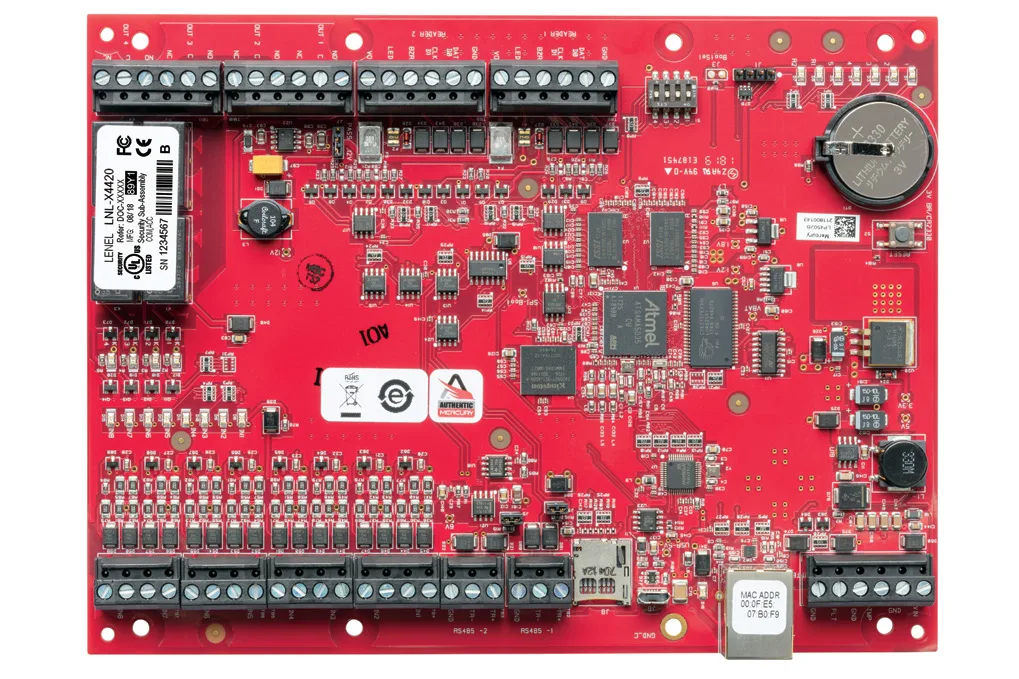
For the principles behind any maker's system, from credential to controller to lock, see how commercial access control works.
| Model | LenelS2's name | What it is |
|---|---|---|
| OnGuard 8.4 | OnGuard, in ES, ADV, PRO and Enterprise system sizes | The access control software, on a server or in OnGuard Cloud |
| LNL-X2210 | Intelligent Single Door Controller | Controller for one or two readers on a single door |
| LNL-X2220 | Intelligent Dual Reader Controller | Controller for one or two doors on the board, plus added modules |
| LNL-X3300 | Intelligent System Controller | Controller with no reader ports or relays; its doors are on its modules |
| LNL-X4420 | Advanced Dual Reader Controller | Controller for up to 64 doors, plus auxiliary inputs and outputs |
| LNL-M2210, LNL-M2220, LNL-M3300, LNL-M4420 | The same names as the four LNL-X controllers | M-Series controllers |
| LNL-1300 Series 3 | Single Reader Interface Module | Module for one reader, wired to the controller |
| LNL-1320 Series 3 | Dual Reader Interface Module | Module for two readers, wired to the controller |
| LNL-1100 Series 3 | Input Control Module | Module with 16 inputs |
| LNL-1200 Series 3 | Output Control Module | Module with 16 relay outputs |
| LNL-1324E | Flexible Network-Connected Door I/O Module | Module for two doors with OSDP readers, or six inputs and four relays, connected over Ethernet |
| LNL-R11330-05TB | Multi-technology Mini-mullion Reader | BlueDiamond wall reader |
| LNL-R11320-05TB | Multi-technology Standard-size Reader | BlueDiamond wall reader |
| LNL-R11325-05TB | Multi-technology Standard-size Reader with PINpad | BlueDiamond wall reader with a keypad |
| LNL-EV22KPP, LNL-EV22KPPFOB, LNL-EV28KPP | 2K PVC card, 2K keyfob, 8K composite card | LenelS2 cards and fob for BlueDiamond readers |
Source LenelS2's OnGuard and BlueDiamond product pages and its controller, module, reader and card data sheets.
Software
What is OnGuard, and which version is it?
OnGuard is LenelS2's physical access control system, which LenelS2 says unifies access control and video monitoring. The OnGuard page lists versions 8.4, 8.3, 8.2 and 8.1, and the 8.4 data sheet calls 8.4 "the latest version of OnGuard from LenelS2".
It runs on-premise, on servers the customer manages; in a customer-maintained commercial cloud; or as OnGuard Cloud, a single-tenant SaaS (software as a service) solution managed by LenelS2 and hosted on Amazon Web Services (AWS).
LenelS2 publishes a specification sheet for each system size. The ES, ADV and PRO sheets each draw an upgrade path from ES to ADV to PRO to Enterprise and say "All versions of OnGuard can be migrated to OnGuard Cloud."
The Enterprise sheet lists master and region servers. Its two master server types allow a maximum of 8 regions and 512 readers, or 10 regions and Unlimited readers, with the same footnote that scalability is limited only by the physical limitations of the system size, for the entire system.
Some features depend on the version: the 8.4 data sheet marks several controller features as 8.4 only, among them Mutual TLS support to secure access controller communications.
| System | Card readers, standard licensing | Card readers, expansion capability | Client workstations |
|---|---|---|---|
| OnGuard ES | 32 | 64 | Up to a maximum of five (5) client workstations |
| OnGuard ADV | 64 | 256 | Up to a maximum of ten (10) client workstations |
| OnGuard PRO | 128 | Unlimited, with the footnote above | An unlimited number of thick client workstations |
Source LenelS2's OnGuard and OnGuard Cloud pages, the OnGuard 8.4 data sheet, and the ES, ADV, PRO and Enterprise system specification sheets.
Architecture
How do the parts connect?
Three of the four LNL-X sheets draw the same chain. The OnGuard Security Server and the controller share a TCP/IP network, the building's ordinary computer network. From the controller, an RS-485 data line runs from module to module, up to 4,000 feet, to the reader, input and output modules, and the readers wire to the reader modules.
When the server connection is lost, the single-door controller functions independently of the host once configured, the Intelligent Dual Reader Controller allows nearly all local functionality to continue until the connection is restored, and the Advanced Dual Reader Controller can maintain most of its local functionality.
| Link | What LenelS2's sheets list |
|---|---|
| Controller to OnGuard, primary | Ethernet, 10-BaseT/100Base-TX, on all four LNL-X sheets |
| Controller to OnGuard, secondary | USB 2.0 port with an optional USB-to-Ethernet adapter (LNL-X controllers only); the second connection should be on a different subnet than the primary |
| Controller to OnGuard, encryption | LNL-X sheets: AES128, or TLS 1.2 with AES256. M-Series sheets: TLS 1.2 / 1.3 |
| Controller to Series 3 modules, encryption | LNL-X sheets: AES 256-bit algorithm |
| Series 3 module to controller, encryption | LNL-1320, LNL-1100, LNL-1200 sheets (2025/12): automatic AES 256 to an M-Series or X-Series ISC. LNL-1300 sheet (2024/06): AES 128-bit |
Source The system diagrams and host communication rows on LenelS2's LNL-X controller data sheets and the Series 3 module data sheets.
Controllers
How many doors does each LNL-X controller handle?
The Intelligent System Controller's sheet lists no reader ports or relays; its 64 doors are on the Series 3 modules wired to its two RS-485 ports.
In the table, a Form-C relay has both a normally open and a normally closed contact, and its rating is the most current it can carry at that voltage. PoE is power over the network cable, a UPS is a backup power supply, and BACnet is a building automation protocol.
| Data sheet row | LNL-X2210 | LNL-X2220 | LNL-X3300 | LNL-X4420 |
|---|---|---|---|---|
| Doors and readers, as the sheet words it | One or two readers to a single door | One or two doors, with two on-board reader ports | No reader ports; its 64 doors are on its modules | A single-board solution for interfacing up to 64 doors, plus auxiliary inputs and outputs |
| Downstream RS-485 | Alternative configuration with OnGuard version 6.6 and higher: the first reader port becomes an RS-485 bus for up to eight addressed devices | One 2-wire RS-485 port for up to 32 devices (maximum 64 doors) | Two 2-wire RS-485 ports for up to 64 devices (64 doors), with a maximum of 32 modules on each bus | Two 2-wire RS-485 ports for up to 64 devices (64 doors) |
| Cardholders | 240,000 | Up to 250,000 | Up to 500,000 | More than 1,000,000 (depending on configuration) |
| Primary power | PoE (12.95 W), IEEE 802.3af; or PoE+ (25 W), IEEE 802.3at; or 12 VDC ± 10%, 1.8 A maximum | 12 to 24 VDC ± 10%, 500 mA maximum (reader current not included) | 12 to 24 VDC ± 10%, 250 mA maximum | 12 to 24 VDC ± 10%, 550 mA maximum (reader current not included) |
| Reader power | 12 VDC ± 10% regulated, 300 mA maximum | 12 VDC regulated, 300 mA maximum each reader, when input is greater than 20 VDC; or 12 to 24 VDC passed through | No reader ports | 12 VDC regulated, 300 mA maximum each reader, when input is greater than 20 VDC; or 12 to 24 VDC passed through |
| Inputs | Two, plus one dedicated to cabinet tamper | Eight, plus two dedicated to cabinet tamper and UPS fault monitoring | Two non-supervised, dedicated to cabinet tamper and power fault monitoring | Eight (four for door interface support, four general-purpose), plus two dedicated to cabinet tamper and UPS fault monitoring |
| Relays | Two Form-C, 2 A @ 30 VDC resistive | Four: 5 A @ 30 VDC normally open contact, 3 A @ 30 VDC normally closed contact | None listed | Four: 5 A @ 30 VDC normally open contact, 3 A @ 30 VDC normally closed contact |
| Reader ports | Support separate in and out readers | Two: Data1/Data0, Clock/Data, Supervised and Unsupervised F2F, and RS-485 OSDP | None listed | Not given here |
| Elevator control, access levels, card formats | Not given here | Up to 128 floors; up to 32,000 access level permissions; up to 16 badge or card formats | Up to 128 floors; up to 32,000 access level permissions; up to 16 badge or card formats | Up to 128 floors; up to 32,000 access level permissions; up to 16 badge or card formats |
| BACnet interface to building automation | Not listed | Not listed | Not listed | Via the ASHRAE BACnet protocol, up to 63 total BACnet points defined through OnGuard |
| Notes | With port 1 as an RS-485 bus, added devices must have a local power supply; port 2 takes a single reader, not an OSDP reader | — | Its RS-485 ports can also connect older devices like the LNL-500B and LNL-500W modules | Its feature list says "A dedicated input for cabinet-tamper and power-failure status" |
Source LenelS2's LNL-X2210, LNL-X2220, LNL-X3300 and LNL-X4420 data sheets (each 2024/07).
Modules
What do the reader, input and output modules do?
Modules put the readers, door contacts, exit buttons and lock relays on the controller's data line: the Series 3 modules over RS-485, the network-connected door module over Ethernet.
In the reader ports row, Wiegand and Magnetic Clock/Data are wiring formats that pass card data from the reader, F2F is another reader signal format, and OSDP runs over RS-485.
On the dual reader module, two OSDP readers can share one physical reader port as an in/out or primary/secondary pair, limited to one physical door per port.
On OnGuard 7.6 or higher, the network-connected door module works as a dual door controller for two doors with OSDP readers, or as an input/output module with up to six inputs and four relay outputs.
| Data sheet row | LNL-1300 Series 3 | LNL-1320 Series 3 | LNL-1100 Series 3 | LNL-1200 Series 3 | LNL-1324E |
|---|---|---|---|---|---|
| Link to the controller | 2-wire RS-485; as many as 32 multidropped up to 4,000 feet (1219 m) per port | 2-wire RS-485; as many as 32 multidropped up to 4,000 feet per port | 2-wire or 4-wire RS-485 | 2-wire or 4-wire RS-485 | 10/100 Ethernet to LenelS2 M-Series or X-Series Intelligent System Controllers |
| Inputs | 2 supervised, plus 1 dedicated for cabinet tamper | 8, plus 2 dedicated for cabinet tamper and UPS fault monitoring | 16, plus 2 dedicated for cabinet tamper and UPS fault monitoring | 2 dedicated for cabinet tamper and UPS fault monitoring | Six |
| Relay outputs | Two Form-C: K1 5A normally open and 3A normally closed @ 30 Vdc; K2 1A @ 30 Vdc | Six Form-C. Specification table: 5A normally open and 3A normally closed @ 30 Vdc. Feature list: 5 A at 28 VDC | 2 Form-C, 5A @ 28Vdc, resistive | 16 Form-C, 5A @ 30Vdc, resistive | Four Form-C, 2 A @ 30 Vdc resistive |
| Primary power | 12 to 24Vdc ±10%, 150mA maximum (plus reader current) | 12 to 24Vdc ±10%, 550mA maximum (plus reader current) | 12 to 24Vdc ±10%, 350mA maximum | 12 to 24Vdc ±10%, 1100mA maximum | PoE (12.95 W), IEEE 802.3af; or PoE+ (25 W), IEEE 802.3at; or 12 Vdc ±10%, 1.7 A maximum |
| Reader ports | Wiegand Data 1/Data 0, Magnetic Clock/Data, Supervised and Unsupervised F2F, Open Supervised Device Protocol | Wiegand Data 1/Data 0, Magnetic Clock/Data, Supervised and Unsupervised F2F, Open Supervised Device Protocol | Not given here | Not given here | In dual door controller mode: OSDP readers only, a maximum of four |
| Card formats | Up to 16 | Up to 16 | Not given here | Not given here | Not given here |
| Door functions | Door contact monitoring, REX push-button monitor, strike control output | Door contact monitoring, REX push-button monitor, strike control output | Not given here | Not given here | Per door: door contact input, request to exit input, strike relay, one auxiliary input, one auxiliary output |
| Fail-safe or fail-secure | Output relays support either | Output relays support either | Relays can be configured for either | Relays can be configured for either | Not given here |
| OnGuard version | Not given here | Not given here | Not given here | Not given here | 7.6 or higher |
Source LenelS2's LNL-1300 Series 3 (2024/06) and LNL-1320, LNL-1100, LNL-1200 Series 3 and LNL-1324E (each 2025/12) data sheets.
Newer line
How do the M-Series controllers differ?
LenelS2's OnGuard page also links data sheets for four M-Series controllers named like the LNL-X boards.
The OnGuard 8.4 data sheet's feature table marks "Native support for the Mercury M-Series controllers" under versions 8.4 and 8.3, and not under 8.2.
| Model | Events stored | Link to OnGuard | Primary power |
|---|---|---|---|
| LNL-M2210 | 500,000 event transaction buffer (LNL-X2210: 50,000) | TLS 1.2 / 1.3 | Not given here |
| LNL-M2220 | 500,000, super capacitor backed (LNL-X2220: 50,000, battery-backed) | TLS 1.2 / 1.3 | Not given here |
| LNL-M3300 | 500,000, super capacitor backed (LNL-X3300: 50,000, battery-backed) | TLS 1.2 / 1.3 | 12 to 24 VDC ± 10%, 500 mA maximum |
| LNL-M4420 | 500,000, super capacitor backed (LNL-X4420: 50,000, battery-backed) | TLS 1.2 / 1.3 | Not given here |
Source LenelS2's LNL-M2210, LNL-M2220, LNL-M3300 and LNL-M4420 data sheets (each 2025/12) and the OnGuard 8.4 data sheet.
Readers
Which reader is on the wall, and what does it read?
In LenelS2's photo below, each reader has a blue diamond-shaped light near the top and a LenelS2 by Honeywell label at the bottom.
All three run on 10 to 16 volts DC, work from -31º to 149ºF (-35º to 65ºC), carry an IP67 dust and water rating, have an integral speaker, and mount on a wall surface or a standard US, UK or EU switchbox. They connect as Supervised F/2F, OSDP or Wiegand; Supervised F/2F support is indicated by a label visible on the physical reader.
Each reads 125 kHz proximity cards (HID Proximity, AWID Proximity and CASI/GE Security ProxLite) and 13.56 MHz smart cards at the same time: MIFARE DESFire EV1/EV2/EV3, MIFARE Classic, Vicinity Card Serial Number under ISO 15693, and HID iCLASS Classic or Standard, not Elite Key, SE or SEOS. The BlueDiamond web page's reader text names DESFire EV1 and EV2 and leaves out EV3.
For phones, the sheet lists BlueDiamond Bluetooth and NFC (the short-range radio in phones) credentials, DESFire Google Wallet NFC and DESFire Apple Wallet NFC. The BlueDiamond page says the wallet credential is currently available for NetBox and OnGuard in North America, and that mobile credentials are issued through the BlueDiamond web portal while permissions are managed in the access control system.
Read range is "Up to 4 in. (10cm) for RFID cards, up to 30 ft. (9m) for Bluetooth". LenelS2's own cards are 13.56 MHz MIFARE DESFire EV3 credentials in 2 and 8 Kbytes, pre-programmed with a LenelS2 key or un-programmed, as an ISO card, an ISO card with magstripe or a keyfob. The card data sheet for the LNL-EV28KPP lists a reading distance of 10 mm; neither sheet says how its figure is measured. Firmware updates, custom key loading and configuration changes can be made over OSDP when the readers are paired with OnGuard 7.5 or greater, Mercury xSeries Controllers and Mercury Series 3 i/o boards.
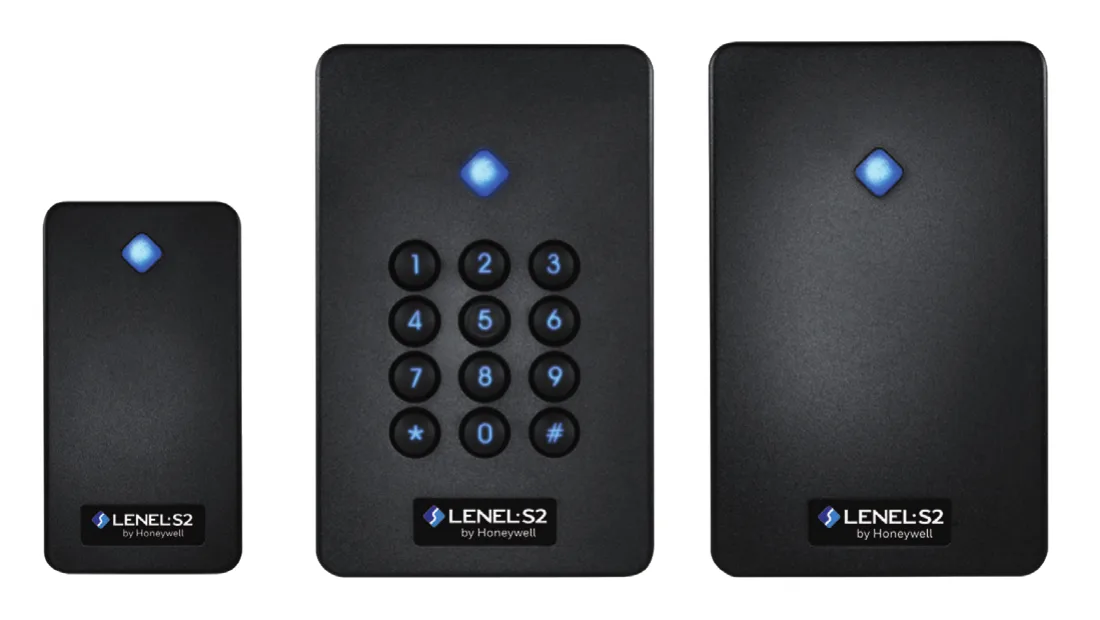
| Model | Dimensions | Peak current draw at 12 VDC | Indication |
|---|---|---|---|
| LNL-R11330-05TB | 3.8 x 2.1 x 0.8 in; 96 x 52 x 21mm | 67mA | 1 RGB LED |
| LNL-R11320-05TB | 4.2 x 3.0 x 0.8 in; 120 x 76 x 21mm (the two don't agree; see the caption) | 73mA | 1 RGB LED |
| LNL-R11325-05TB | 4.2 x 3.0 x 0.8 in; 120 x 76 x 21mm (the two don't agree; see the caption) | 105mA | 1 RGB LED + illuminated keypad |
Source LenelS2's BlueDiamond Multi-technology Readers data sheet (2026/05), its BlueDiamond product page and its LNL-EV28KPP card data sheet (2026/03).
Doors and codes
How does it release the door, and what do the sheets say about codes?
The Intelligent Dual Reader Controller and reader module sheets say their output relays support fail-safe operation (the lock releases when power is cut) or fail-secure operation (it stays locked), and the input and output module sheets say theirs can be configured for either. The sheets do not say which mode a given door needs.
The four LNL-X sheets and the network-connected door module sheet print two notes above their specifications: "The interface is for use in low voltage, Class 2 Circuits only" and "The installation of this device must comply with all local fire and electrical codes." Their approvals rows read "FCC Part 15, CE, RoHS, UL 294, UL 2610". UL 294 is UL's standard for access control system units.
Source LenelS2's LNL-X controller, Series 3 module and LNL-1324E data sheets.
FAQ
Lenel access control questions
What is Lenel OnGuard?
OnGuard is LenelS2's physical access control system. Its 8.4 data sheet calls 8.4 the latest version, and it runs on-premise, in a customer-maintained commercial cloud, or as OnGuard Cloud, which LenelS2 hosts on AWS.
How many doors does one Lenel controller handle?
It depends on the model. The LNL-X2210 controls a single door, and the LNL-X2220 one or two doors on the board plus up to 32 downstream devices (maximum 64 doors). The LNL-X3300 and LNL-X4420 each take up to 64 devices (64 doors) on two RS-485 ports.
Which card readers work with a Lenel system?
LenelS2's two reader modules take Wiegand, Magnetic Clock/Data, Supervised and Unsupervised F2F, and OSDP readers. LenelS2's own BlueDiamond readers connect as Supervised F/2F, OSDP or Wiegand. The network-connected door module takes OSDP readers only, in its dual door controller mode.
Who owns LenelS2 now?
LenelS2's own site answers that only indirectly: lenels2.com opens LenelS2's pages on Honeywell's Building Automation website, which carry the notice "Copyright © 2026 Honeywell International Inc.", as do the 2026 data sheets, and the BlueDiamond data sheet and the readers pictured on it read LenelS2 by Honeywell.
Service for Lenel access control in the Bay Area
Elwin Security installs, repairs and supports the readers, door hardware and wiring on Lenel access control systems as part of access control installation for commercial and multifamily properties in the San Francisco Bay Area. Calls are answered 8:00 AM-8:00 PM daily at (408) 539-0535.
Sources and further reading
These sources back up the general guidance. Your building and the people who approve the work decide the details for your doors.
- LenelS2 (Honeywell Building Automation): LenelS2 home page (lenels2.com opens here)
- LenelS2 (Honeywell Building Automation): OnGuard product page
- LenelS2 (Honeywell Building Automation): OnGuard Cloud product page
- LenelS2 (Honeywell Building Automation): OnGuard Version 8.4 data sheet (2026/02)
- LenelS2 (Honeywell Building Automation): OnGuard ES System Technical Specifications (2025/12)
- LenelS2 (Honeywell Building Automation): OnGuard ADV System Technical Specifications (2025/12)
- LenelS2 (Honeywell Building Automation): OnGuard PRO System Technical Specifications (2025/12)
- LenelS2 (Honeywell Building Automation): OnGuard Enterprise System Technical Specifications (2025/12)
- LenelS2 (Honeywell Building Automation): LNL-X2210 Intelligent Single Door Controller data sheet (2024/07)
- LenelS2 (Honeywell Building Automation): LNL-X2220 Intelligent Dual Reader Controller data sheet (2024/07)
- LenelS2 (Honeywell Building Automation): LNL-X3300 Intelligent System Controller data sheet (2024/07)
- LenelS2 (Honeywell Building Automation): LNL-X4420 Advanced Dual Reader Controller data sheet (2024/07)
- LenelS2 (Honeywell Building Automation): LNL-1300 Series 3 Single Reader Interface Module data sheet (2024/06)
- LenelS2 (Honeywell Building Automation): LNL-1320 Series 3 Dual Reader Interface Module data sheet (2025/12)
- LenelS2 (Honeywell Building Automation): LNL-1100 Series 3 Input Control Module data sheet (2025/12)
- LenelS2 (Honeywell Building Automation): LNL-1200 Series 3 Output Control Module data sheet (2025/12)
- LenelS2 (Honeywell Building Automation): LNL-1324E Flexible Network-Connected Door I/O Module data sheet (2025/12)
- LenelS2 (Honeywell Building Automation): LNL-M2210 Intelligent Single Door Controller data sheet (2025/12)
- LenelS2 (Honeywell Building Automation): LNL-M2220 Intelligent Dual Reader Controller data sheet (2025/12)
- LenelS2 (Honeywell Building Automation): LNL-M3300 Intelligent System Controller data sheet (2025/12)
- LenelS2 (Honeywell Building Automation): LNL-M4420 Advanced Dual Reader Controller data sheet (2025/12)
- LenelS2 (Honeywell Building Automation): BlueDiamond product page
- LenelS2 (Honeywell Building Automation): BlueDiamond Multi-technology Readers data sheet (2026/05)
- LenelS2 (Honeywell Building Automation): LNL-EV28KPP MIFARE DESFire EV3 cards for BlueDiamond readers data sheet (2026/03)