
Key takeaways
- The ACS300 is Brivo's compact panel: 2 card readers, 8 inputs and 6 outputs, with power over Ethernet (PoE+, 802.3at) as the recommended power.
- Brivo's modular panels take up to 30 card readers with 14 expansion door boards.
- Brivo's Smart Reader data sheet rates the readers IP 66, while the three reader installation guides print IP65.
- Brivo says its panels keep operating doors on existing permissions when connectivity drops.
Which Brivo panel do I have?
The ACS300-E-B is one controller board in a compact plastic enclosure. The ACS-SDC runs one door from a single-gang junction box or a wall-mounted enclosure, and the two modular series are chassis holding a main board and expansion boards. For how the parts work together, see the general guide to how commercial access control works.
Brivo counts capacity two ways: its Control Panels page counts doors (up to 2 on the compact series, up to 30 on the ACS6000 series), while the data sheets below count card readers. The page also lists Mercury Intelligent Controllers as "Open architecture controller options supported through Brivo".
Brivo also publishes a data sheet for the ACS100, "a combination control panel and credential reader". The Control Panels page omits it, but the firmware page, last updated October 14, 2026, still lists its latest firmware.
| ACS300-E-B | ACS-SDC (B-ACS-SDC-E, B-ACS-SDC-E-ENC) | ACS6000-E | ACS6100R-E and ACS6100L-E | |
|---|---|---|---|---|
| Part numbers | B-ACS300-E-B on the data sheet. Installation guide: B-ACS300-E, B-ACS300-E-B, B-ACS300V2-E and B-ACS300V2-E-B | B-ACS-SDC-E mounts recessed in a single-gang junction box (box not included); B-ACS-SDC-E-ENC is a full enclosure for wall mounting | B-ACS6000-E and B-ACS6008-E | B-ACS6100R-E Regular Panel and B-ACS6100L-E Large Panel; main boards named: B-ACS6000-MBE and B-ACS6000V2-MBE |
| Card readers | 2 | 1 external reader required; optional second external reader for in/out or anti-passback control | Up to 30 (with 14 expansion door boards) | 2 on the controller board, and up to 30 (with 14 expansion door boards) |
| Card reader inputs | (2) Wiegand ports or (1) RS-485 port for (2) OSDP readers | OSDP | 2 Wiegand or RS-485 OSDP | 2 RS-485 OSDP or 2 Wiegand |
| Inputs | 8 per controller: 2 door position, 2 request to exit, 4 auxiliary | 3: 1 auxiliary, 1 door position, 1 request-to-exit (REX) | 8 per board; up to 120 with 14 expansion boards | 8 per board; up to 120 with 14 expansion boards |
| Outputs | 6 per controller: 2 door lock relays and 4 general purpose dry relays | 2: one door lock relay output and one switched ground aux output | 6 per board; up to 118 with 14 expansion boards | 6 per board; up to 118 with 14 expansion boards |
| Power | Recommended: PoE+ (802.3at). Alternate: 12VDC, 2.5A power supply (not included) | PoE (802.3af) and/or 12VDC@800 mA | Included transformer 19VDC @ 36W; included power supply 12VDC @ 3A | Included transformer 19VDC @ 50W (two on the ACS6100L-E); included power supply 12VDC @ 4.2A |
| Host communications | Ethernet 10/100Mbps or WiFi IEEE 802.11 b/g/n (2.4GHz) | Ethernet 10/100Mbps | Ethernet and/or WiFi IEEE 802.11 b/g/n | Ethernet and/or WiFi IEEE 802.11 b/g/n; cellular with a separate optional Cellular Network Module |
| Phone credential named | Brivo Mobile Pass (Copyright 2025 copy); Brivo Mobile Key and Brivo Wallet Key (revision 20261021) | Brivo Mobile Pass | Brivo Mobile Pass, on the ACS6000-E only | Brivo Mobile Pass |
| Credentials while offline | Up to 250,000 | Up to 250,000 | Up to 250,000 | Up to 250,000 |
| Event history offline | 60,000 events (first in, first out) | 60,000 events | 60,000 events (first in, first out) | 60,000 events (first in, first out) |
| Operating temperature | 32°F to 125°F (0°C to 49°C). The installation guide warns against areas below 32°F or above 120°F | 32° to 104° F (0° to 40° C) on the data sheet; the installation guide differs (ACS-SDC section) | 32°F to 125°F (0° to 49°C) | 32°F to 125°F (0° to 52°C) |
Source Brivo's Control Panels page; the ACS300, ACS-SDC, ACS6000 and ACS6100 data sheets; the ACS300 installation guide; the ACS100 data sheet and Brivo's firmware page.
ACS300: two readers, two wired doors and up to 30 wireless locks
Brivo calls this panel its "next generation of Ethernet/Wi-Fi controller". Its support site counts up to 2 wired doors, on the controller's own output relays, plus up to 30 wireless locks, 30 doors and locks in total.
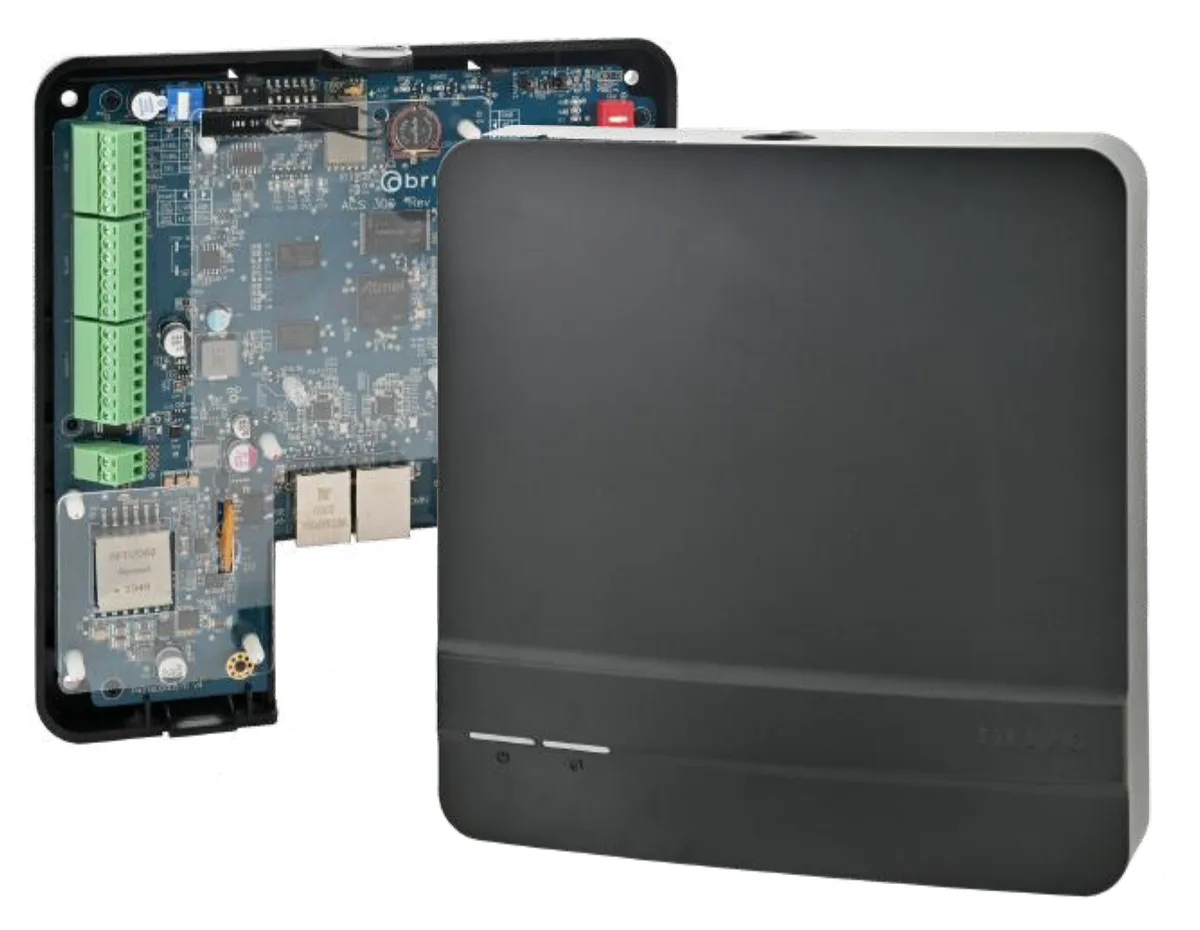
Its one RS-485 port, a wired data connection for readers or locks, serves either OSDP readers, up to two, or Allegion wireless door locks, up to 30, and must be configured for one technology only. The Wiegand and OSDP glossary pages explain the two reader protocols.
The installation guide limits the unit to indoor use. Under its UL heading, the panel "complies with the UL 294 Standard for access control units" with restrictions, among them: "Wi-Fi connection is supplemental and was not evaluated by UL."
Source Brivo's ACS300 data sheet and installation guide, and its support articles on ACS300 door count and RS-485 port configuration.
ACS6000 and ACS6100: a two-reader main board plus expansion boards
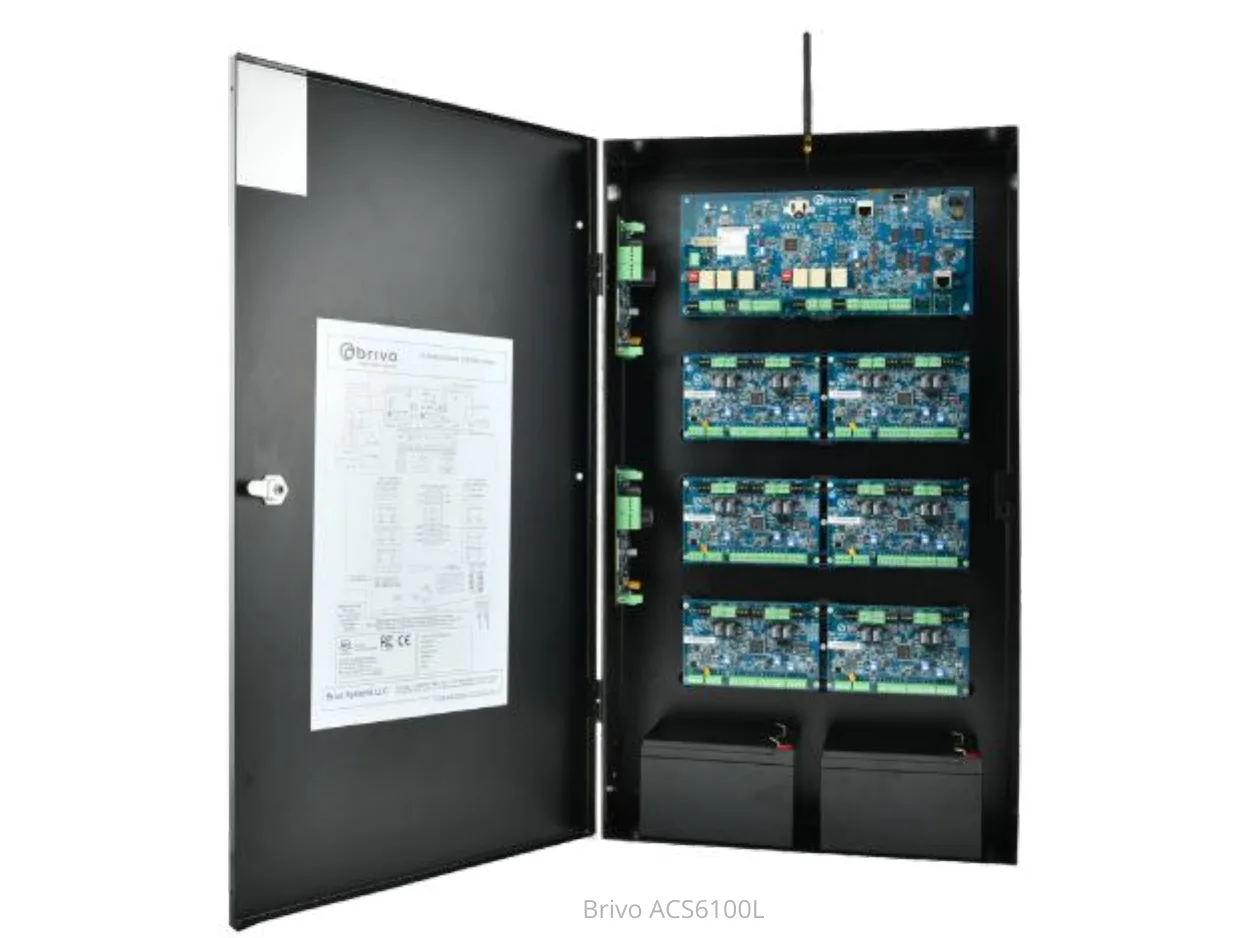
Both families pair a two-reader main board with up to 14 door or input/output boards on a CAN bus, a wired link between boards. Chassis can be chained on CAT5 or higher UTP (unshielded twisted pair) cable up to 1,500 feet.
The newer ACS6100 panels support the existing ACS6000 main boards along with new door and I/O expansion boards. Those boards also work with ACS5000 controller boards, but "the new OSDP functionality is not supported by ACS5000".
The ACS6000-E is for Brivo Access. The data sheet also describes an ACS6000-A for the Brivo Onsite Server, which Brivo stopped selling new on December 31st, 2020.
| ACS6000 series | ACS6100 series | |
|---|---|---|
| B-ACS6000-E | Two-board chassis, with main board, power supply board, battery and transformer | Not applicable |
| B-ACS6008-E | Four-board chassis, with main board, power supply board, battery and transformer | Not applicable |
| B-ACS6100R-E Regular Panel | Not applicable | Two additional accessory boards (product text); (2) or up to (4) (specification table) |
| B-ACS6100L-E Large Panel | Not applicable | Six additional accessory boards (product text); (6) or up to (8) (specification table) |
| Door board | ACS6000-DB | ACS6100-DB |
| Door board reader inputs | 2 Wiegand | 2 RS-485 OSDP or 2 Wiegand |
| Door board outputs | 6 per board | 4 per board |
| Door board inputs | 8: 2 door position, 2 request to exit, 4 auxiliary | 8: 2 door position, 2 request to exit, 4 auxiliary |
| Open collector Wiegand readers | Supported by the ACS6000-MBE main board and older ACS6000-DB door boards; the technical note also names the ACS300 | Not compatible with the ACS6100-DB: no 5V pullup resistor on the Wiegand data lines |
Source Brivo's ACS6000 and ACS6100 data sheets, its Onsite Server end of sale notice, and its technical note on open collector Wiegand readers and the ACS6100 door board.
ACS-SDC: a single door controller for OSDP readers
The ACS-SDC is a single door Ethernet controller for OSDP readers only. Its optional second reader allows in/out anti-passback, where a card that went in must badge out before it opens the door again.
The installation guide says it is primarily for indoor use, can be used outdoors if contained in a protected water tight enclosure, and is intended to be installed within the secure or protected area.
The two documents give different temperatures. The data sheet rates it for continuous operation in ambient temperatures of 32° to 104° F (0° to 40° C), while the installation guide says it is UL tested to between -35°C (-31°F) and 66°C (150°F) and EN -40°C (-40°F) to 70°C (158°F) and 85% humidity.
Source Brivo's ACS-SDC single door controller data sheet and ACS-SDC-E installation guide.
Brivo Smart Readers: models, credentials and wiring
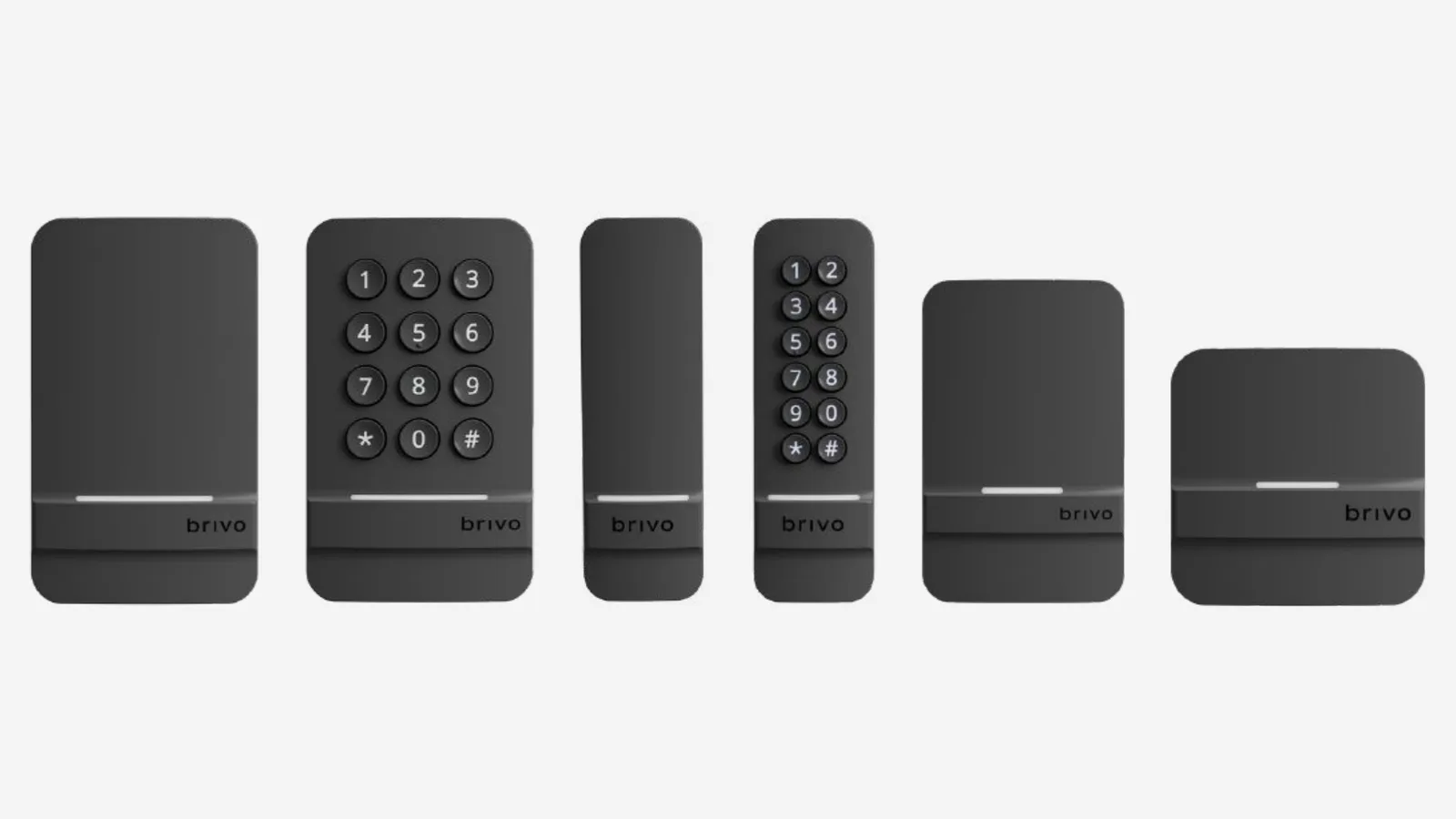
Smart Readers come in single gang (for a standard wall box), mullion (a narrow reader for a door frame) and recessed US and EU shapes, the first two with or without a keypad. All read Brivo mobile credentials and 13.56 MHz encrypted smart cards; the B-BSP part numbers also read 125 kHz non-encrypted proximity cards. The installation guides call the two groups Tri-Tech and Dual-Tech.
Data sheet read ranges are 1 to 6 feet for Brivo Mobile Pass over Bluetooth, 1 to 1.5 inches for Brivo Wallet Pass and for 13.56 MHz B-SC series encrypted smart cards, and 2 to 4 inches for 125 kHz proximity cards. The two phone ranges vary with environmental conditions.
For the installer: readers connect by OSDP or Wiegand, with runs of 500 feet on 18 AWG wiring for Wiegand and 1000 feet on 22 AWG twisted pair for OSDP RS485 powered at 12VDC. Each installation guide adds: "Readers must be powered by a compatible UL Listed, limited power source, access control panel rated 5-24VDC."
Brivo's documents disagree on the readers' weather rating, temperature range and power. The data sheet prints "IP 66, -31º to 151º F (-35º to 66º C) for indoor or outdoor use" and "100-190mA@5-24VDC". The three installation guides print IP65 under approvals, a temperature rating per UL294/ULC60839-11-1 of -40°C to 66°C, and the per-model maximum currents in the table below.
On power up, 3 green flashes mean a Tri-Tech reader and 2 mean Dual-Tech. Then one beep and a red blink means Wiegand only, a beep and 2 green blinks OSDP only, and a beep and 4 green blinks Auto-Detect.
A blinking yellow light means the reader is powered on and idle; a reader connected by Wiegand blinks red and green while the door is running an unlock schedule.
Updated Smart Readers, full-size and recessed, configured in Secure Mode and keyed with a panel can't be moved to another panel until reset to Auto-Detect mode with a configuration app.
| Part number | Mounting | 125 kHz proximity cards | Maximum current at 5V / 12V / 24V |
|---|---|---|---|
| B-BSM-V2-B | Mullion | Not marked | 194mA / 95mA / 50mA |
| B-BSS-V2-B | Single Gang | Not marked | 254mA / 125mA / 64mA |
| B-BSK-V2-B and B-BSMK-V2-B | Single Gang/Mullion Keypad | Not marked | Single Gang with Keypad: 237mA / 141mA / 72mA. Mullion with Keypad: 205mA / 101mA / 53mA |
| B-BSR-US-B and B-BSR-EU-B | Recessed (US/EU) | Not marked | 150mA / 75mA / 45mA (US and EU) |
| B-BSPM-V2-B | Mullion | Yes | 194mA / 95mA / 50mA |
| B-BSPS-V2-B | Single Gang | Yes | 254mA / 125mA / 64mA |
| B-BSPK-V2-B and B-BSPMK-V2-B | Single Gang/Mullion Keypad | Yes | Single Gang with Keypad: 237mA / 141mA / 72mA. Mullion with Keypad: 205mA / 101mA / 53mA |
| B-BSPR-US-B and B-BSPR-EU-B | Recessed (US/EU) | Yes | 150mA / 75mA / 45mA (US and EU) |
Source Brivo's Smart Reader data sheet, its Mullion, Single Gang and Recessed Smart Reader installation guides, its hardware FAQ and its article on readers blinking red and green.
Brivo Mobile Pass, now Brivo Mobile Key
Brivo Mobile Key is Brivo's phone app credential for opening doors on a Brivo Access account. It requests access over the internet by cellular or Wi-Fi, or over Bluetooth Low Energy (BLE) to a Brivo tri-technology or dual-technology reader.
With a reader that has no BLE, Brivo Access instructs the panel to unlock the door. The internet method can control a door or gate with no reader, and Brivo Access can limit the credential to a local Wi-Fi connection, which Brivo calls the Trusted Network Option.
With a reader set for BLE, the reader FAQ gives the range as "typically between 3 to 6 feet for iPhones and 1 to 6 feet for Android smartphones"; the reader data sheet gives 1 to 6 feet. A reader designated for local BLE then won't use Wi-Fi or cellular.
Because of a limitation with the Android operating system, the app enforces a 20 second delay between unlock requests to Brivo readers. Brivo Mobile Key is not supported on IPDC controllers.
Brivo Wallet Pass (Brivo Wallet Key in the Wallet Key FAQ and newest ACS300 data sheet) is an employee badge in Apple Wallet or Google Wallet. It uses NFC, the short-range tap technology in phones, and needs no internet or cellular data. Enabling it disables the reader's ability to read card serial numbers.
Brivo's reader update guide lists as prerequisites active subscriptions for both Brivo Mobile Pass and Employee Badge in Apple Wallet, and panel firmware 6.2.3 or later.
Source Brivo's Mobile Key release notes, its Mobile Key and Brivo Reader FAQ, its hardware FAQ, its Wallet Key FAQ and its guide to updating readers for Brivo Wallet Pass.
Offline behavior, network and end-of-support panels
Brivo panels maintain a constant connection to the cloud and, with no activity, send a heartbeat check-in once per minute. They can't be configured to use IPv6 at this time, and Brivo recommends 1.5 Mbps per panel for the ACS6000/6100, ACS300, ACS100 and ACS-SDC.
Brivo's end of support notice names the ACS5000, ACS-IPDC and ACS5000-Edge / HID Edge, models "that have not been sold for nearly 8 years", with an End of Support date of April 30, 2026.
End of Support means no technical support, firmware upgrades or bug fixes. End of Life follows, when the panels "will no longer connect to the Brivo cloud"; the notice gives no date for it.
Source Brivo's hardware FAQ, its bandwidth recommendations article and its Legacy Control Panel End of Support Notice.
What Brivo's guides say about fire exits and fail secure
The ACS300, ACS6100 and ACS-SDC installation guides carry the same fire code warning to the installer: "You must consult with, and get approval from, local fire officials before installing locks or devices on any doors that may be fire exits."
The ACS-SDC guide also warns: "Do not install the system in the fail secure mode unless permitted by the local authority having jurisdiction." Fail secure means the lock stays locked without power; the guide says installing it that way may cause interference with the operation of panic hardware, the push bars on exit doors.
Source Brivo's ACS300, ACS6100 and ACS-SDC-E installation guides.
Service for Brivo access control in the Bay Area
Elwin Security installs, configures and supports Brivo control panels and readers as part of access control installation for commercial and multifamily properties in the San Francisco Bay Area. Calls are answered 8:00 AM-8:00 PM daily at (408) 539-0535.
Questions about Brivo access control
Brivo access control questions
How many readers can a Brivo ACS6000 take?
A maximum of 30 on a single unit, according to Brivo's support article: one main board plus 14 expansion door boards, at 2 readers per board. Its example uses ACS6100 door boards; the ACS6000 data sheet gives the same 30.
What phone does Brivo Mobile Pass need?
As of June 2026, iOS 17.0 or later or Android 12 or later. A phone that can't be upgraded to meet the minimum will be unable to install new versions or updates of the app.
Does a Brivo panel keep working when the internet is down?
Yes. Brivo's Control Panels page says that if connectivity drops, doors continue to operate according to the permissions the panel already has, and events sync back when the network returns.
Sources and further reading
These sources back up the general guidance. Your building and the people who approve the work decide the details for your doors.
- Brivo: Access Control Panels (Control Panels product page)
- Brivo: Brivo ACS300 Controller data sheet (Copyright 2025)
- Brivo: Brivo ACS300 Controller Data Sheet (revision 20261021)
- Brivo: Brivo ACS300 Installation Guide (20260527, v1.26)
- Brivo: Brivo ACS6000/ACS6008 Series Control Panel data sheet (11.01.19)
- Brivo: Brivo ACS6100 Series Control Panel data sheet (Copyright 2025)
- Brivo: Brivo ACS6100 Installation Guide (v1.4.6)
- Brivo: Brivo ACS-SDC Single Door Controller data sheet (Copyright 2025)
- Brivo: Brivo ACS-SDC-E Installation Guide (20260122)
- Brivo: Brivo ACS100 data sheet
- Brivo: Brivo Smart Readers data sheet (20260817)
- Brivo: Brivo Mullion Smart Reader Installation Guide (20260921, v1.1)
- Brivo: Brivo Single Gang Smart Reader Installation Guide (20260921, v1.1)
- Brivo: Brivo Recessed Smart Reader Installation Guide (20260819, v1.0)
- Brivo: Updating Readers to Support Brivo Wallet Pass, Configuration Guide (v1.1)
- Brivo: Brivo Mobile Key Release Notes
- Brivo: Brivo Mobile Key + Brivo Reader FAQ (v1.4)
- Brivo: What is the minimum iOS or Android versions needed for Brivo Mobile Pass?
- Brivo: Brivo Wallet Key - FAQ
- Brivo: How many doors can be controlled by the ACS300
- Brivo: ACS300 RS-485 Port Configuration
- Brivo: How many readers can you put on an ACS6000 control panel?
- Brivo: Open collector Wiegand readers and the ACS6100-DB Door Board, Technical Note
- Brivo: Hardware Frequently Asked Questions (FAQ)
- Brivo: Why is my reader blinking red and green?
- Brivo: What is the latest firmware?
- Brivo: Bandwidth Recommendations for Brivo Hardware
- Brivo: Legacy Control Panel End of Support Notice
- Brivo: Brivo Onsite Server - End of Sale