
Key takeaways
- Every model on this page runs on 802.3af Power over Ethernet, with a 12-volt DC connector for use when PoE is not used.
- The 7-inch door phone has two relay outputs; the other door phones and both door controllers have one each. Two of the three indoor monitor versions have one, and Akuvox's Model Differences table shows none on the version with a single network port.
- The single-button and 5-inch door phones read 13.56 MHz cards; the 7-inch door phone and both door controllers read 13.56 MHz and 125 kHz.
- The door phones and door controllers carry an IP65 rating for dust and water; the 7-inch door phone and both door controllers add an IK07 impact rating.
Identify
Which Akuvox model do I have?
A narrow door phone with one call button and a camera is an E12, which Akuvox calls a single-button SIP video door phone (SIP is the standard used for internet phone calls). It comes in two versions, with and without Wi-Fi.
A door phone with a touchscreen is an E16C, with a 5-inch screen, or an E18C, with a 7-inch screen. Akuvox calls both face recognition door phones.
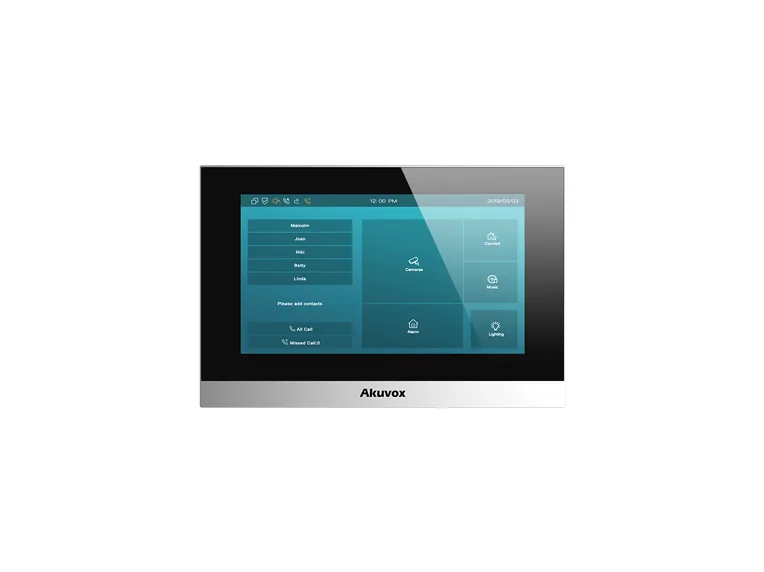
Indoors, the 7-inch touch screen is the C313 indoor monitor. Its three versions differ in network ports, Wi-Fi and whether they have a relay output.
A small panel, 86 by 86 millimeters, that combines a door controller and card reader is an A01S, with a toughened glass front panel and an aluminum frame, or an A02S, with a touch keypad front panel.
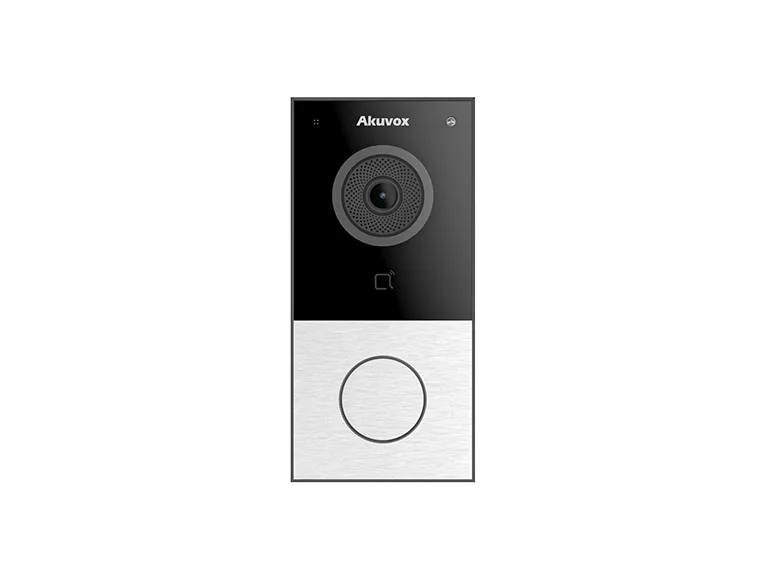
On November 10, 2026, Akuvox's product pages for all six families on this page were live, and none gave a discontinuation or end-of-sale date. For a door phone that will not call or will not release the door, see the guide to apartment intercom troubleshooting.
| Model | What it is (Akuvox's description) | How to tell it apart | Display | Camera |
|---|---|---|---|---|
| E12S | Single-button SIP video door phone | "Single button for outdoor environment"; plastic body; 146x70x23 mm; no Wi-Fi | Not listed | 2M pixels, automatic lighting; viewing angle 123° (H), 69° (V) |
| E12W | Single-button SIP video door phone | Same button, body and size as the E12S; the Wi-Fi model | Not listed | 2M pixels, automatic lighting; viewing angle 123° (H), 69° (V) |
| E16C | Face recognition door phone | Plastic body with a 5-inch touchscreen | 5 inch IPS LCD, 720x1280 | E16C data sheet: main camera 2M pixels, WDR (wide dynamic range), and auxiliary camera 2M pixels, automatic lighting. E16 product page ordering table: "1 Camera". |
| E18C | 7-inch face recognition door phone | Plastic body with a 7-inch touchscreen | 7 inch IPS LCD, 600x1024 | Main camera 2M pixels, WDR; auxiliary camera 2M pixels, automatic lighting |
| C313S | 7-inch indoor monitor | Two network ports, no Wi-Fi; eight alarm inputs and one relay output | 7-inch TFT LCD, capacitive touch screen, 1024x600 | Not listed |
| C313W | 7-inch indoor monitor | Wi-Fi and two network ports; eight alarm inputs and one relay output | 7-inch TFT LCD, capacitive touch screen, 1024x600 | Not listed |
| C313N | 7-inch indoor monitor | One network port, no Wi-Fi; no alarm inputs and no relay output | 7-inch TFT LCD, capacitive touch screen; 1024*600 in the Model Differences table | Not listed |
| A01S | IP-based access control terminal that combines door controller and card reader in one device | Toughened glass front panel, aluminum frame; 86x86x33 mm; RFID cards and mobile access via NFC (A01 product page) | Not listed | Not listed |
| A02S | IP-based access control terminal that combines door controller and card reader in one device | Touch keypad front panel; 86x86x33 mm; PIN codes, RFID cards and mobile access via NFC (A02 product page) | Not listed (touch keypad front panel) | Not listed |
The single-port monitor and the product page
The indoor monitor's product page lists only the two versions with two network ports in its ordering table. The single-port version appears in the page's technical files and in the Model Differences table in Akuvox's administrator guide.
Source Akuvox's product pages, each model's data sheet and the model-difference tables in Akuvox's administrator guides.
Not covered
Akuvox models this page doesn't cover
Akuvox lists more models than the nine above; the table names some. This page covers them no further, apart from one note on the two-wire E12S-2.
| Models | Where Akuvox names them |
|---|---|
| S539, X915, R29 and R20K, among others | Akuvox's Smart Doorphones product list |
| E12N, E12S-2 | Data sheets on the E12 product page |
| E16P | A data sheet on the E16 product page |
| C313W-2, C313S-2, C313W-LP-2 | The Model Differences table in the C313 administrator guide |
The two E12S-2 data sheets disagree
Akuvox publishes two data sheets for the two-wire model. The one on the E12 product page gives a working temperature of -30°C to +55°C, 1,000 users and 5,000 cards; the one on the model's own product page gives -40°C to +55°C, 5,000 users and 25,000 cards.
Power and network
How is it powered and connected?
The sheets give 802.3af PoE for every model, with no PoE class, and show a 12-volt DC connector marked for use if PoE is not used.
| Model | Power | Network | IP / IK rating | Working temperature |
|---|---|---|---|---|
| E12S | 802.3af PoE; 12V DC connector (if not using PoE) | RJ45, 10/100Mbps adaptive | IP65; IK not listed. The data sheet adds "Rated for outdoor use". | -30°C to +60°C |
| E12W | 802.3af PoE; 12V DC connector (if not using PoE) | RJ45, 10/100Mbps adaptive. Wi-Fi: IEEE802.11a/b/g/n/ac/ax, 2.4GHz & 5GHz in the E12W data sheet; IEEE802.11b/g/n, 2.4GHz in the E12 product page's ordering table | IP65; IK not listed. The "Rated for outdoor use" line on the E12S sheet is not on the E12W sheet. | -30°C to +60°C |
| E16C | 802.3af PoE; 12V DC connector (if not using PoE) | RJ45, 10/100Mbps adaptive | IP65; IK not listed | -20°C to +55°C |
| E18C | 802.3af PoE; 12V DC connector (if not using PoE) | RJ45, 10/100Mbps adaptive | IP65 / IK07 | -20°C to +55°C |
| C313S | 802.3af PoE; 12V DC connector (if not using PoE) | 2 x RJ45, 10/100Mbps adaptive | Not listed | -10°C to +45°C |
| C313W | 802.3af PoE; 12V DC connector (if not using PoE) | 2 x RJ45, 10/100Mbps adaptive; Wi-Fi IEEE802.11 b/g/n, 2.4GHz | Not listed | -10°C to +45°C |
| C313N | 802.3af PoE; 12V DC connector (if not using PoE) | 1 x RJ45, 10/100Mbps adaptive | Not listed | -10°C to +45°C |
| A01S | 802.3af PoE; 12V DC connector (if not using PoE) | RJ45, 10/100Mbps adaptive | IP65, IK07; "IP65 & IK07 for outdoor usage" | -20°C to +55°C |
| A02S | 802.3af PoE; 12V DC connector (if not using PoE) | RJ45, 10/100Mbps adaptive | IP65, IK07; "IP65 & IK07 for outdoor usage" | -20°C to +55°C |
Wi-Fi on the E12W
The E12 product page and the Wi-Fi version's data sheet give different Wi-Fi standards and bands: 2.4 GHz on the product page, 2.4 GHz and 5 GHz on the data sheet. The table gives both.
Indoor monitor power draw
The three indoor-monitor data sheets print the same figures: on PoE, standby power of at most 1.44 watts and full load power of at most 6 watts; on the 12-volt supply, standby power of at most 2.77 watts and full load power of at most 6.59 watts.
Source Each model's data sheet.
Mounting
How does it mount?
A door phone's data sheet and product page don't always agree on mounting, and three of the four sheets print two different mounting lines, so the table gives every one.
| Model | Data sheet | Product page ordering table |
|---|---|---|
| E12S | "Surface-mounted" in the At a Glance list; "Wall-mounted" in the Installation line | Surface mount |
| E12W | "Surface-mounted" in the At a Glance list; "Wall-mounted" in the Installation line | Surface mount |
| E16C | Flush-mounted or wall-mounted (Installation line) | "Surface Mount" |
| E18C | "Surface-mounted" in the At a Glance list; "Flush-mounted & Wall-mounted" in the installation line | Surface mount; the accessories include an E18C In-Wall Mounting Box |
Indoor monitor
The C313S data sheet gives wall-mounted and desktop installation and says the monitor supports US or European electrical wall box mounting.
Source Each door phone's data sheet and the ordering table on its product page.
Door release
How does it release the door?
A relay is a switch inside the unit: Akuvox's guides define a local relay as the relay output built into the intercom device, which can directly control connected devices such as door locks. The load figure is the maximum electrical load that the relay contacts can handle without being damaged.
| Model | Relay outputs | Inputs | Relay resistive load | Wiegand | RS485 |
|---|---|---|---|---|---|
| E12S, E12W | 1 | 2 | 30V 2A (E12) | 1ch input/output (selectable) | None |
| E16C | 1 | 1 | 30V 2A (E16) | 1ch input/output (selectable) | Support |
| E18C | 2 | 3 | 30V 2A (E18) | 2ch input/output (selectable) | 1 |
| C313S, C313W | 1 | Bell In 1; alarm inputs 8 | 30V 2A (C313) | Not listed | 1 |
| C313N | None | Bell In 1 | Not listed | Not listed | Not listed |
| A01S, A02S | 1 | 2 | 30V 3A (A01~A03) | 1ch input/output (selectable) | Not listed |
Source Akuvox's administrator guides, its knowledge base article on relay resistive load, and each model's data sheet.
Locks
Which locks can it run, and how are they powered?
Akuvox's door phones are compatible with different types of electronic locks, including powerbolt locks, electric strikes (an electrically controlled catch plate in the door frame) and electromagnetic locks (maglocks, which hold the door shut with a magnet). The article's note says the power supply to all these locks must be 12V DC.
The relay articles in Akuvox's administrator guides for the E12 and both door controllers add that external devices connected to the relay require a separate power adapter.
The wiring article also describes two ways a lock can behave. A fail-safe lock stays locked when the power is on and unlocked when it is open-circuited (the circuit is broken). A fail-secure lock stays locked when the power is off.
The E12 guide covers the inputs too: when users open the door from inside by pressing an Exit button, the Input terminal that matches the Exit button is set up to activate the relay.
The same guide names two more kinds of relay. The Security Relay, Akuvox's SR01, is installed inside the door, where it directly governs the door opening mechanism. A web relay has a built-in web server and is controlled over the Internet or a local network.
Source Akuvox's knowledge base article on wiring a door lock to a door phone relay, and the relay and door-opening articles in its administrator guides.
Credentials
What cards and phones does it read?
The data sheet for every door phone and door controller here prints "NFC (only Android)" beside the reader; NFC is the short-range radio in phones. BLE is Bluetooth Low Energy.
| Model | Card reader | Identification on the data sheet | Users | Cards | Other capacity |
|---|---|---|---|---|---|
| E12S, E12W | 13.56MHz & NFC (only Android); Mifare card and DesFire card (EV1/EV2/EV3) | BLE: Support BT5.0 | 1,000 | 5,000 | Not given here |
| E16C | 13.56MHz & NFC (only Android) | Face, PIN, NFC, Card, BLE & QR code | 20,000 | 20,000 | 20,000 face templates; 20,000 PINs; 50,000-entry event log |
| E18C | 13.56MHz & 125kHz, NFC (only Android) | Face, PIN, NFC, EM/Mifare Card, BLE & QR code | 20,000 | 20,000 | 20,000 face templates; 20,000 PINs; 50,000-entry event log |
| A01S | 13.56MHz & 125kHz, NFC (only Android) | Multi-frequency RFID card reader | 20,000 | 20,000 | 100,000 access logs |
| A02S | 13.56MHz & 125kHz, NFC (only Android) | RFID cards, NFC & PIN codes | 20,000 | 20,000 | 20,000 PINs; 100,000 access logs |
Face recognition figures
The data sheets for the two face recognition door phones on this page give a face recognition speed of under 200ms and a face recognition accuracy of 99.7%. Those are Akuvox's own figures.
Card lists by firmware
Akuvox's knowledge base gives longer supported-card lists tied to firmware. The lists for the E18C on firmware 18.30.10.92 or higher and the A01 on firmware 101.30.10.127 or higher open with two unencrypted ID cards. Those two are the EM4100 and EM4200. The E12 list, for firmware 312.30.10.208 or higher, and the E16C version 2.0 list, for firmware 216.30.10.106 or higher, do not include them.
Source Each model's data sheet and, for cards supported by firmware version, Akuvox's knowledge base.
Connection
How do the door phone and indoor monitor talk to each other?
The guide describes two kinds of call. An IP call is a direct call between two intercom devices using their IP addresses, without a server or a PBX (a building phone system), and it works when the devices are on the same network. A SIP call requires a SIP account, a SIP address for each device, and SIP settings configured on the devices.
A setting called Connect Type has three values. None, the default factory setting, means devices connect directly to each other or within a local area network without relying on external servers. Cloud connects the device to the SmartPlus Cloud, and SDMC connects it to SDMC, which the guide calls a management platform designed for on-premise projects.
The RTSP feature (a video streaming standard) allows Akuvox indoor monitors or third-party devices to obtain the live stream from the device. The device can also be integrated with third-party devices over Wiegand, as a receiver in Input mode or a sender in Output mode.
The E12S and E12W data sheets add that relays are controlled individually by DTMF tones (telephone keypad tones), and that the door phone is "Compatible to 3rd party video components, e.g. NVRs" (network video recorders).
Akuvox's indoor monitor guide says the monitor can be connected to the Akuvox door phone for audio/video communication, unlocking, and monitoring. It describes a remote relay as the relay of another intercom, such as a door phone: during calls, users can enter a DTMF code or press the Unlock tab to unlock the door lock connected to the door phone.
Source Akuvox's E12 Series administrator guide, written for firmware version 312.30.11.112, except where another document is named.
FAQ
Akuvox intercom questions
What is the difference between the Akuvox E12S and E12W?
Only the E12W has Wi-Fi, according to Akuvox's Model Specification and Differences table. The same table gives both models a 2M pixel camera, two relay inputs, one relay output, a card reader, Bluetooth, a Wiegand port and a tamper alarm.
What is the difference between the Akuvox C313S, C313W and C313N?
The C313W is the Wi-Fi version, with two network ports. The C313S has two network ports and no Wi-Fi. The C313N has one network port, no Wi-Fi, no alarm inputs and no relay output; the other two have eight alarm inputs and one relay output. All three share a 7-inch display and one Bell In input, according to Akuvox's Model Differences table.
What is the difference between the Akuvox A01 and A02?
Akuvox's product pages say the A01 supports RFID cards and mobile access via NFC, and the A02 supports PIN codes, RFID cards, and mobile access via NFC. Its data sheet adds a touch keypad front panel and a PIN capacity of 20,000. Both have one relay output, two inputs and a 13.56 MHz and 125 kHz reader.
Service
Help with an Akuvox door phone or indoor monitor
Elwin Security installs, repairs, replaces and supports Akuvox door phones, indoor monitors and access control terminals through its video intercom installation service for commercial and multifamily properties in the San Francisco Bay Area. Calls are answered 8:00 AM-8:00 PM daily at (408) 539-0535.
Sources and further reading
These sources back up the general guidance. Your building and the people who approve the work decide the details for your doors.
- Akuvox: E12 product page
- Akuvox: E16 product page
- Akuvox: E18 product page
- Akuvox: C313 product page
- Akuvox: A01 product page
- Akuvox: A02 product page
- Akuvox: E12S-2 product page
- Akuvox: Smart Doorphones product list
- Akuvox: Akuvox E12S Datasheet V6.0
- Akuvox: Akuvox E12W Datasheet V6.0
- Akuvox: Akuvox E12S-2 Datasheet V7.0
- Akuvox: Akuvox E12S-2 Datasheet V4.0
- Akuvox: Akuvox E16C Datasheet V5.0
- Akuvox: Akuvox E18C Datasheet V5.0
- Akuvox: Akuvox C313S Silver Datasheet_2606 V3.0
- Akuvox: Akuvox C313W Black Datasheet_2606 V3.0
- Akuvox: Akuvox C313N Silver Datasheet_2606 V3.0
- Akuvox: Akuvox A01S Datasheet
- Akuvox: Akuvox A02S Datasheet
- Akuvox Knowledge Base: Relay Output of Indoor Monitors (Relay Resistive Load), updated August 6, 2026
- Akuvox Knowledge Base: Wire Door Lock to Door Phone Relay, updated May 22, 2026
- Akuvox Knowledge Base: E12 Series Door Phone Administrator Guide: About This Manual
- Akuvox Knowledge Base: E12 Series Door Phone Administrator Guide: Model Specification and Differences
- Akuvox Knowledge Base: E12 Series Door Phone Administrator Guide: Relay Setting
- Akuvox Knowledge Base: E12 Series Door Phone Administrator Guide: Network Setting
- Akuvox Knowledge Base: E12 Series Door Phone Administrator Guide: Intercom Call Configuration
- Akuvox Knowledge Base: E12 Series Door Phone Administrator Guide: Door-opening Configuration
- Akuvox Knowledge Base: E12 Series Door Phone Administrator Guide: Monitor and Image
- Akuvox Knowledge Base: E12 Series Door Phone Administrator Guide: Integration with Third Party Device
- Akuvox Knowledge Base: E16 Door Phone Administrator Guide: Model Specification
- Akuvox Knowledge Base: E18 Door Phone Administrator Guide: Model Specification
- Akuvox Knowledge Base: C313 Indoor Monitor Administrator Guide: Product Overview
- Akuvox Knowledge Base: C313 Indoor Monitor Administrator Guide: Model Differences
- Akuvox Knowledge Base: C313 Indoor Monitor Administrator Guide: Access Control Configuration
- Akuvox Knowledge Base: A01 Access Control Terminal Administrator Guide: Model Specification
- Akuvox Knowledge Base: A01 Access Control Terminal Administrator Guide: Relay Settings
- Akuvox Knowledge Base: A02 Access Control Terminal Administrator Guide: Relay Setting