
Key takeaways
- DoorKing sells the 1835 in two enclosures, the 80 Series and the 90 Series. It belongs to DoorKing's 1830 Series. The 1833, 1834 and 1837 are the other models in it.
- The 1835 stores up to 3,000 names and phone numbers, each with a 4-digit entry code, and up to 8,000 access card codes, a figure DoorKing calls "dependent on system memory".
- The three relays are marked 30 Volt, 3 Amp max, and the system does not supply power for an electric strike or magnetic lock.
- DoorKing names three ways to connect it: its own cellular service, a network cable or a telephone line. Its documents say an ordinary phone line is not recommended for programming.
Identify
Which DoorKing 1835 do I have?
DoorKing describes the Model 1835 as a telephone entry system suited for apartment and gated community applications as well as office buildings and industrial sites. It comes in two enclosures, the 80 Series and the 90 Series, and DoorKing also uses the name DKS on its products. For how a controller, power supply and lock work together on any brand, see the general guide to how commercial access control works. DoorKing's 1812 systems have their own DoorKing 1812 page.
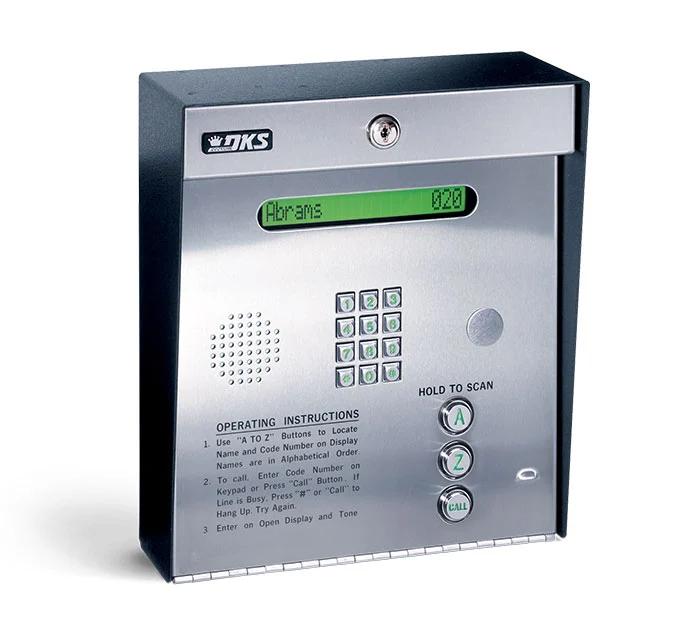
The directory tells the four 1830 Series models apart. The 1835 shows resident names, or apartment numbers, and their directory code on a single line. The 1837 shows a page of eight names at a time, and the 1833 relies on a separate printed directory. The 1834 also has a one-line directory, but DoorKing describes it as "Simple Non-expandable 2 Entry Points".
If a panel is dead, will not ring or will not release the door, the checks are in the apartment intercom troubleshooting guide.
| Feature | 1833 | 1834 | 1835 | 1837 |
|---|---|---|---|---|
| 8000 device codes | Yes | No | Yes | Yes |
| Elevator control | Yes | No | Yes | Yes |
| Entry points | 3 | 2 | 3 | 3 |
| Expands up to 48 wired, or 24 wirelessly | Yes | No | Yes | Yes |
| A to Z and CALL buttons | No | Yes | Yes | Yes |
| Directory | None | 1-line | 1-line | 8-line |
| Anti-pass back (stops a card re-entering before it has exited) | Yes | No | Yes | Yes |
| Entry code time zones | Yes | No | Yes | Yes |
| Permission levels | Yes | No | Yes | Yes |
Source DoorKing's 1835 80 Series and 90 Series product pages, its 1830 80 Series brochure (Rev. 2/23) and the 80 Series installation and owner's manual.
Capacity
How many residents and codes does it hold?
The 1835 keeps a directory of residents, each with a phone number and an entry code. Separately, it holds codes for cards, remote transmitters and keypad PINs, which DoorKing calls device codes.
| Item | What DoorKing lists |
|---|---|
| Telephone numbers and names | Up to 3,000 (names limited to 15 characters max) |
| Area codes | Up to 255 (the 80 Series manual says Rev E and higher boards only) |
| Entry codes | 3,000 (4-digit), one for each telephone number |
| Directory codes | 1 to 4 digits in length, and can be randomly assigned (80 Series manual) |
| Device (card) codes | Up to 8,000 access card codes, dependent on system memory; the 80 Series manual says up to 8000 card, transmitter or digital PIN codes |
| Security (permission) levels | 31, with 29 programmable with 4 time zones each |
Source DoorKing's 1835 80 Series product page and cut sheet (Rev. 12/20), with the 80 Series manual where the table names it.
Connections
How does it call residents?
DoorKing says each 1830 Series unit allows a voice and data connection over cellular, internet or POTS (Plain Old Telephone Service, an ordinary phone line), and that the choice depends on what is available at the entry system location.
DoorKing gives two part numbers for its VoIP adapter: 1815-568 in the 80 Series manual and on the 1835 product page, and 1815-578 on its connection options page.
The manual says DoorKing does not recommend using a POTS line for programming, because some phone company services and switches no longer support modem communications. It also says modem communications will not work over cellular or VoIP connections.
DoorKing's cellular cut sheet (Rev. 8/26) lists the same cellular kit for other DoorKing entry systems, including the 1812, and says a monthly subscription fee applies.
| Connection | What it uses | Parts DoorKing names | Conditions |
|---|---|---|---|
| No wired connection | DKS cellular service for voice and data, provided by AT&T 4G LTE where available | Voice/Data Cellular System kit, P/N 1800-080 | A DKS Cellular subscription is required; the kit manages two entry systems through DoorKing's cellular network server |
| Network cable, DoorKing service | DKS Data over the Internet with DKS VoIP (internet calling) for voice | TCP/IP Converter Kit P/N 1830-186 with a VoIP adapter kit, or the VoIP/RS-232 Control Box P/N 2334-080 | |
| Network cable, third party | A VoIP service and data transfer service the user selects | TCP/IP Converter Kit P/N 1830-185, which the product page labels manual setup | |
| Telephone line | The phone line for voice, with the DKS IM Server Modem service or a user-supplied modem for data | No additional hardware for the IM Server Modem connection | Touch-tone, loop-start central office line |
Source DoorKing's 80 Series manual (its connection options section) and 1835 product page, and DoorKing's connection options page.
Door and gate release
What can it release?
The 1835 has three relays, Relay 0, Relay 1 and Relay 2: switches that activate a door lock or a gate operator for a programmed strike time, the length of time the entry stays released. Together they control a main entry point plus two additional entry points.
DoorKing's product page calls them three Form C dry contact relays: switches with a normally open and a normally closed side that carry no power of their own. The 1834 has two. The relay a resident activates from their telephone, after a visitor's call, is the primary relay; card reader inputs can only activate Relay 1 or Relay 2.
The manual's door control drawing shows an electric strike wired to Normally Open and a magnetic lock wired to Normally Closed. It says power for the electric strike or magnetic lock is not provided by the system and calls for a separate power supply.
For gates, the manual carries this warning: "If this telephone entry system is used to control a vehicular gate with an automatic gate operator, the telephone entry system must be mounted a minimum of six (6) feet away from the gate and gate operator, or in such a way that the user cannot come into contact with the gate or gate operator when using this entry system." DoorKing's manual says to check all local building ordinances and building codes prior to installing the system.
| Relay | Terminals | Rating | Notes |
|---|---|---|---|
| Relay 0 | Normally Open, Normally Closed and Common | 30 Volt, 3 Amp max | Not available on the 1834 |
| Relay 1 | Normally Open, Normally Closed and Common | 30 Volt, 3 Amp max | One card reader (Wiegand) input activates it |
| Relay 2 | Common and one Contact terminal | 30 Volt, 3 Amp max | The other card reader (Wiegand) input activates it |
Source DoorKing's 80 Series manual (its terminal descriptions, door control drawing and gate warning), with the 1835 and 1834 product pages where named.
Add-ons
What can be added to it?
Card readers connect to the 1835 itself. More doors and gates need DoorKing's Tracker Expansion Boards, sold separately, and elevators need its elevator control boards.
DoorKing's documents give two expansion limits. The 1835 product pages, the cut sheet, the 1830 brochure, the Tracker Expansion Board manual and the 90 Series manual say up to 48 entry points, with 24 for a wireless connection on the product pages. The current 80 Series manual says up to 24 entry points in addition to the main entry point, with up to 24 boards hardwired.
The elevator count also differs by document. The product page, the elevator control cut sheet and the 1830 brochure say up to eight elevators, each serving up to 64 floors; the 80 Series and 90 Series manuals say up to four elevators. The cut sheet says installation must be coordinated with a licensed elevator servicing company.
| Add-on | What it does | Limits and conditions |
|---|---|---|
| Card readers (Wiegand, the common card reader wiring format) | Two card readers on the main board, each activating Relay 1 or Relay 2 | Formats: 26-bit on the product page summary; 26, 30 and 31-bit on the 80 Series manual cover |
| Other access devices | Keypads, MicroPlus RF controls, and a relay board for existing 26-bit Wiegand devices (product page) | |
| Model 2358 Tracker Expansion Board | Takes card readers, RF transmitters and digital keypads, and provides a request to exit input (for a switch that unlocks the door from inside) | One board per remote entry point; each needs its own power source |
| Tracker board reporting | Can report door ajar and forced entry conditions (Tracker Expansion Board manual) | |
| 2348 elevator control board | Each board interfaces with up to 16 floor buttons in the elevator car; four boards control up to 64 floors for a single shaft | Not stand-alone: must be interfaced with a DKS model 1833, 1835 or 1837, or a model 1838 access control system |
Source DoorKing's 80 Series manual, its Tracker Expansion Board manual, its 2348 elevator control cut sheet (Rev. 3/21), the 1835 product pages and the 1830 brochure.
Power
How is it powered?
The 1835 runs on two supplied transformers. DoorKing's product page gives them as 16 VAC, 20 VA; the 80 Series manual gives 16.5 VAC, 20 VA for the 1833, 1834 and 1835.
Both transformers must be connected for the system to operate. The manual says to use only the two supplied transformers "(or UL listed equivalent)" and not to power any other devices, such as expansion boards, electric strikes or magnetic locks, from them.
Its listing statement reads: "This product has been tested to and found to be in compliance with the UL 294 Safety Standard and Certified to CAN/ULC-S319-05 by Intertek Testing Services NA Inc. (a Nationally Recognized Testing Laboratory) and is ETL listed." It adds that the tamper switch needs to be connected to a security device or existing security system to comply with the UL 294 standard.
| Item | What the manual says |
|---|---|
| Transformer 1 | Powers the phone system at the main terminal; a 40 VA transformer is not to be used for the 1835 phone system |
| Transformer 2 | Powers the 14-pin auxiliary terminal, which powers the RS-232 serial data connection, elevator control and the Wiegand inputs |
| Standby power (optional) | 12 volt gel-cell batteries, P/N 1801-008; two required, one for system power and one for auxiliary terminal power |
Source DoorKing's 80 Series manual (its power wiring and listing pages), with the 1835 80 Series product page where named.
Mounting
Where can it mount?
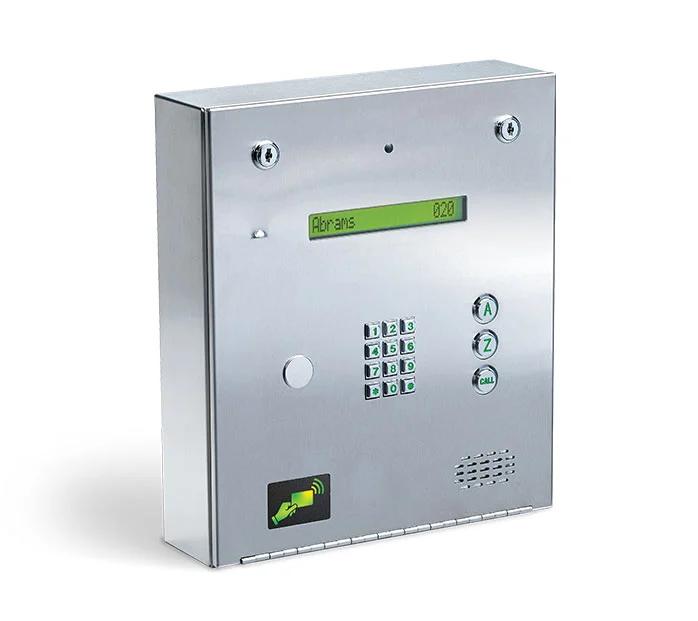
The 80 Series comes in surface and flush mount styles, and the 90 Series is a different enclosure. Both 1835 pages list the environmental range as 10°F to 145°F (-12°C to 62°C).
| Enclosure or option | Size or part | What DoorKing says |
|---|---|---|
| 80 Series surface mount | 13 in. H x 11.25 in. W x 4.75 in. D | Designed for direct outdoor installations; preferably protected from direct exposure to driven rain or snow |
| 80 Series flush mount | 13.25 in. H x 12 in. W x 3.25 in. D | Installed into a wall; must be protected from direct exposure to the elements |
| Flush mount kit | P/N 1814-165 (stainless) or 1814-166 (gold) | Not included with the flush mount entry system |
| Flush unit on a wall surface | Surface mounting kit P/N 1814-152 | Mounts a flush unit on the surface of a wall |
| Self-standing lighted kiosk | P/N 1200-170 | Holds a flush unit |
| 80 Series wall mount style | None | Marked discontinued in the 80 Series manual |
| 90 Series | 14.75 in. (375 mm) H x 12.75 in. (324 mm) W x 3.75 in. (95 mm) D | Optional hood in stainless steel, P/N 1814-180, or black, P/N 1814-185 |
| Heater kit | P/N 2600-584 | Recommended below 10°F (-12°C) on the 80 Series page and below 35°F (1.6°C) on the 90 Series page |
| Handset | P/N 1807-012 | Listed on the 80 Series page as an "ADA Compliant Handset Kit (P/N 1807-012)" |
Source DoorKing's 1835 80 Series and 90 Series product pages, the 80 Series manual's mounting pages and the 90 Series manual (1835-067, Version P) for the hood.
Programming
How is it programmed, and what does the manual cover?
The 80 Series manual says the system is primarily programmed with DoorKing's Remote Account Manager for Windows software, version 6.5.a or higher.
DoorKing's Cloud Account Manager is a way to log in to the DKS Access System through a browser on any device with internet access. DoorKing lists it as compatible with every 1830 Series model and with the 1838 Multi Door Card Access System, and says DKS Cloud programming is available with DKS Cellular, VoIP Internet or IM Server subscriptions.
The manual has seven sections: installation, wiring, programming, adjustments, system operating instructions, maintenance (with troubleshooting and an accessories list) and log tables, plus a resident instruction sheet in the back. This page does not reproduce programming steps or codes.
Source DoorKing's 80 Series manual, the 1835 product page and the 1830 brochure.
FAQ
DoorKing 1835 questions
How many names and phone numbers does a DoorKing 1835 hold?
Up to 3,000 telephone numbers and names, with names limited to 15 characters, according to DoorKing's product page.
Does a DoorKing 1835 need a phone line?
No. DoorKing lists three ways to connect an 1835 for voice and programming: its cellular service, a network connection with internet calling, or a standard phone line.
How many doors or gates can a DoorKing 1835 control?
Three on its own relays: a main entry point plus two more. With Tracker Expansion Boards, DoorKing's product page says up to 48 wired entry points or 24 wirelessly; the current 80 Series manual says up to 24 in addition to the main entry point.
What is the difference between the DoorKing 1834 and 1835?
Both have a one-line directory and hold 3,000 names and phone numbers. DoorKing's 1830 brochure shows the 1834 with 2 entry points and without device codes, elevator control, expansion, anti-pass back, entry code time zones or permission levels, all of which it shows for the 1835.
Service
Help with a DoorKing 1835
Elwin Security repairs, replaces and supports DoorKing telephone entry systems, including the 1835, through its intercom repair service for commercial and multifamily properties in the San Francisco Bay Area. Calls are answered 8:00 AM-8:00 PM daily at (408) 539-0535.
Sources and further reading
These sources back up the general guidance. Your building and the people who approve the work decide the details for your doors.
- DoorKing: 1835 - 80 Series Entry System product page
- DoorKing: 80 Series Telephone Entry and Access Control Systems Installation/Owner's Manual (1835-065-R-11-24)
- DoorKing: 1835 80 Series Telephone Entry System cut sheet (Rev. 12/20)
- DoorKing: 1830 / 80 Series Telephone Entry / Access Control Systems brochure (Rev. 2/23)
- DoorKing: 1835 - 90 Series Entry System product page
- DoorKing: 90 Series Telephone Entry and Access Control Systems Installation/Owner's Manual (1835-067, Issued 3-19, Version P)
- DoorKing: 1834 - 80 Series Entry System product page
- DoorKing: Telephone Entry Cellular Connection cut sheet (Rev. 8/26)
- DoorKing: Connection Options: Cellular, VoIP, POTS
- DoorKing: Tracker Expansion Board Installation/Owner's Manual (2358-065, Issued 7-19)
- DoorKing: 2348 Elevator Access and Control System cut sheet (Rev. 3/21)