
Key takeaways
- A bridge buffers video and sends it to the cloud; a CMVR does the same and also records video locally.
- The bridge data sheets list a video buffer of 2 days on premises for all 14 bridge models in their tables.
- Cloud retention runs from 1 day to 10 years; local retention depends on the CMVR model and number of cameras.
- The Eagle Eye FAQ recommends 400 kbps per IP camera and adds that this is not a rule.
What an Eagle Eye system is: bridges and CMVRs
Eagle Eye's data sheets call the system "a fully managed cloud video surveillance solution". The cameras connect to an on-premise appliance, a bridge or a CMVR, which links them to the Eagle Eye Cloud VMS (video management system: the software for watching and managing video). The FAQ says the VMS is standalone and does not work with other VMS systems, and that Eagle Eye sells through channel partners, not directly to the user.
Bridges buffer video and send it to the cloud, and perform encryption, video data deduplication (not storing the same data twice), bandwidth management, motion analysis and video compression. CMVRs perform all bridge functions, plus record video locally and optionally send it to the cloud for hybrid retention.
Eagle Eye Networks owns the bridge, keeps it updated and maintains it; the customer owns the CMVR. Standard Support, free of charge with an active subscription, reads "Bridge - no cost replacement, CMVR - 3 year warranty" on the rack bridge data sheet.
A banner on een.com says Brivo and Eagle Eye Networks have merged; the current data sheets carry a 2026 Brivo copyright line and the Brivo name, while the web pages still say Eagle Eye Cloud VMS.
The tables below cover the 14 bridges and 11 CMVRs in Eagle Eye's four rack and compact data sheets. Its data sheet page also has High Capacity CMVRs, Enterprise CMVRs and PoE switches, not covered here.
For how cloud recording compares with a recorder on site on any platform, see the general guide to NVR vs DVR vs cloud video storage.
Source Eagle Eye's four bridge and CMVR data sheets, its cybersecurity guide, its Cloud Video Surveillance FAQ, its data sheets page and the banner on een.com.
Which bridge is it? Models, camera counts and mounting
Rack bridges are designed to fit in a standard equipment rack. Compact bridges can be wall or shelf-mounted, have a status display screen, and suit applications with up to 50 4 MP cameras when a server rack is not available. The camera counts are marked typical; for precise capacity, the data sheets point to Eagle Eye's Bridge Wizard.
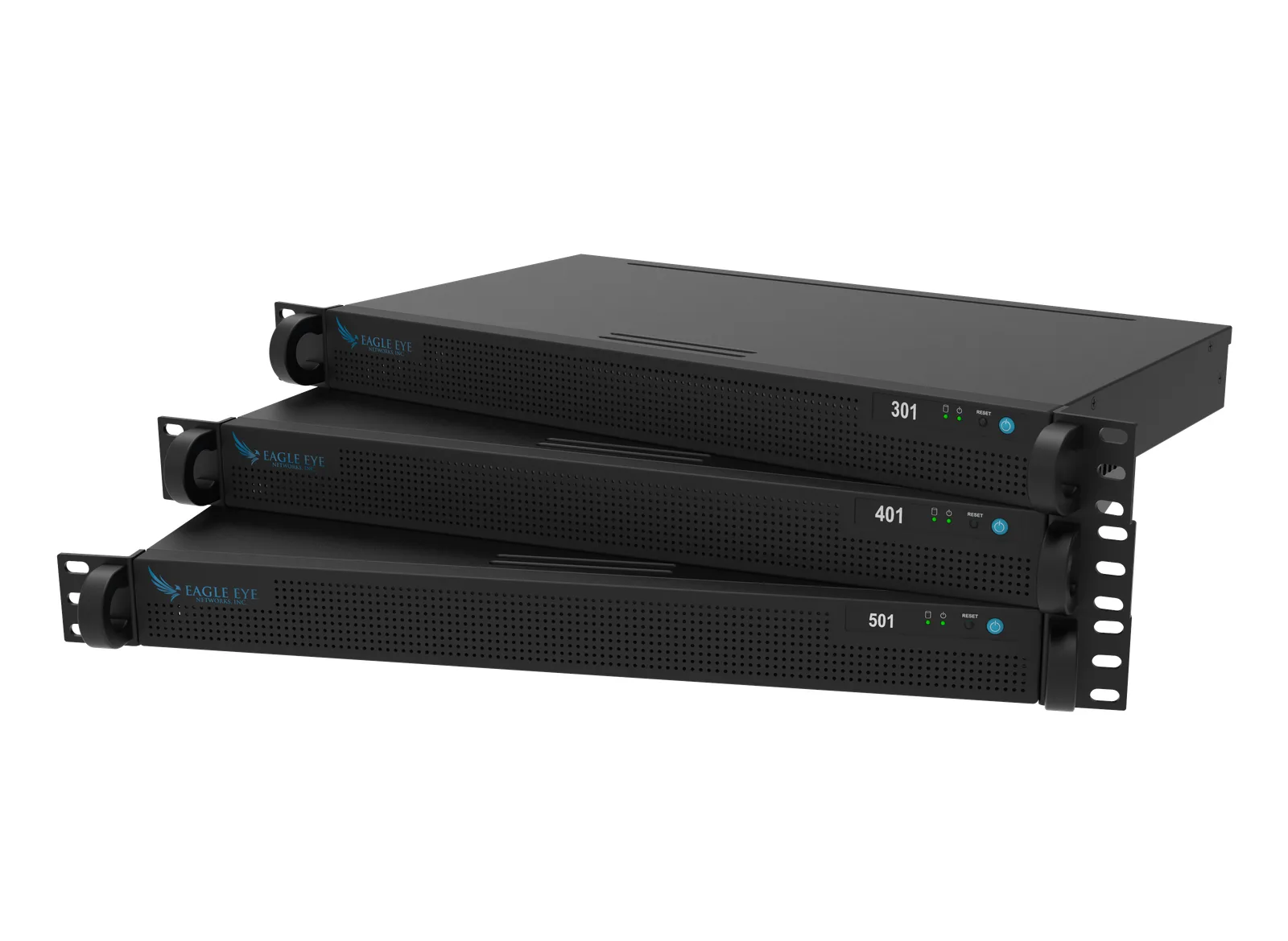
The Bridges web page lists a compact Bridge 504+ at 50 IP cameras; the compact bridge data sheet has a Bridge 506+ at up to 50 IP cameras and no 504+.
| Model | Form | Max cameras | PoE camera ports | Video buffer | Operating temperature |
|---|---|---|---|---|---|
| Bridge 301 | Rack, 1U | Up to 20 | None | 2 days on premises | 0 to 35 °C |
| Bridge 303g | Rack, 1U | Up to 20 | 8 ports, Class 3 | 2 days on premises | 0 to 35 °C |
| Bridge 401 | Rack, 1U | Up to 35 | None | 2 days on premises | 0 to 35 °C |
| Bridge 401ai | Rack, 1U | Up to 35 | None | 2 days on premises | 0 to 35 °C |
| Bridge 403g | Rack, 1U | Up to 35 | 16 ports, Class 3 | 2 days on premises | 0 to 35 °C |
| Bridge 501 | Rack, 1U | Up to 50 | None | 2 days on premises | 0 to 35 °C |
| Bridge 501ai | Rack, 4U | Up to 30 | None | 2 days on premises | 0 to 35 °C |
| Bridge 701 | Rack, 1U | Up to 150 | None | 2 days on premises | 0 to 35 °C |
| Bridge 901 | Rack, 1U | Up to 300 | None | 2 days on premises | 0 to 35 °C |
| Bridge 304+ | Compact | Up to 20 | None | 2 days on premises | -10 to 50 °C |
| Bridge 305 (Japan only) | Compact | Up to 12 | 4 ports, Class 3 | 2 days on premises | -10 to 50 °C |
| Bridge 305+ | Compact | Up to 20 | 8 ports, Class 3 | 2 days on premises | -10 to 50 °C |
| Bridge 406+ | Compact | Up to 35 | None | 2 days on premises | -10 to 50 °C |
| Bridge 506+ | Compact | Up to 50 | None | 2 days on premises | -10 to 50 °C |
Source Eagle Eye's rack bridge and compact bridge data sheets, and its Bridges web page.
Which CMVR is it? Models, camera counts and storage
Compact CMVRs are suitable for wall or shelf mounting, for applications with up to 35 4MP cameras when a server rack is not available.
The CMVRs web page lists the CMVR 426+ at 20 IP cameras and 24 TB; the compact CMVR data sheet has up to 35 IP cameras at 4MP and 24 TB. The web page also lists a CMVR 225 (6 IP cameras, 1 TB) and a CMVR 325 (8 IP cameras, 2 TB).
It also lists a CMVR 524+ (25 IP cameras, 16 TB). The data sheet has the 225+, 325+ and 526+ instead, and the table follows the data sheet.
| Model | Form | Max cameras | Storage capacity | PoE camera ports |
|---|---|---|---|---|
| CMVR 320 | Rack, 1U | Up to 20 | 16 TB (30 days for 20 cameras at 4MP) | None |
| CMVR 323g | Rack, 1U | Up to 20 | 16 TB (30 days for 20 cameras at 4MP) | 8 ports, Class 3 |
| CMVR 420 | Rack, 1U | Up to 35 | 24 TB (30 days for 35 cameras at 4MP) | None |
| CMVR 420ai | Rack, 1U | Up to 35 | 24 TB (30 days for 35 cameras at 4MP) | None |
| CMVR 520ai | Rack, 4U | Up to 30 | 24 TB (30 days for 30 cameras at 4MP) | None |
| CMVR 224+ | Compact | Up to 8 | 2 TB (45 days for 8 cameras at 1MP) | None |
| CMVR 225+ | Compact | Up to 8 | 2 TB (45 days for 8 cameras at 1MP) | 8 ports, Class 3 |
| CMVR 324+ | Compact | Up to 20 | 16 TB (30 days for 20 cameras at 4MP) | None |
| CMVR 325+ | Compact | Up to 20 | 4 TB (30 days for 20 cameras at 1MP) | 8 ports, Class 3 |
| CMVR 426+ | Compact | Up to 35 | 24 TB (30 days for 35 cameras at 4MP) | None |
| CMVR 526+ | Compact | Up to 35 | 24 TB (30 days for 35 cameras at 4MP) | None |
Source Eagle Eye's rack CMVR and compact CMVR data sheets, and its CMVRs web page.
Where is the video stored, and for how long?
With a bridge, the video is stored and managed in Eagle Eye's cloud data center. The cybersecurity guide says video can be retained entirely in the cloud, entirely on-prem, or with a hybrid approach that combines both options.
Each customer's video and data is assigned to the data center closest to their region and, in the cybersecurity guide's words, "stored in triple redundancy".
| Item | What Eagle Eye lists |
|---|---|
| Cloud video retention | 1 day to 10 years |
| Local video retention | "Duration dependent on CMVR model and number of cameras" |
| Hybrid retention | "Hybrid Options Available" |
| Data centers | 11 globally: Austin (two), San Jose, Montreal, Amsterdam, London, Frankfurt, Mumbai, Hong Kong, Tokyo (two) |
| Recording | Motion or continuous recording; optional audio recording |
| Audio | One-way, available with compatible cameras, disabled by default |
Source Eagle Eye's Cloud VMS tech specs page, its rack bridge data sheet and its cybersecurity guide.
What happens when the internet is down, and how much upload it needs
The Eagle Eye FAQ says the bridge buffers the video in case the internet connection goes down, and both bridge tables have a Video Buffer row of 2 days on premises for all 14 models. Eagle Eye's documents here do not say how the buffer is used once it is full.
The data sheets' feature lists include internet outage, network disconnected and camera trouble alerts.
On upload bandwidth, the FAQ says: "We recommend 400 kbps per IP camera. This is not a rule, however." It adds that many settings can be adjusted to fit the site's upload bandwidth, and the cybersecurity guide says Intelligent Bandwidth Management adjusts transmission dynamically and prioritizes transmissions.
A support post dated April 17, 2014, linked from the FAQ, adds detail; its figures are that post's own, and Eagle Eye's current documents on this page do not restate them. In it, video saved to the bridge is queued, sent up as bandwidth allows, then removed from the bridge.
The post splits bandwidth three ways. Real-time bandwidth (metadata and preview images) is set to 50 kbps by default; background bandwidth (the video upload) can have scheduled limits so it does not interfere with other network traffic. On-demand bandwidth has the highest priority: requested video not yet uploaded is pulled from the bridge immediately, and when several people watch the same live stream, they view it through the cloud, so only a single live stream between bridge and cloud is required.
Source Eagle Eye's Cloud Video Surveillance FAQ, its four bridge and CMVR data sheets, its cybersecurity guide, and its support post on bandwidth dated April 17, 2014.
Which cameras work with an Eagle Eye bridge or CMVR?
Bridges and CMVRs support ONVIF Profile S IP cameras (ONVIF is a shared standard for cameras and recorders from different makers), and the Cloud VMS uses dual codec (H.264 and MJPEG) dual stream to communicate with the cameras on Eagle Eye's supported list. Some cameras may need additional configuration in their own web page before they can be added. The supported device list gives each model's minimum supported firmware; for an unlisted camera, support can be requested within the dashboard once it is connected to a bridge or CMVR.
The tech specs page counts more than 10,000 compatible camera models, including IP, analog, HD over coax, body-worn, thermal, LPR/ANPR (license plate recognition) and fisheye.
Combo Bridges and CMVRs support both IP and NTSC and PAL analog cameras (the two common analog video formats), and analog-ready bridges digitize the video. HD over coax cameras, which send HD video over coaxial cable, need a recorder or encoder compatible with the specific cameras (TVI, SVI, CVI, or other HD over coax technology) and supported by Eagle Eye. That recorder or encoder connects to the bridge or CMVR via the CamLAN port, and the bridge receives two streams per camera from it.
Some models have built-in PoE (Power over Ethernet: power through the network cable), shown in the PoE column of the tables; the FAQ recommends a PoE switch for the models that do not.
Source Eagle Eye's data sheets, its camera compatibility pages for IP and HD over coax cameras, its tech specs page and its FAQ.
How people watch the video
Video is accessed from the web or Eagle Eye's mobile apps. Administration is 100% browser-based with no software necessary, on Windows, Mac and Linux with no plugins. The tech specs page lists Chrome, Safari, Edge, Firefox and Opera, and 100 simultaneous live viewers per camera.
The iOS and Android apps give access to live and recorded video and can also install, configure and manage the system. The mobile app page says the Eagle Eye Viewer app requires a subscription to the Eagle Eye Security Camera VMS for one or more cameras.
Source Eagle Eye's FAQ, its data sheets, its tech specs page and its mobile app page.
Eagle Eye's own security statements
These are Eagle Eye's statements about its own product, quoted from its documents.
On open ports, the rack bridge data sheet says: "The Brivo Eagle Eye Bridge has no open ports to the Internet".
The cybersecurity guide's summary has: "Appliances have no open inbound network ports". The guide says each bridge or CMVR has at least two network ports, one for the camera network and one for the internet, and that "there is no way to access cameras directly from the internet".
On encryption, it says: "The privacy of video data is protected using Advanced Encryption Standard (AES) 256-bit encryption", on the bridges and CMVRs and in the cloud data center, and that the data center connects to each bridge or CMVR using Transport Layer Security (TLS) 1.2 or higher.
Eagle Eye's security page says: "In most cases, Eagle Eye customers do not need to modify their network or firewall settings to use Eagle Eye services." Organizations that must manage their firewalls need to allow a list of specific outbound-only ports and a defined list of IP addresses.
Source Eagle Eye's rack bridge data sheet, its cybersecurity guide (white paper) and its security and firewall configuration page.
Where the current documents are, and who works on these systems
Eagle Eye keeps its bridge, CMVR and switch sheets on its data sheets page, and its supported device list on its camera compatibility page.
Elwin installs, configures and supports camera systems, including Eagle Eye bridges and CMVRs, for commercial and multifamily properties in the San Francisco Bay Area. See security camera installation. Calls are answered 8:00 AM-8:00 PM daily at (408) 539-0535.
Questions about Eagle Eye bridges and CMVRs
Does an Eagle Eye system keep recording when the internet goes down?
The bridge buffers the video in case the internet connection goes down, says Eagle Eye's FAQ.
Do existing analog cameras work with Eagle Eye?
Combo Bridges and CMVRs support NTSC and PAL analog cameras as well as IP cameras. HD over coax cameras need a compatible recorder or encoder that Eagle Eye supports.
How long does Eagle Eye keep video?
Cloud video retention is 1 day to 10 years, per Eagle Eye's tech specs page. Local retention depends on the CMVR model and number of cameras, and hybrid options are available.
Sources and further reading
These sources back up the general guidance. Your building and the people who approve the work decide the details for your doors.
- Eagle Eye Networks (Brivo): Eagle Eye Rack Bridge data sheet (301, 303g, 401, 401ai, 403g, 501, 501ai, 701, 901)
- Eagle Eye Networks (Brivo): Eagle Eye Compact Bridge data sheet (304+, 305, 305+, 406+, 506+)
- Eagle Eye Networks (Brivo): Eagle Eye Rack CMVR data sheet (320, 323g, 420, 420ai, 520ai)
- Eagle Eye Networks (Brivo): Eagle Eye Compact CMVR data sheet (224+, 225+, 324+, 325+, 426+, 526+)
- Eagle Eye Networks: Bridge, CMVR and switch data sheets page
- Eagle Eye Networks: Eagle Eye Bridges
- Eagle Eye Networks: Eagle Eye CMVRs
- Eagle Eye Networks: Eagle Eye Cloud VMS Tech Specifications
- Eagle Eye Networks: Cloud Video Surveillance FAQ
- Eagle Eye Networks: Eagle Eye Networks Cybersecurity Guide (white paper)
- Eagle Eye Networks: Security and firewall configuration
- Eagle Eye Networks: Camera compatibility: digital IP
- Eagle Eye Networks: Camera compatibility: analog encoders and HD over coax
- Eagle Eye Networks: Eagle Eye Cloud VMS mobile app
- Eagle Eye Networks: Bandwidth Recommendations (support post, April 17, 2014)