
Key takeaways
- From the back, the HRX-1634 shows 16 round BNC connectors labeled VIDEO IN, and the XRN-1620SB1 shows 16 network sockets labeled PoE (CAMERA).
- The XRN-1620SB1 lists a PoE budget of 200W and a maximum of 30W per port. Past either limit, all ports will be powered off one by one.
- On the XRN-1620SB1, Hanwha's user manual says enabling or disabling RAID mode deletes existing data.
- Hanwha's manuals say the initial administrator ID is "admin" and the password should be set when logging in for the first time.
- Both manuals name the Wisenet mobile app for phones and the Wisenet Viewer app for computers.
Identify
Which Hanwha recorder do I have?
The back panel tells the two apart. The HRX-1634, which Hanwha titles a 16CH Pentabrid DVR, has 16 round BNC connectors labeled VIDEO IN, its video signal inputs. The XRN-1620SB1, titled a 16CH 4K 140Mbps H.265 PoE+ NVR, has 16 network sockets labeled PoE (CAMERA), each a power supply port to connect to a camera.
Hanwha's specification manuals say the DVR records video and audio from cameras to a hard disk, and the NVR records video and audio from network cameras to a hard disk. For how a DVR and an NVR differ on any brand, see the general guide to NVR, DVR and cloud video storage.

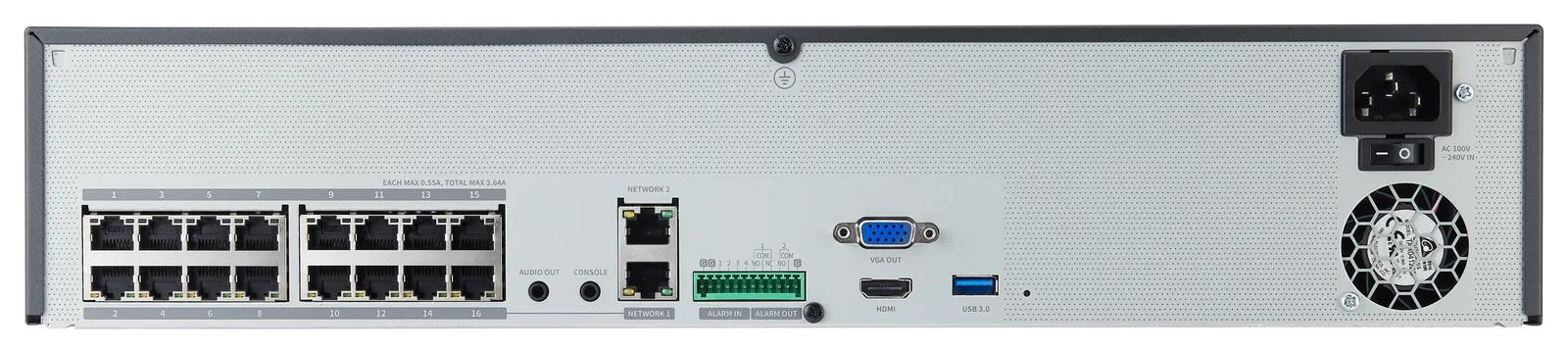
Both models appear on Hanwha Vision's Recorder & Server product listing, which shows more recorders than these two, such as the HRX-1635, XRN-1620B2 and XRN-820S. The HRX-1634 shares its manual with the HRX-1635 and HRX-835A. The XRN-1620SB1 shares its manual with the XRN-1620B2 and XRN-820S. This page does not cover those other models.
Hanwha's XRN-1620SB1 data sheet carries the line "Hanwha Vision is formerly known as Hanwha Techwin."
| Rear panel label | HRX-1634 (DVR) | XRN-1620SB1 (NVR) |
|---|---|---|
| VIDEO IN | Video signal input ports, BNC type (product page: 16CH In) | Not listed |
| Spot output | 1 BNC output (product page: 1CH Out, Spot Output) | Not listed |
| PoE (CAMERA) | Not listed | Power supply ports to connect to a camera (product page: 16 PoE+ RJ-45) |
| NETWORK | One port, for connecting the camera and web viewer | Not listed |
| NETWORK 1 | Not listed | Port for camera connections; it receives video from a camera |
| NETWORK 2 | Not listed | Port recommended for connection with a network and web viewer |
| ALARM, HDMI, VGA OUT, AUDIO OUT, USB 3.0 | Listed | Listed |
| Power on/off switch | Not listed | Listed |
| CONSOLE | Not listed | "Designed for the service repair purpose only" |
Source Hanwha Vision's Recorder & Server product listing, its HRX-1634 and XRN-1620SB1 product pages and specification manuals, and the XRN-1620SB1 data sheet.
Cameras
Which cameras will it take?
Hanwha calls the HRX-1634 a 5-in-1 recorder: it takes four analog camera signal types (AHD, HDTVI, HDCVI and CVBS) and network cameras. Its product page gives the total this way: "Total 18 Channels (Analog Maximum 16 channel + Network Maximum 2-18 channels, depending on number of analog channels), up to 8MP". The XRN-1620SB1 lists network camera inputs, a maximum of 16 channels.
The NVR's specification manual says that if the total power of the ports or the maximum power per port is exceeded, all ports will be powered off one by one.
In the NVR's PnP (plug-and-play) mode, cameras connected to its PoE ports are registered automatically for each channel in order of port number. The user manual says a device running a DHCP server, such as a router, should never be connected to a PoE port or a camera setup port.
Both user manuals say a Wisenet camera is registered via Wisenet protocol while a third party camera is registered via ONVIF protocol. Their note on changing the passwords of registered cameras all at once adds that the password cannot be changed for cameras registered with ONVIF and RTSP.
| Item | HRX-1634 (DVR) | XRN-1620SB1 (NVR) |
|---|---|---|
| Analog camera inputs | 16CH (1Vp-p 75ohm, BNC) | Not listed |
| Analog signal types | AHD, HDTVI and HDCVI (each 8MP, 5MP, 4MP, 1080p, 720p), CVBS (NTSC/PAL) | Not listed |
| Network camera inputs | Additional 2CH (up to 18CH) | Max. 16CH |
| Network camera resolution | 8MP ~ CIF | 32MP ~ CIF |
| Camera protocols | SUNAPI (Wisenet), ONVIF | SUNAPI, ONVIF |
| PoE ports | Not listed | PoE+ RJ-45 16EA (LAN, 10/100) |
| PoE budget | Not listed | 200W |
| PoE per port (specification manual) | Not listed | Max. 30W |
| Alarm | In 16EA, Out 4EA | In 4EA, Out 2EA |
Source Hanwha Vision's HRX-1634 and XRN-1620SB1 product pages, the XRN specification manual for the PoE limits, and both user manuals for camera registration.
Recording
How much video does it record?
Both recorders list H.265, H.264 and MJPEG compression, the formats that shrink video for storage, and the same recording modes.
For analog cameras, the HRX-1634 specification table lists the main stream record rate (NTSC/PAL) per channel as 8/8fps at 8M, 12/12fps at 5M, 15/12fps at 4M, and 30/25fps at 2M and 720p, and adds that the maximum recording frame rate depends on the frame rate of the input camera. Its live display line gives different rates: 15/12fps at 8MP, 20/12fps at 5MP and 30/25fps at 4MP per channel.
The recording rates disagree between documents. The Key Features at the top of the HRX-1634 product page include "Recording Analog Camera up 8MP(15fps), 5MP(20fps), 4MP(30fps)...", while Hanwha's HRX-1634 data sheet lists "8fps@8MP, 12fps@5MP, 15/12fps@4MP, 30/25fps@2MP recording".
The XRN-1620SB1 page also lists a recording resolution of 32MP ~ CIF and a playback resolution of CIF ~ 32MP, up to 9MP in H.264 and 32MP in H.265.
| Item | HRX-1634 (DVR) | XRN-1620SB1 (NVR) |
|---|---|---|
| Compression | H.265, H.264, MJPEG | H.265, H.264, MJPEG |
| Recording bandwidth | Max. 128Mbps | Max. 140Mbps |
| Playback bandwidth | Max. 32Mbps | Max. 32Mbps |
| Simultaneous playback | 18CH (local monitor) | Max. 64CH (local 16CH, remote 16CH per user) |
| Recording modes | Normal, Dual Stream, Schedule (Continuous/Event), Event (Pre/Post), Bookmark | Normal, Dual Stream, Schedule (Continuous/Event), Event (Pre/Post), Bookmark |
Source Hanwha Vision's HRX-1634 and XRN-1620SB1 product pages, and the HRX-1634 data sheet for its recording line.
Storage
How much storage does it hold?
Each recorder takes internal hard disk drives (HDDs) of up to 6TB each. Both specification manuals say to check compatibility with the product before adding an HDD.
RAID-1 combines at least two hard disks into one array, and the available capacity of one array becomes the size of the smallest disk. The NVR user manual's model table marks RAID 1 as supported and RAID 5, 6 as not supported for the XRN-1620SB1 and XRN-820S. Enabling or disabling RAID mode deletes existing data, and old data should be exported first if it needs to be kept. HDDs with the same storage space from the same manufacturer are recommended in RAID mode.
The NVR's camera setting palette displays the total bandwidth, expected space and expected days of the registered cameras, which may differ from the actual recording content.
ARB (auto recovery backup) lets video that was not recorded due to a camera disconnection be backed up once the connection with the camera is re-established. The NVR manual limits it to video saved in the SD card of a Wisenet camera registered using the Wisenet protocol, and the DVR manual says an analog channel cannot be selected for it.
| Item | HRX-1634 (DVR) | XRN-1620SB1 (NVR) |
|---|---|---|
| Supported HDD | Up to 6TB | Up to 6TB |
| HDD slots | SATA 2ea (Max 12TB) | SATA 4ea (Max. 24TB) |
| RAID | Not listed | RAID-1 |
| File backup | Recorder, SEC, AVI on the set. AVI in the web viewer | BU/Exe/AVI (GUI), JPG/AVI (Network) |
| Auto recovery backup (ARB) | Support | Support |
| Built-in HDD guaranteed temperature | 5°C to 55°C (41°F to 131°F) | 5°C to 55°C (41°F to 131°F) |
Source Hanwha Vision's HRX-1634 and XRN-1620SB1 product pages, both specification manuals, and both user manuals for RAID and auto recovery backup.
Network
How does it connect, and what power does it need?
Both product pages list ONVIF (Profile-S) among the network protocols, and both specification manuals carry the feature line "Supports ONVIF Profile S standard and RTP / RTSP protocols".
The HRX-1634 product page gives two power lines: its Electrical section lists the power input as DC12V, while its Interface section carries a line reading "Power inlet 1EA AC".
The HRX-1634 page lists its certifications as UL, CE, FCC, KC and UKCA, and its Key Features list includes the line "NDAA & FCC Compliant". That is Hanwha's own statement about the HRX-1634.
| Item | HRX-1634 (DVR) | XRN-1620SB1 (NVR) |
|---|---|---|
| Ethernet | RJ-45 (10/100/1000BASE-T) | PoE+ RJ-45 16EA (LAN, 10/100), RJ-45 2ea (LAN/WAN 1Gbps) |
| Video out | HDMI 1 EA, VGA 1 EA | HDMI 1EA 3840x2160 30Hz, VGA 1920x1080 30Hz |
| USB | 3EA (front USB 2.0 2ea, rear USB 3.0 1ea) | 3EA (front 2 x USB 2.0, rear 1 x USB 3.0) |
| Power input | DC12V (see the note below) | 100 ~ 240 VAC ±10%, 50/60Hz |
| Power consumption | Max. 40W (6TB HDD 2ea) | Max. 310W |
| Dimension | 370.0 x 44.0 x 320.0 mm (14.57 x 1.73 x 12.6 inch) | 440.0 x 89.8 x 428.4 mm (17.32 x 3.54 x 16.87 inch) |
| Guaranteed operating temperature (specification manual) | 0°C to 40°C (32°F to 104°F) | 0°C to 40°C (32°F to 104°F) |
| Network protocols (among others) | ONVIF (Profile-S), SUNAPI (Server, Client), RTSP, HTTPS, DDNS, SNMP | The same, plus IPv4 and IPv6 |
| Security | IP address filtering, user access log, 802.1x authentication, encryption, device certificate | IP address filtering, user access log, 802.1x, device certificate, signed firmware |
Source Hanwha Vision's HRX-1634 and XRN-1620SB1 product pages, and both specification manuals for the ONVIF feature line and operating temperature.
Remote viewing
Which apps view it remotely?
For a phone, both user manuals name the Wisenet mobile app, which can scan the recorder's QR code on its Add device screen. For a computer, they name the Wisenet Viewer app from Hanwha Vision's website.
A remote user can reach a recorder using a DDNS address (a name that follows a changing internet address) in a dynamic IP system, and a P2P service is the alternative when a dynamic IP connection is not possible. The recorder connects to Wisenet DDNS first and, if that does not connect, automatically connects to P2P. A viewer connected through P2P instead of DDNS may perform lower than a DDNS connection.
The XRN-1620SB1 page also says it supports CGI (SUNAPI) for integration to third-party video management software (VMS), and lists Windows 10 and macOS 10.13 for its web viewer, with Google Chrome, Microsoft Edge and Mac Safari as supported browsers.
| Item | HRX-1634 (DVR) | XRN-1620SB1 (NVR) |
|---|---|---|
| Viewer software | SSM, Webviewer, SmartViewer, Wisenet Mobile Viewer, Wisenet Viewer | WAVE, SSM, Webviewer, Smart Viewer, Wisenet mobile |
| Easy configuration | P2P (QR code) | P2P (QR code) |
| Supported smartphones | iOS, Android | iOS, Android |
| Remote users | Search (3), Live Unicast (10), Multicast (20) | Search (3), Live Unicast (10), Multicast (20) |
| Smartphone live and playback | Live view 16 channels, playback 4 channels, at a maximum of 2MP | Live 16CH, playback 4CH |
Source Hanwha Vision's HRX-1634 and XRN-1620SB1 product pages, and the remote-access sections of both user manuals.
First setup
What do the manuals say about the first password?
Hanwha's specification manuals for both recorders say the initial administrator ID is "admin" and the password should be set when logging in for the first time.
The password is configured in the installation wizard, which both user manuals say can only be accessed at factory reset. The HRX-1634 page lists its setup wizard items as language, date/time, password, network and auto camera configuration. The NVR's wizard has a Recorder ID/PW screen for the administrator password and a separate Camera ID/PW screen for cameras that are in factory reset, with up to 3 sets of camera ID and password.
Both specification manuals say to change the password every three months, and that security and any other problems caused by mismanaging a password are the user's responsibility. For the problem "I forgot the password", the troubleshooting table in both user manuals has one action: contact the recorder administrator for help.
Source Both recorders' specification manuals and user manuals, and the HRX-1634 product page for its setup wizard items.
FAQ
Hanwha Vision recorder questions
Is the Hanwha HRX-1634 a DVR or an NVR?
Hanwha Vision titles the HRX-1634 a 16CH Pentabrid DVR. Its product page lists 16 analog camera inputs on BNC connectors for AHD, HDTVI, HDCVI and CVBS signals, and network camera inputs as an additional 2 channels, up to 18 in total.
How much PoE power does the Hanwha XRN-1620SB1 supply?
Hanwha lists a PoE budget of 200W across 16 PoE+ RJ-45 ports, and a maximum of 30W per port in the specification manual, which says all ports are powered off one by one if either limit is exceeded.
Does the Hanwha XRN-1620SB1 support RAID?
Hanwha's product page lists RAID-1 for the XRN-1620SB1, and the user manual's model table marks RAID 5, 6 as not supported for it. Enabling or disabling RAID mode deletes existing data.
What is the default password on a Hanwha Vision recorder?
The manuals for the HRX-1634 and XRN-1620SB1 give an initial administrator ID of "admin" and say the password should be set when logging in for the first time. For a forgotten password, their troubleshooting tables point to the recorder administrator for help.
Which app views a Hanwha HRX-1634 or XRN-1620SB1 remotely?
Hanwha's user manuals name the Wisenet mobile app for a smartphone and the Wisenet Viewer app for a PC. Both product pages list iOS and Android as supported smartphones and P2P (QR code) for easy configuration.
Service
Help with a Hanwha Vision recorder
Elwin Security installs, repairs and replaces video recorders and cameras, including Hanwha Vision recorders, as part of its security camera installation service for commercial and multifamily properties in the San Francisco Bay Area. Calls are answered 8:00 AM-8:00 PM daily at (408) 539-0535.
Sources and further reading
These sources back up the general guidance. Your building and the people who approve the work decide the details for your doors.
- Hanwha Vision: HRX-1634 16CH Pentabrid DVR product page and specifications
- Hanwha Vision: XRN-1620SB1 16CH 4K 140Mbps H.265 PoE+ NVR product page and specifications
- Hanwha Vision: Digital Video Recorder Product Specification Manual, HRX-1635/HRX-1634/HRX-835A (2023)
- Hanwha Vision: Digital Video Recorder User Manual, HRX Series (2023)
- Hanwha Vision: Network Video Recorder Product Specification Manual, XRN-1620B2/XRN-1620SB1/XRN-820S (2023)
- Hanwha Vision: Network Video Recorder User Manual (2024)
- Hanwha Vision: HRX-1634 data sheet
- Hanwha Vision: XRN-1620SB1 data sheet
- Hanwha Vision: Recorder & Server product listing, page 3 (HRX-1634)
- Hanwha Vision: Recorder & Server product listing, page 4 (XRN-1620SB1)