
Key takeaways
- Security Center's features fall into four main categories: Common, video surveillance (Omnicast), access control (Synergis) and license plate recognition (AutoVu).
- Security Center versions are numbered Architecture, Major, Minor and Patch. Upgrading to a new Major release needs a license update; a new Minor or patch release does not.
- Security Center comes pre-loaded on every Streamvault unit, a line Genetec groups into entry-level appliances, enterprise rackmount appliances and workstations.
- The standard Synergis Cloud Link has four RS-485 ports, the channels for connecting card readers or I/O interface modules; the 312 model has 12.
The platform
What is Genetec Security Center?
Genetec's Security Center page says: "Security Center is a unified security platform. It incorporates access control, video management, automatic license plate recognition (ALPR), communications, and more into a single, intuitive solution."
It has two user interfaces: Security Desk, for monitoring, reporting and managing events and alarms, and Config Tool, for configuring video surveillance, access control and ALPR.
For the general difference between recording on a server on site and recording in the cloud, see NVR vs DVR vs cloud video.
Source Genetec's Security Center product page and the About Security Center topic in the Security Center Administrator Guide 5.14.
Systems
What do Omnicast, Synergis and AutoVu do?
Genetec's Security Center page lists seven items under its on-premises platform. The first three are the main systems.
Omnicast is "an IP-based video management system (VMS) that is part of the Genetec Security Center platform." Its main features include live and playback video from all cameras, up to 64 video streams side-by-side on a single workstation, motion detection, video export and digital signatures that protect video against tampering.
Synergis is the access control system. A server role called the Access Manager talks directly to the door controllers, which Genetec calls access control units, over the network using TCP/IP, and pushes schedules, cardholder information and access rules to them. When a cardholder presents a credential to a reader, the controller refers to the access rule to grant or deny access. After synchronizing with the Access Manager, controllers can operate autonomously, even if they lose the network connection to it.
Synergis supports proximity cards, MIFARE DESFire smart cards, biometric identifiers, PINs, license plates and mobile credentials. It works with third-party readers, door controllers and electronic locks from manufacturers such as Axis Communications, HID and STid.
AutoVu is the license plate recognition system. Its Sharp cameras send plate images to Genetec Patroller or Security Center to be matched against lists of vehicles of interest (hotlists) and vehicles with permits (permit lists). Depending on the Sharp hardware, AutoVu can be fixed, such as on a pole in a parking lot, or mobile, such as on a patrol vehicle.
| Name | Genetec's label on the Security Center page |
|---|---|
| Omnicast | Video management system |
| Synergis | Access control |
| AutoVu | Automatic license plate recognition |
| Sipelia | Communications management system |
| Mission Control | Collaborative decision management system |
| Intrusion Panel integration | Intrusion and alarm management |
| Industrial IoT | Aggregated contextual data |
Source Genetec's Security Center and Synergis product pages, and the Omnicast, Synergis and AutoVu topics in the Security Center User Guide 5.14.
Cameras
Does Genetec make cameras, and which cameras work with it?
On 2026-11-10, Genetec's products page listed five items under "Hardware and edge devices": Genetec Cloudlink, Streamvault, Axis Powered by Genetec, Access control hardware and Automatic license plate readers. It lists no surveillance camera there. For license plates, Genetec describes the AutoVu SharpV as a fixed device that can detect plates and stream video, and the AutoVu SharpZ3 as a mobile one.
For video, the Supported Device List opens: "Here at Genetec, we support a wide range of industry-leading cameras, encoders, cloud and storage devices, intercoms, video surveillance equipment, and access control hardware."
Its Camera, Intercom and Access Control tabs give each device's manufacturer, model name, device type and compression type. The list is provided for general reference, and Genetec cautions that "the compatibility of certain devices may have been tested only by their manufacturer and not by Genetec".
Source Genetec's products page, AutoVu product page and Supported Device List.
Cloud
What is Security Center SaaS?
Genetec's SaaS Setup Guide says "Security Center SaaS is a unified hybrid-cloud solution offering physical security as a service."
On where it runs, the SaaS product page says: "Deploy in the cloud, on-premises, or a mix of both". Under its SaaS platform heading it lists access control as a service, video management as a service, cloud-managed appliances, intrusion monitoring, communications, digital evidence management and work management. A cloud-based system can include direct-to-cloud devices, such as cameras and door controllers, and cloud-managed appliances, such as servers or edge-processing devices.
Genetec's cloud-managed appliances page names the three Genetec Cloudlink models in the table, and calls the Synergis Cloud Link part of the Genetec Cloudlink family.
On security, the SaaS product page says: "Our cloud software has many built-in cybersecurity and data privacy features, and maintains SOC 2, ISO27001, and ISO27017 compliance."
| Model | What the page says |
|---|---|
| Cloudlink 110 | Connects up to 8 devices |
| Cloudlink 210 | Connects up to 64 devices to the cloud; 8TB, 22TB or 2X22TB storage configurations |
| Cloudlink 2210 | Up to 240 TB of usable storage |
Source The About Security Center SaaS topic in Genetec's Security Center SaaS Setup Guide, Genetec's Security Center SaaS product page and its cloud-managed appliances page.
Versions
Which Security Center version is current, and how are versions numbered?
Genetec's lifecycle policy applies to Security Center on-premises software and Genetec Mission Control.
Genetec's versioning topic says: "Security Center uses an A.M.mi.p versioning scheme representing Architecture, Major, Minor, and Patch releases." A Major release brings new features, behavioral changes, SDK capabilities, support for new devices and performance improvements, and upgrading to one requires a license update.
Minor and patch releases need no license update; a Patch release contains support for new devices, bug fixes and security fixes. The 5.14 build number table lists 5.14.0.0 as a Major release with a Release Date of 2026/05/11, 5.14.1.0 as a Minor release with a Release Date of 2026/08/13, and 5.14.1.3, its top row, as a Patch release with a Release Date of 2026/10/26.
When a major version enters general support, its last minor release becomes the long-term support (LTS) version: 5.13.3 for 5.13, and 5.12.2 for 5.12.
In the table, general availability means a version is commercially available for new and existing deployments. General support means it is no longer available for new deployments but still supported for existing ones, limited support means maintenance is limited primarily to security fixes, and end of life means it is fully retired.
| Version | General availability | General support | Limited support | End of life |
|---|---|---|---|---|
| 5.14 | 2026-05-12 | Not listed | Not listed | Not listed |
| 5.13 | 2024-12-16 | 2025-12-31 | 2027-12-31 | 2030-12-31 |
| 5.12 | 2023-12-11 | 2024-12-31 | 2026-12-31 | 2029-12-31 |
| 5.11 | 2022-09-12 | 2023-12-11 | 2025-12-31 | 2028-12-31 |
Source Genetec's Product Lifecycle Policies on TechDoc Hub (Security Center versioning, lifecycle policy and lifecycle timelines) and the build numbers for Security Center 5.14.
Hardware
What is a Streamvault appliance?
Genetec says "Streamvault™ is a line of preloaded security infrastructure solutions" and "Our unified security platform, Security Center, comes pre-loaded on every Streamvault unit." The line has three families, and each figure in the table is an "up to" figure for the family, not for a single model.
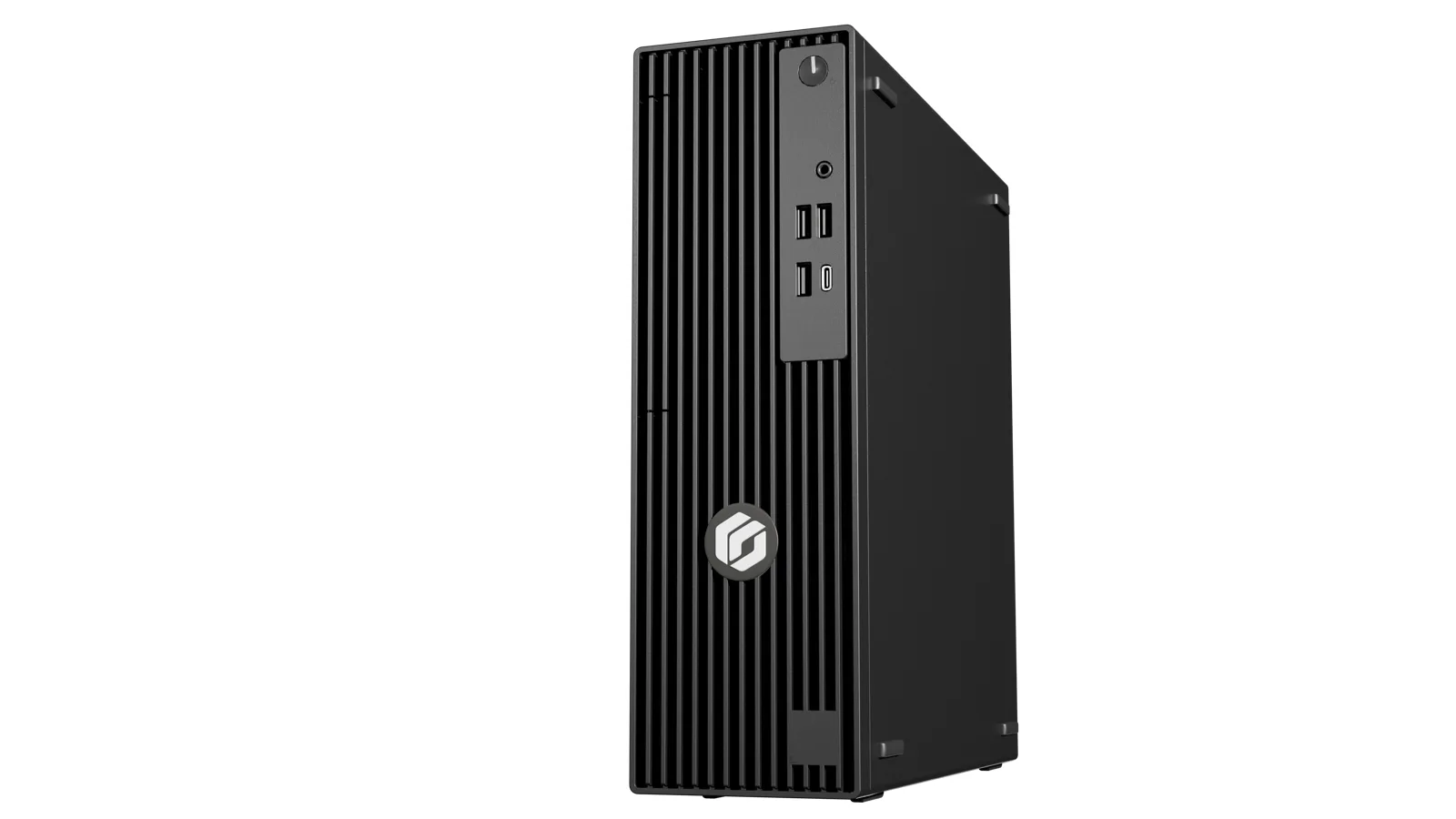
| Family | Models with a specs link | Figures Genetec gives for the family |
|---|---|---|
| Entry-level appliances | SV-300E, SV-1000E | Up to 50 cameras and 100 readers; connects to video, access control, intrusion, and intercom devices; up to 60 TB of storage |
| Enterprise rackmount appliances | SV-2000E, SV-4000E, SV-7000EX | Up to 4135 Mbps throughput; up to 2000 readers and 75 ALPR cameras; up to 672 TB storage (SAS) with RAID capabilities |
| Workstations | SVW-100E, SVW-300E, SVW-500E | Up to 136 full HD streams; up to 8 monitors |
Source Genetec's Streamvault product page.
Hardware
What is the Synergis Cloud Link?
Genetec's hardware guide says "Synergis™ Cloud Link is an intelligent PoE-enabled IoT gateway designed to address the demand for a non-proprietary access control solution." PoE means it can take power over its network cable. It natively supports intelligent controllers such as Mercury Security, HID Global, and Axis communications, and electronic locks from ASSA ABLOY, Allegion, and SimonVoss, which requires Mercury controllers.
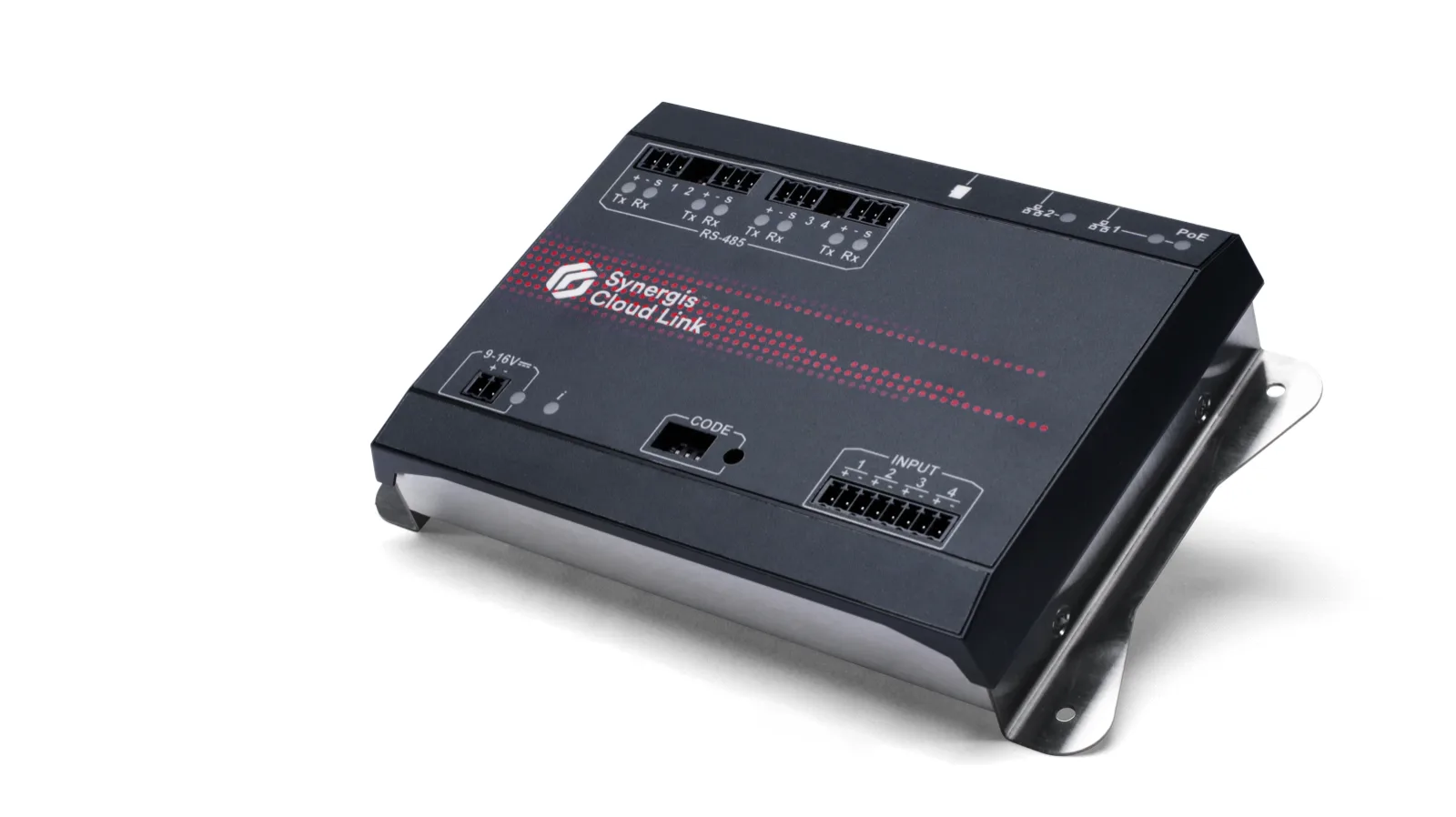
Its RS-485 channels connect input/output (I/O) interface modules or card readers, and how many modules fit on each channel depends on the module type. The appliance doesn't power RS-485 readers; they need a separate power source. It keeps managing the system locally even when the connection to the server is lost.
For the standard appliance, the listing topic says: "Synergis™ Cloud Link is a UL294-listed subassembly under file BP20761. This certification has been made with the Synergis Cloud Link as part of Lifesafety Power's FPO series access control enclosures." It also says "The electronic access control system shall not prohibit the free exit granted by other emergency systems."
For the 312 model, the guide says: "The Synergis Cloud Link 312 has not been evaluated for UL/ULC compliance and must not be used in installations where UL/ULC compliance is required."
| Item | What Genetec lists |
|---|---|
| Ethernet ports (standard model) | Two 10/100/1000 Mbps Gigabit Ethernet ports |
| RS-485 ports | Four on the standard model; 12 on the 312 (eight additional) |
| Inputs (standard model) | "4 Inputs; supervised or digital" |
| Power over Ethernet (standard model) | PoE on LAN1 (IEEE 802.3af or 802.3at Type 1) |
| DC input, standard model | 12 V dc nominal, 9 - 16 V dc range, average 300 mA, max. 600 mA |
| DC range note, standard model | "The 9 - 16 V dc range was not evaluated by UL." |
| DC input, 312 | Average 450 mA, max. 900 mA |
| Operating temperature (standard model) | 0°C (32°F) to 50°C (122°F); "For indoor use only" |
| Card slots (312) | Three Secure Access Module (SAM) card slots for encryption key storage |
| Locks and readers (product page) | "up to 256 locks and readers per Synergis Cloud Link" |
Source Genetec's Synergis Cloud Link Hardware Installation Guide (overview, specifications, RS-485 channel, 312 model and UL/ULC listing topics) and Genetec's Synergis Cloud Link product page.
Exported video
How do I play a Genetec G64 video file?
Genetec says: "Genetec™ Video Player is a standalone media player you can use to view G64 and G64x video files exported from Security Desk. You can also use it to view video on a computer that does not have Security Center installed." It works only on Windows computers and is incompatible with other operating systems, such as macOS, Linux or Android. Security Desk can also view both file types.
G64x and G64 are proprietary video formats that support audio, bookmarks, date-time information and motion indicators; G64x also supports metadata overlays. When a file will not open, the FAQ says the player version might be outdated and points to the Genetec Download Center for the latest version.
Source Genetec's Video Player Quick Start Guide 5.14 and its FAQ about Genetec Video Player on TechDoc Hub.
Service for cameras and doors on a Genetec system in the Bay Area
Elwin Security installs, repairs and supports the cameras, readers, door hardware and wiring that connect to a Genetec Security Center system as part of security camera installation for commercial and multifamily properties in the San Francisco Bay Area. Calls are answered 8:00 AM-8:00 PM daily at (408) 539-0535.
FAQ
Genetec Security Center questions
What is the difference between Security Center and Omnicast?
Omnicast is the video part of Security Center. Genetec calls it "an IP-based video management system (VMS) that is part of the Genetec Security Center platform."
Does Genetec make cameras?
Genetec's products page, as read on 2026-11-10, lists no surveillance camera under "Hardware and edge devices". Its AutoVu line includes the SharpV and SharpZ3 license plate devices, which Genetec's User Guide calls Sharp cameras; its Supported Device List names supported video cameras by manufacturer and model.
What is the current version of Genetec Security Center?
Version 5.14 is the newest in Genetec's lifecycle timelines table, as read on 2026-11-10; the top row of its build number table is 5.14.1.3, a Patch release with a Release Date of 2026/10/26.
Can Genetec Video Player run on a Mac?
No. Genetec's FAQ says Genetec Video Player works only on Windows computers and is incompatible with other operating systems, such as macOS, Linux or Android.
Sources and further reading
These sources back up the general guidance. Your building and the people who approve the work decide the details for your doors.
- Genetec: Security Center product page
- Genetec: Products page
- Genetec: Security Center SaaS product page
- Genetec: Synergis product page
- Genetec: AutoVu product page
- Genetec: Streamvault product page
- Genetec: Synergis Cloud Link product page
- Genetec: Cloud-managed appliances page
- Genetec: Supported Device List
- Genetec TechDoc Hub: Security Center Administrator Guide 5.14: About Security Center
- Genetec TechDoc Hub: Security Center User Guide 5.14: About Security Center Omnicast
- Genetec TechDoc Hub: Security Center User Guide 5.14: About Security Center Synergis
- Genetec TechDoc Hub: Security Center User Guide 5.14: About Security Center AutoVu
- Genetec TechDoc Hub: Security Center SaaS Setup Guide: About Security Center SaaS
- Genetec TechDoc Hub: Genetec Product Lifecycle Policies: Security Center versioning
- Genetec TechDoc Hub: Genetec Product Lifecycle Policies: Security Center lifecycle policy
- Genetec TechDoc Hub: Genetec Product Lifecycle Policies: Security Center lifecycle timelines
- Genetec TechDoc Hub: Security Center build numbers: Build numbers for Security Center 5.14
- Genetec TechDoc Hub: Synergis Cloud Link Hardware Installation Guide: What is Synergis Cloud Link?
- Genetec TechDoc Hub: Synergis Cloud Link Hardware Installation Guide: Synergis Cloud Link specifications
- Genetec TechDoc Hub: Synergis Cloud Link Hardware Installation Guide: Synergis Cloud Link 312 specifications
- Genetec TechDoc Hub: Synergis Cloud Link Hardware Installation Guide: Synergis Cloud Link RS-485 communication channels
- Genetec TechDoc Hub: Synergis Cloud Link Hardware Installation Guide: About Synergis Cloud Link 312
- Genetec TechDoc Hub: Synergis Cloud Link Hardware Installation Guide: Synergis Cloud Link UL/ULC listing
- Genetec TechDoc Hub: Genetec Video Player Quick Start Guide 5.14: About Genetec Video Player
- Genetec TechDoc Hub: FAQ about Genetec Video Player